Find a trade in the trade book, open it, and work through its contracts, documents, discrepancies, shipments and money.
A trade (also called a deal) groups everything about one physical transaction: the purchase and sale contracts, the documents that arrive for it, the shipments that carry the cargo, and the invoices and payments that settle it. The Trades page is your trade book. This page helps you find a trade, read it, and close it out.The examples follow Veltana Commodities SA’s sugar trade VCS-S-2026-0714: 27 MT of white refined sugar bought FOB Laem Chabang from Kanchana Siam Sugar at USD 528/MT and sold CIF Singapore to Meridian Foodstuffs at USD 565/MT. To see how it was built from its documents, follow the walkthrough.
Available when the Trades module is turned on for your workspace. It is on by default. Ask your workspace admin.
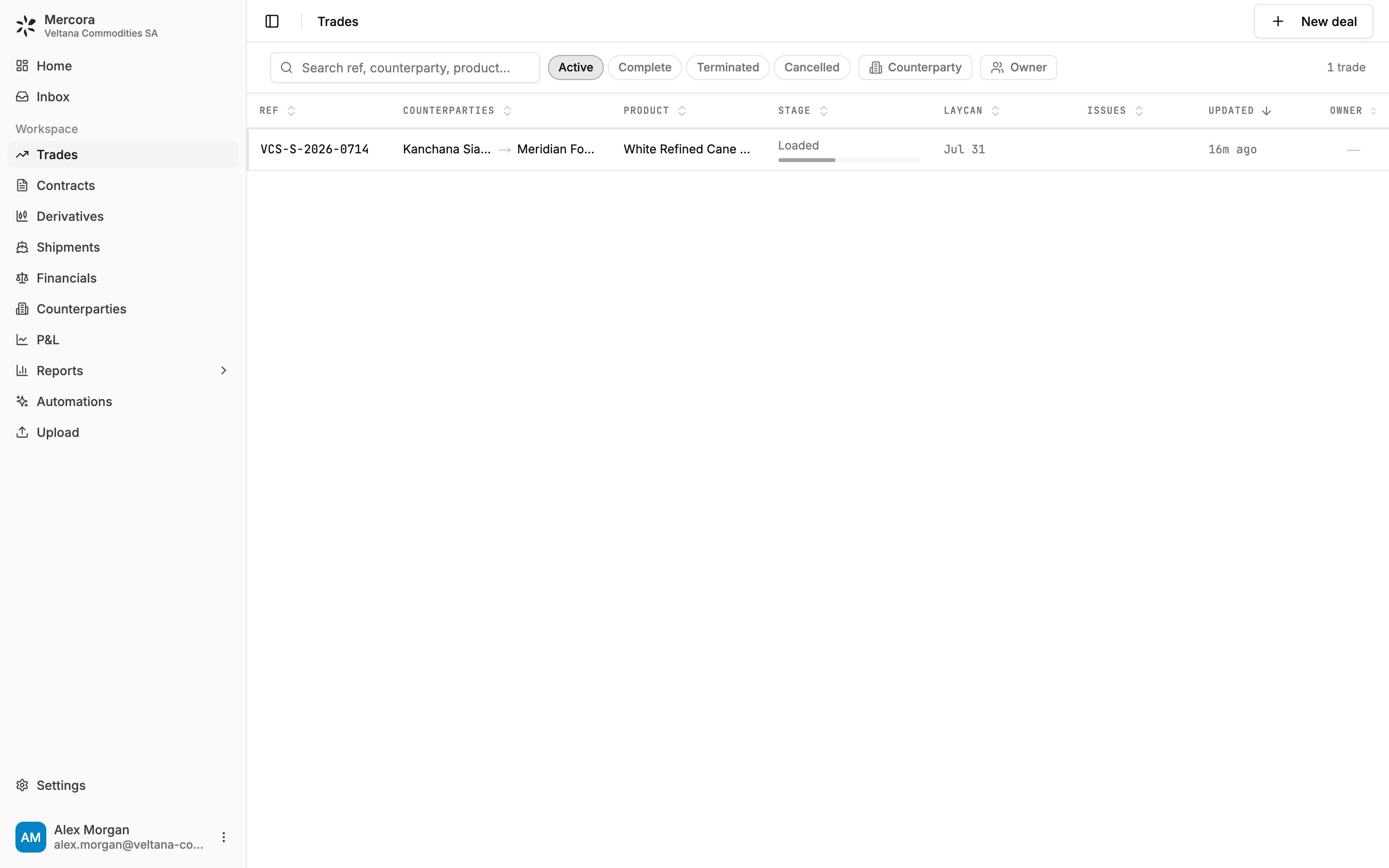
Search matches the reference, counterparty or product.
Status chips: Active, Complete, Terminated and Cancelled. Only Active is on when you first open the page, so finished and cancelled trades stay out of the way until you switch their chip on.
Counterparty and Owner narrow the list to the parties or teammates you pick.
Clear filters resets everything.
Filters live in the page address, so you can bookmark a filtered list or send the link to a colleague. Sort order and column widths are remembered in your browser.
New deal is available when the Contracts module is turned on for your workspace. Ask your workspace admin.
1
Open the dialog
On Trades, click New deal.
2
Link the contracts
Under Contracts, search for the purchase and sale contracts to link, or create a new one in place. Each side can hold several contracts, for example one purchase sold through two sales. When you create the second side, the form is prefilled from the first so a back-to-back contract takes seconds.
3
Check the reference, owner and book
Deal ref is filled from the contract numbers. Edit it to override. Pick an Owner and, if your workspace uses books, a Book.
4
Create
Click Create deal. With both sides linked, the dialog previews the quantity, laycan and the margin per unit before you create.
Contracts are optional. With only one side linked, the deal starts one-sided and the counterpart contract pairs in when it lands. A deal reference alone starts an empty deal.
Click a row to open the trade. The header shows the reference, the trade’s status, and whether the cargo is Insured or Not insured. If you can edit trades, you also get:
Edit: change the trade’s own fields (reference, product, quantity, ports, laycan, Incoterms, payment terms, vessel and so on).
Mark complete / Reopen: close out the trade, or bring a completed one back.
The … menu: Terminate trade, Cancel trade and Delete trade.
The page has up to five tabs. Which ones you see depends on your role and your workspace’s modules.
Overview
Documents
Discrepancies
Financials
Shipments
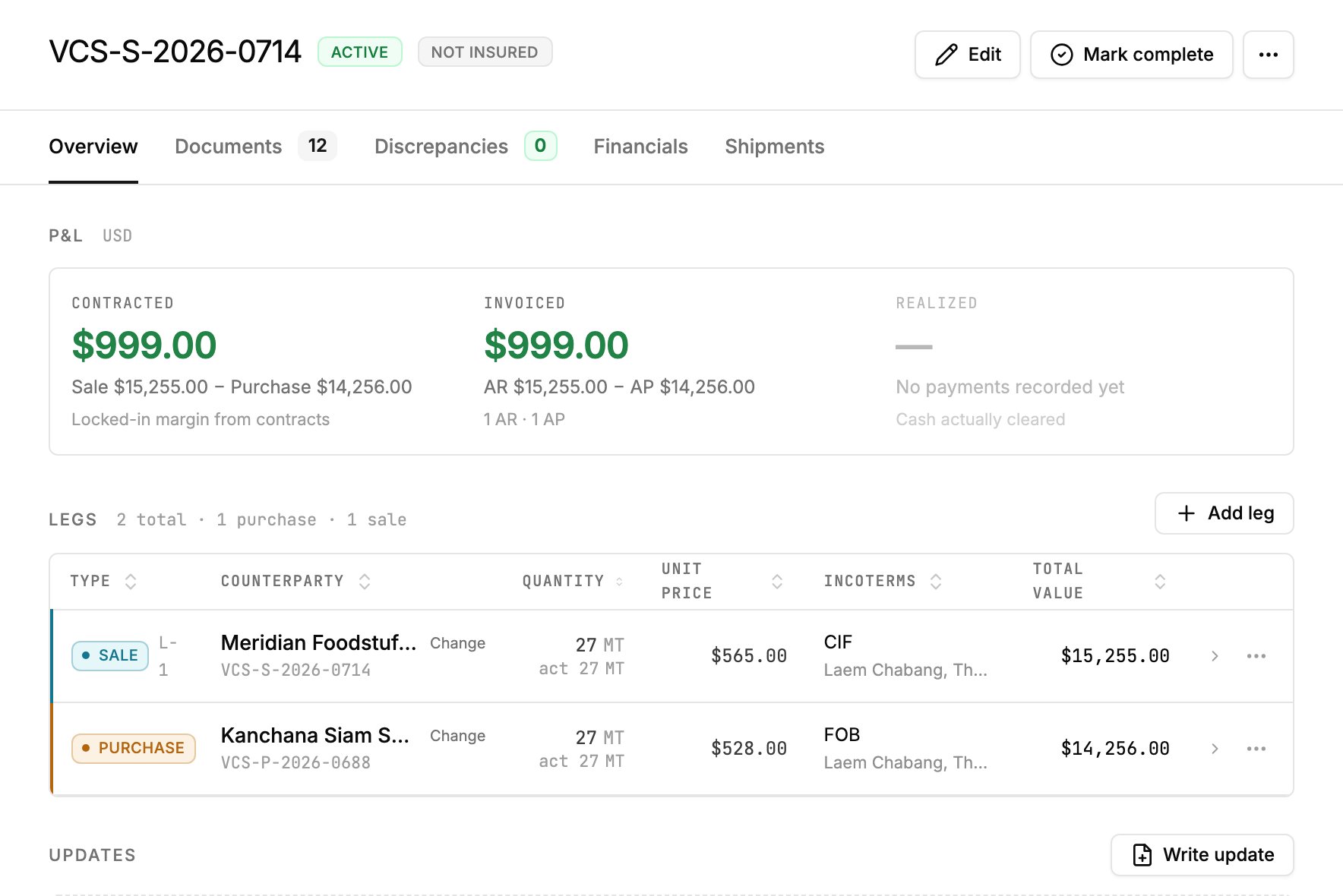
The Overview tab answers “what is the deal and what is it making”.
VCS-S-2026-0714: contracted and invoiced margin are both $999.00 (sale $15,255.00 minus purchase $14,256.00); nothing is realized until payments are recorded.
P&L shows up to three numbers, each in your workspace’s reporting currency:
Number
Basis
Contracted
Sale value minus purchase value, from the contracts. Needs a purchase and a sale.
Invoiced
Invoiced to customers (AR) minus invoiced by suppliers (AP), whether or not the cash has moved.
Realized
Cash actually received minus cash actually paid, from recorded payments.
AR (accounts receivable) is money owed to you. AP (accounts payable) is money you owe. Invoiced and Realized need access to Financials. If an amount can’t be converted because an exchange rate is missing, the card says how many invoices or payments it skipped rather than showing a partial total as final. The FX line under the card lists the rates it used.On the sugar trade, Contracted reads $999.00 (sale $15,255.00 minus purchase $14,256.00), and **Invoiced** reads the same $999.00 because the supplier and customer invoices match the contracts. Realized stays empty (“No payments recorded yet”) until payments are recorded. The $999.00 is a gross margin before freight and insurance: Contracted counts only the purchase and sale contracts, and a freight or insurance invoice only enters Invoiced once it’s filed on the trade as AP.Legs lists the trade’s contracts. A leg is one side of the deal: a purchase leg is what you buy, a sale leg is what you sell. Each row shows the type, counterparty, quantity, unit price, Incoterms and total value. Open a leg to see its ports, laycan, payment terms and currency, and to set the actual quantity loaded. Type it in, or click Use loaded to take the loaded total from the trade’s shipments when they carry one.Updates holds short status posts (On track, At risk, Off track) so the team can see the latest word on the deal. Notes holds free-form notes.
The Documents tab lists every document on the trade, with a Linked to column naming the contract or shipment each one belongs to. Click Upload to add files. See Uploading documents.Expected Documents is the checklist of documents this trade should receive. Generate builds it from the documents-required clauses of the trade’s contract and letter of credit, and documents you’ve already approved tick it off. You can Add document to the list yourself. Rows you added are kept when you click Refresh.Each document’s menu offers Download, Reclassify…, Reassign to Trade, Change shipment (when it belongs to a shipment), Full Reprocess, and Delete document. A document pack also offers Split pages and Merge with.
The Discrepancies tab lists the differences Mercora found between this trade’s documents and contracts, for example a weight that differs between the B/L (bill of lading) and the packing list. The tab badge counts the open ones. Click a row to review it. See Discrepancies.
The Financials tab holds the trade’s invoices, payments and AR/AP, and the cost and income plan if your workspace uses one. See Trade financials.
The Shipments tab lists the vessels, trucks and other movements carrying this trade’s cargo. See Shipments.
The stage moves through Contract, Pre-ship, Loaded, In transit, Delivered and Complete. Mercora reads it from the evidence (the trade’s shipments, or its cargo documents such as the B/L) and names the basis under the ladder, for example “From shipment KITI BHUM”, “From B/L” or “No cargo evidence yet”. If the evidence is wrong or late, you can pick the stage yourself. Your pick shows as “Set by” you, and Use the evidence hands the stage back to Mercora.
Book and Entity appear on the trade when the P&L module is turned on for your workspace. Ask your workspace admin.
Book is the bucket the deal is carried in on the P&L. A deal lands in a book when its reference ends in one of the book’s codes, or when someone picks the book on the trade. Picking Use the reference goes back to the code.
Entity is your own company on the deal. It’s read from your side of the contract. If your admin has listed your entities, you can pick a different one, and Use the contract goes back to what the contract says.
When a trade involves a currency other than USD, FX overrides lists each currency with the rate in use and whether it’s live or an override. Click a rate to pin your own (for example a hedged rate). It’s entered as that currency’s rate to USD. Use live removes the override. An override on a trade is used everywhere that trade’s numbers are converted: the Overview card, the Financials tab and the P&L.
These four actions do different things to your numbers:
Action
What happens
Mark complete
The trade is finished and drops off the default Active list. Its contracts read as Complete, and on the P&L a completed trade is valued from its contracts or invoices, no longer from a cost plan. Reopen undoes it.
Terminate trade
The deal ends without further delivery. It stays in the P&L and in AR/AP, and no more documents are expected. You can record a reason and Undo it later.
Cancel trade
The trade stays on record for audit but is hidden from running views and excluded from the P&L and AR/AP totals. Documents and discrepancies stay in place. Un-cancel brings it back.
Delete trade
Permanent. Removes the trade’s discrepancies and legs. You choose what happens to its documents: send them back to the Inbox with their approval state kept, or remove them too.
Deleting a trade can’t be undone. If you only want it off the running list, cancel it instead.
Record invoices and payments, and plan costs and income.
Shipments
Follow the vessels and containers carrying the cargo.
P&L
See the trade’s margin across the whole book.
⌘I
{"docsConfig":{"theme":"maple","$schema":"https://mintlify.com/docs.json","name":"Mercora","description":"Trade operations for physical commodity traders: documents, matching, reconciliation, financials and the P\u0026L.","colors":{"primary":"#232323","light":"#FFF9EE","dark":"#232323"},"logo":{"light":"https://mintcdn.com/placeholder-f4ffdeec/22McaegbdDRSI41b/logo/mark-dark.svg?fit=max\u0026auto=format\u0026n=22McaegbdDRSI41b\u0026q=85\u0026s=72ad184e9bf63cc57e531ed33f5c631b","dark":"https://mintcdn.com/placeholder-f4ffdeec/22McaegbdDRSI41b/logo/mark-light.svg?fit=max\u0026auto=format\u0026n=22McaegbdDRSI41b\u0026q=85\u0026s=743a6c820e7423e0df7a6e0ae10efc86","href":"/"},"favicon":"https://mintcdn.com/placeholder-f4ffdeec/22McaegbdDRSI41b/favicon.svg?fit=max\u0026auto=format\u0026n=22McaegbdDRSI41b\u0026q=85\u0026s=60a082af42cdf29819901c284f9e7359","appearance":{"default":"system","strict":false},"background":{"color":{"light":"#FFFFFF","dark":"#171717"}},"navbar":{"links":[{"href":"https://mercora.io","label":"mercora.io"}]},"footer":{"socials":{"website":"https://mercora.io","linkedin":"https://www.linkedin.com/company/mercoraai"}},"search":{"prompt":"Search the docs…"},"fonts":{"family":"Inter"},"icons":{"library":"fontawesome"},"styling":{"eyebrows":"section","codeblocks":"system","latex":true},"contextual":{"options":["copy","view","chatgpt","claude"],"display":"header"},"navigation":{"pages":[]}},"deployment":{"deploymentMetadataValue":{"subdomain":"placeholder-f4ffdeec","hasAudioNarration":false,"actualSubdomain":"placeholder-f4ffdeec","customDomains":["docs.mercora.io"],"gitSource":{"type":"github","owner":"sebastianbugal","repo":"mercora","deployBranch":"main","contentDirectory":"client_docs","isPrivate":true,"mountPath":"","label":"","_id":"6adf3dbbabb6f86a455ef035"},"chroma":{"latestBuiltDeploymentHistoryId":"6ae0668a02cd8de5ec2643dc","collectionId":"13289552-774c-43a0-b354-db31f2d90208","liveDeploymentHistoryId":"6ae0668a02cd8de5ec2643dc","schemaVersion":"v3"},"entitlements":{"AI_CHAT":{"status":"ENABLED"},"WEB_MCP":{"status":"ENABLED"},"NARRATION":{"status":"ENABLED"}},"buildId":"6ae09da407896b4595e1d2f2","clientVersion":"0.0.3971","searchFilterCounts":[{"language":"default","tag":"Guides","count":37},{"language":"default","tag":"API reference","count":6},{"language":"default","tag":"Documents","count":6},{"language":"default","tag":"Integrations","count":6},{"language":"default","tag":"Copilot and workflows","count":5},{"language":"default","tag":"Get started","count":5},{"language":"default","tag":"Administration","count":3},{"language":"default","tag":"Core concepts","count":3},{"language":"default","tag":"Finance","count":3},{"language":"default","tag":"Records","count":3}]},"assistantConfig":{"enableAskAiButton":false,"enableStarterQuestions":false,"enableContextualStarterQuestions":false,"enableAskAiSearchBar":true},"basePath":"","hasChatPermissions":true,"hasWebMcpPermissions":true,"toggles":[{"name":"kill-isr","enabled":true,"variant":{"name":"disabled","enabled":false,"feature_enabled":true},"impressionData":false},{"name":"agent-mintlify-slack","enabled":true,"variant":{"name":"disabled","enabled":false,"feature_enabled":true},"impressionData":false},{"name":"editor-v7-file-tree","enabled":true,"variant":{"name":"disabled","enabled":false,"feature_enabled":true},"impressionData":false},{"name":"agent-integrations-settings","enabled":true,"variant":{"name":"disabled","enabled":false,"feature_enabled":true},"impressionData":false},{"name":"automations-pr-grouping","enabled":true,"variant":{"name":"disabled","enabled":false,"feature_enabled":true},"impressionData":false},{"name":"custom-prefix","enabled":true,"variant":{"name":"disabled","enabled":false,"feature_enabled":true},"impressionData":false},{"name":"analytics-v7","enabled":true,"variant":{"name":"disabled","enabled":false,"feature_enabled":true},"impressionData":false},{"name":"user-flows-analytics","enabled":true,"variant":{"name":"disabled","enabled":false,"feature_enabled":true},"impressionData":false},{"name":"no-publish-flow","enabled":true,"variant":{"name":"disabled","enabled":false,"feature_enabled":true},"impressionData":false},{"name":"workos-onboarding","enabled":true,"variant":{"name":"disabled","enabled":false,"feature_enabled":true},"impressionData":false},{"name":"llms-txt-v2","enabled":true,"variant":{"name":"disabled","enabled":false,"feature_enabled":true},"impressionData":false},{"name":"pause-universal-search-reconcile","enabled":true,"variant":{"name":"disabled","enabled":false,"feature_enabled":true},"impressionData":false},{"name":"snapshot-serving-live","enabled":true,"variant":{"name":"disabled","enabled":false,"feature_enabled":true},"impressionData":false},{"name":"stripTemperatureMiddleware","enabled":true,"variant":{"name":"disabled","enabled":false,"feature_enabled":true},"impressionData":false},{"name":"per-site-search-delta","enabled":true,"variant":{"name":"disabled","enabled":false,"feature_enabled":true},"impressionData":false},{"name":"support-platform-pylon-zendesk","enabled":true,"variant":{"name":"disabled","enabled":false,"feature_enabled":true},"impressionData":false},{"name":"snapshot-serving","enabled":true,"variant":{"name":"disabled","enabled":false,"feature_enabled":true},"impressionData":false},{"name":"instant-rollback","enabled":true,"variant":{"name":"disabled","enabled":false,"feature_enabled":true},"impressionData":false},{"name":"granular-notifications-server","enabled":true,"variant":{"name":"disabled","enabled":false,"feature_enabled":true},"impressionData":false},{"name":"granular-notifications","enabled":true,"variant":{"name":"disabled","enabled":false,"feature_enabled":true},"impressionData":false},{"name":"editor-private-page-search","enabled":true,"variant":{"name":"disabled","enabled":false,"feature_enabled":true},"impressionData":false},{"name":"automations-fable","enabled":true,"variant":{"name":"disabled","enabled":false,"feature_enabled":true},"impressionData":false},{"name":"fixed-ai-action-pricing","enabled":true,"variant":{"name":"disabled","enabled":false,"feature_enabled":true},"impressionData":false},{"name":"automation-resolve-merge-conflict","enabled":true,"variant":{"name":"disabled","enabled":false,"feature_enabled":true},"impressionData":false},{"name":"scoped-publishing","enabled":true,"variant":{"name":"disabled","enabled":false,"feature_enabled":true},"impressionData":false},{"name":"mintql","enabled":true,"variant":{"name":"disabled","enabled":false,"feature_enabled":true},"impressionData":false},{"name":"page-level-analytics","enabled":true,"variant":{"name":"disabled","enabled":false,"feature_enabled":true},"impressionData":false},{"name":"editor-version-history-v2","enabled":true,"variant":{"name":"disabled","enabled":false,"feature_enabled":true},"impressionData":false},{"name":"editor-nav-generations","enabled":true,"variant":{"name":"disabled","enabled":false,"feature_enabled":true},"impressionData":false},{"name":"billing-page-v2","enabled":true,"variant":{"name":"disabled","enabled":false,"feature_enabled":true},"impressionData":false},{"name":"workspace-projects","enabled":true,"variant":{"name":"disabled","enabled":false,"feature_enabled":true},"impressionData":false},{"name":"assistant-v5","enabled":true,"variant":{"name":"disabled","enabled":false,"feature_enabled":true},"impressionData":false},{"name":"byok-sep-25","enabled":true,"variant":{"name":"disabled","enabled":false,"feature_enabled":true},"impressionData":false},{"name":"fork-pr-previews","enabled":true,"variant":{"name":"disabled","enabled":false,"feature_enabled":true},"impressionData":false},{"name":"revalidation-jwt","enabled":true,"variant":{"name":"disabled","enabled":false,"feature_enabled":true},"impressionData":false},{"name":"vite-origin","enabled":true,"variant":{"name":"disabled","enabled":false,"feature_enabled":true},"impressionData":false},{"name":"editor-agent-model-picker","enabled":true,"variant":{"name":"disabled","enabled":false,"feature_enabled":true},"impressionData":false},{"name":"billing-updated-9-15","enabled":true,"variant":{"name":"disabled","enabled":false,"feature_enabled":true},"impressionData":false},{"name":"workos-sso-scim","enabled":true,"variant":{"name":"disabled","enabled":false,"feature_enabled":true},"impressionData":false},{"name":"hobby-abuse-scan","enabled":true,"variant":{"name":"disabled","enabled":false,"feature_enabled":true},"impressionData":false},{"name":"dashboard-inbox","enabled":true,"variant":{"name":"disabled","enabled":false,"feature_enabled":true},"impressionData":false},{"name":"workos-signup","enabled":true,"variant":{"name":"disabled","enabled":false,"feature_enabled":true},"impressionData":false},{"name":"workos-enabled","enabled":true,"variant":{"name":"disabled","enabled":false,"feature_enabled":true},"impressionData":false}],"isAtlas":false,"googleFontsInlined":false},"customCss":[{"filePath":"style.css","content":"/* vietnamese */\n@font-face {\n font-family: 'Newsreader';\n font-style: normal;\n font-weight: 400;\n font-display: swap;\n src: url(/_mintlify/assets/fonts/google/s/newsreader/v26/cY9AfjOCX1hbuyalUrK439HyjJBG.woff2) format('woff2');\n unicode-range: U+0102-0103, U+0110-0111, U+0128-0129, U+0168-0169, U+01A0-01A1, U+01AF-01B0, U+0300-0301, U+0303-0304, U+0308-0309, U+0323, U+0329, U+1EA0-1EF9, U+20AB;\n}\n/* latin-ext */\n@font-face {\n font-family: 'Newsreader';\n font-style: normal;\n font-weight: 400;\n font-display: swap;\n src: url(/_mintlify/assets/fonts/google/s/newsreader/v26/cY9AfjOCX1hbuyalUrK439DyjJBG.woff2) format('woff2');\n unicode-range: U+0100-02BA, U+02BD-02C5, U+02C7-02CC, U+02CE-02D7, U+02DD-02FF, U+0304, U+0308, U+0329, U+1D00-1DBF, U+1E00-1E9F, U+1EF2-1EFF, U+2020, U+20A0-20AB, U+20AD-20C4, U+2113, U+2C60-2C7F, U+A720-A7FF;\n}\n/* latin */\n@font-face {\n font-family: 'Newsreader';\n font-style: normal;\n font-weight: 400;\n font-display: swap;\n src: url(/_mintlify/assets/fonts/google/s/newsreader/v26/cY9AfjOCX1hbuyalUrK4397yjA.woff2) format('woff2');\n unicode-range: U+0000-00FF, U+0131, U+0152-0153, U+02BB-02BC, U+02C6, U+02DA, U+02DC, U+0304, U+0308, U+0329, U+2000-206F, U+20AC, U+2122, U+2191, U+2193, U+2212, U+2215, U+FEFF, U+FFFD;\n}\n/* vietnamese */\n@font-face {\n font-family: 'Newsreader';\n font-style: normal;\n font-weight: 500;\n font-display: swap;\n src: url(/_mintlify/assets/fonts/google/s/newsreader/v26/cY9AfjOCX1hbuyalUrK439HyjJBG.woff2) format('woff2');\n unicode-range: U+0102-0103, U+0110-0111, U+0128-0129, U+0168-0169, U+01A0-01A1, U+01AF-01B0, U+0300-0301, U+0303-0304, U+0308-0309, U+0323, U+0329, U+1EA0-1EF9, U+20AB;\n}\n/* latin-ext */\n@font-face {\n font-family: 'Newsreader';\n font-style: normal;\n font-weight: 500;\n font-display: swap;\n src: url(/_mintlify/assets/fonts/google/s/newsreader/v26/cY9AfjOCX1hbuyalUrK439DyjJBG.woff2) format('woff2');\n unicode-range: U+0100-02BA, U+02BD-02C5, U+02C7-02CC, U+02CE-02D7, U+02DD-02FF, U+0304, U+0308, U+0329, U+1D00-1DBF, U+1E00-1E9F, U+1EF2-1EFF, U+2020, U+20A0-20AB, U+20AD-20C4, U+2113, U+2C60-2C7F, U+A720-A7FF;\n}\n/* latin */\n@font-face {\n font-family: 'Newsreader';\n font-style: normal;\n font-weight: 500;\n font-display: swap;\n src: url(/_mintlify/assets/fonts/google/s/newsreader/v26/cY9AfjOCX1hbuyalUrK4397yjA.woff2) format('woff2');\n unicode-range: U+0000-00FF, U+0131, U+0152-0153, U+02BB-02BC, U+02C6, U+02DA, U+02DC, U+0304, U+0308, U+0329, U+2000-206F, U+20AC, U+2122, U+2191, U+2193, U+2212, U+2215, U+FEFF, U+FFFD;\n}\n:root{--mc-border:rgb(35 35 35 / 0.1);--mc-border-strong:rgb(35 35 35 / 0.28);--mc-shadow:0 1px 2px rgb(0 0 0 / 0.04), 0 6px 16px -6px rgb(0 0 0 / 0.08);--mc-frame-bg:#fafafa}html.dark{--mc-border:rgb(255 249 238 / 0.1);--mc-border-strong:rgb(255 249 238 / 0.3);--mc-shadow:0 1px 2px rgb(0 0 0 / 0.3), 0 6px 16px -6px rgb(0 0 0 / 0.5);--mc-frame-bg:#1d1d1d}#page-title{font-family:\"Newsreader\",ui-serif,Georgia,serif;font-weight:500;letter-spacing:-.015em}.mdx-content>blockquote,.mdx-content>ol,.mdx-content>p,.mdx-content>ul{max-width:72ch}.card{transition:border-color 150ms ease,box-shadow 150ms ease}.card:hover{border-color:var(--mc-border-strong)!important;box-shadow:var(--mc-shadow)}[data-name=frame]{background:var(--mc-frame-bg)}[data-name=frame] img{border:1px solid var(--mc-border);border-radius:.625rem}.mdx-content table{font-size:.875rem;font-variant-numeric:tabular-nums}.mdx-content td,.mdx-content th{padding-top:.5rem;padding-bottom:.5rem}@media (prefers-reduced-motion:reduce){.card{transition:none}}"}],"page":{"pagePath":"trades/overview","slug":"/trades/overview","pageMetadata":{"title":"Trades","description":"Find a trade in the trade book, open it, and work through its contracts, documents, discrepancies, shipments and money.","icon":"arrow-right-arrow-left","href":"/trades/overview"},"description":{"compiledSource":"\"use strict\";\nconst {jsx: _jsx} = arguments[0];\nconst {useMDXComponents: _provideComponents} = arguments[0];\nfunction _createMdxContent(props) {\n const _components = {\n p: \"p\",\n ..._provideComponents(),\n ...props.components\n };\n return _jsx(_components.p, {\n children: \"Find a trade in the trade book, open it, and work through its contracts, documents, discrepancies, shipments and money.\"\n });\n}\nfunction MDXContent(props = {}) {\n const {wrapper: MDXLayout} = {\n ..._provideComponents(),\n ...props.components\n };\n return MDXLayout ? _jsx(MDXLayout, {\n ...props,\n children: _jsx(_createMdxContent, {\n ...props\n })\n }) : _createMdxContent(props);\n}\nreturn {\n default: MDXContent\n};\n","frontmatter":{},"scope":{}},"pageType":"default","mdx":{"mdxSource":{"compiledSource":"\"use strict\";const{Fragment:_Fragment,jsx:_jsx,jsxs:_jsxs}=arguments[0];const{useMDXComponents:_provideComponents}=arguments[0];function _createMdxContent(props){const _components={a:`a`,li:`li`,p:`p`,strong:`strong`,tbody:`tbody`,td:`td`,th:`th`,thead:`thead`,tr:`tr`,ul:`ul`,..._provideComponents(),...props.components},{Card,CardGroup,Frame,Heading,Note,OptimizedImage,Step,Steps,Tab,Table,Tabs,Tip,Warning}=_components;if(!Card)_missingMdxReference(`Card`,true);if(!CardGroup)_missingMdxReference(`CardGroup`,true);if(!Frame)_missingMdxReference(`Frame`,true);if(!Heading)_missingMdxReference(`Heading`,true);if(!Note)_missingMdxReference(`Note`,true);if(!OptimizedImage)_missingMdxReference(`OptimizedImage`,true);if(!Step)_missingMdxReference(`Step`,true);if(!Steps)_missingMdxReference(`Steps`,true);if(!Tab)_missingMdxReference(`Tab`,true);if(!Table)_missingMdxReference(`Table`,true);if(!Tabs)_missingMdxReference(`Tabs`,true);if(!Tip)_missingMdxReference(`Tip`,true);if(!Warning)_missingMdxReference(`Warning`,true);return _jsxs(_Fragment,{children:[_jsxs(_components.p,{children:[`A trade (also called a deal) groups everything about one physical transaction: the purchase and sale contracts, the documents that arrive for it, the shipments that carry the cargo, and the invoices and payments that settle it. The `,_jsx(_components.strong,{children:`Trades`}),` page is your trade book. This page helps you find a trade, read it, and close it out.`]}),`\n`,_jsxs(_components.p,{children:[`The examples follow Veltana Commodities SA’s sugar trade `,_jsx(_components.strong,{children:`VCS-S-2026-0714`}),`: 27 MT of white refined sugar bought FOB Laem Chabang from Kanchana Siam Sugar at USD 528/MT and sold CIF Singapore to Meridian Foodstuffs at USD 565/MT. To see how it was built from its documents, follow the `,_jsx(_components.a,{href:`/getting-started/walkthrough`,children:`walkthrough`}),`.`]}),`\n`,_jsx(Note,{children:_jsxs(_components.p,{children:[`Available when the `,_jsx(_components.strong,{children:`Trades`}),` module is turned on for your workspace. It is on by default. Ask your workspace admin.`]})}),`\n`,_jsx(Heading,{level:`2`,id:`the-trade-list`,children:`The trade list`}),`\n`,_jsxs(_components.p,{children:[`Open `,_jsx(_components.strong,{children:`Trades`}),` in the sidebar to see the running book.`]}),`\n`,_jsx(Frame,{caption:`The Trades list with VCS-S-2026-0714 at the Loaded stage, bought from Kanchana Siam Sugar and sold to Meridian Foodstuffs.`,children:_jsx(OptimizedImage,{src:`https://mintcdn.com/placeholder-f4ffdeec/22McaegbdDRSI41b/images/trades/trades-list.png?fit=max\u0026auto=format\u0026n=22McaegbdDRSI41b\u0026q=85\u0026s=fd9a4684640ae68db7aba59c732c48b3`,alt:`The Trades list with the search box, the Active, Complete, Terminated and Cancelled chips, and the Counterparty and Owner filters`,\"data-og-width\":`2880`,width:`2880`,\"data-og-height\":`1800`,height:`1800`,\"data-path\":`images/trades/trades-list.png`,\"data-optimize\":`true`,\"data-opv\":`3`,srcset:`https://mintcdn.com/placeholder-f4ffdeec/22McaegbdDRSI41b/images/trades/trades-list.png?w=280\u0026fit=max\u0026auto=format\u0026n=22McaegbdDRSI41b\u0026q=85\u0026s=bc23d473421b9d72755fcb81e9f479d8 280w, https://mintcdn.com/placeholder-f4ffdeec/22McaegbdDRSI41b/images/trades/trades-list.png?w=560\u0026fit=max\u0026auto=format\u0026n=22McaegbdDRSI41b\u0026q=85\u0026s=865064131770eae333e1edd895ab3d81 560w, https://mintcdn.com/placeholder-f4ffdeec/22McaegbdDRSI41b/images/trades/trades-list.png?w=840\u0026fit=max\u0026auto=format\u0026n=22McaegbdDRSI41b\u0026q=85\u0026s=5e16dea571969609f5c58e440399d90d 840w, https://mintcdn.com/placeholder-f4ffdeec/22McaegbdDRSI41b/images/trades/trades-list.png?w=1100\u0026fit=max\u0026auto=format\u0026n=22McaegbdDRSI41b\u0026q=85\u0026s=998e41707a3aaad1d11c196014d2a31e 1100w, https://mintcdn.com/placeholder-f4ffdeec/22McaegbdDRSI41b/images/trades/trades-list.png?w=1650\u0026fit=max\u0026auto=format\u0026n=22McaegbdDRSI41b\u0026q=85\u0026s=db2c90c26ceab564dcb60b34186c19e2 1650w, https://mintcdn.com/placeholder-f4ffdeec/22McaegbdDRSI41b/images/trades/trades-list.png?w=2500\u0026fit=max\u0026auto=format\u0026n=22McaegbdDRSI41b\u0026q=85\u0026s=0e0a6e881a65cae5d594cee86da1e60e 2500w`})}),`\n`,_jsx(_components.p,{children:`Each row shows:`}),`\n`,_jsxs(Table,{children:[_jsx(_components.thead,{children:_jsxs(_components.tr,{children:[_jsx(_components.th,{children:`Column`}),_jsx(_components.th,{children:`What it shows`})]})}),_jsxs(_components.tbody,{children:[_jsxs(_components.tr,{children:[_jsx(_components.td,{children:_jsx(_components.strong,{children:`Ref`})}),_jsx(_components.td,{children:`The deal reference. A cancelled trade is struck through.`})]}),_jsxs(_components.tr,{children:[_jsx(_components.td,{children:_jsx(_components.strong,{children:`Counterparties`})}),_jsx(_components.td,{children:`Who you buy from and who you sell to.`})]}),_jsxs(_components.tr,{children:[_jsx(_components.td,{children:_jsx(_components.strong,{children:`Product`})}),_jsx(_components.td,{children:`The commodity on the trade.`})]}),_jsxs(_components.tr,{children:[_jsx(_components.td,{children:_jsx(_components.strong,{children:`Stage`})}),_jsx(_components.td,{children:`Where the cargo is: Contract, Pre-ship, Loaded, In transit, Delivered or Complete. Cancelled and terminated trades say so.`})]}),_jsxs(_components.tr,{children:[_jsx(_components.td,{children:_jsx(_components.strong,{children:`Laycan`})}),_jsx(_components.td,{children:`The loading window agreed in the contract.`})]}),_jsxs(_components.tr,{children:[_jsx(_components.td,{children:_jsx(_components.strong,{children:`Issues`})}),_jsxs(_components.td,{children:[`Open discrepancies (for example “2 discrepancies”), or `,_jsx(_components.strong,{children:`Missing docs`}),` when a document the trade should already have hasn’t arrived.`]})]}),_jsxs(_components.tr,{children:[_jsx(_components.td,{children:_jsx(_components.strong,{children:`Updated`})}),_jsx(_components.td,{children:`When the trade last changed.`})]}),_jsxs(_components.tr,{children:[_jsx(_components.td,{children:_jsx(_components.strong,{children:`Owner`})}),_jsx(_components.td,{children:`The teammate responsible for the trade.`})]})]})]}),`\n`,_jsx(Heading,{level:`3`,id:`filter-the-list`,children:`Filter the list`}),`\n`,_jsxs(_components.ul,{children:[`\n`,_jsxs(_components.li,{children:[_jsx(_components.strong,{children:`Search`}),` matches the reference, counterparty or product.`]}),`\n`,_jsxs(_components.li,{children:[_jsx(_components.strong,{children:`Status chips`}),`: `,_jsx(_components.strong,{children:`Active`}),`, `,_jsx(_components.strong,{children:`Complete`}),`, `,_jsx(_components.strong,{children:`Terminated`}),` and `,_jsx(_components.strong,{children:`Cancelled`}),`. Only `,_jsx(_components.strong,{children:`Active`}),` is on when you first open the page, so finished and cancelled trades stay out of the way until you switch their chip on.`]}),`\n`,_jsxs(_components.li,{children:[_jsx(_components.strong,{children:`Counterparty`}),` and `,_jsx(_components.strong,{children:`Owner`}),` narrow the list to the parties or teammates you pick.`]}),`\n`,_jsxs(_components.li,{children:[_jsx(_components.strong,{children:`Clear filters`}),` resets everything.`]}),`\n`]}),`\n`,_jsx(_components.p,{children:`Filters live in the page address, so you can bookmark a filtered list or send the link to a colleague. Sort order and column widths are remembered in your browser.`}),`\n`,_jsx(Heading,{level:`2`,id:`how-trades-are-created`,children:`How trades are created`}),`\n`,_jsx(_components.p,{children:`Mercora doesn’t create trades on its own. A trade appears when someone on your team creates or approves one:`}),`\n`,_jsxs(_components.ul,{children:[`\n`,_jsxs(_components.li,{children:[_jsx(_components.strong,{children:`From the Inbox.`}),` When you approve a contract or recap that doesn’t belong to an existing trade, you can start a new trade from it. See `,_jsx(_components.a,{href:`/documents/inbox`,children:`Reviewing documents in the Inbox`}),` and `,_jsx(_components.a,{href:`/documents/matching`,children:`Matching documents to trades`}),`.`]}),`\n`,_jsxs(_components.li,{children:[_jsx(_components.strong,{children:`With New deal.`}),` When your workspace uses standalone contracts, the Trades page has a `,_jsx(_components.strong,{children:`New deal`}),` button. See `,_jsx(_components.a,{href:`#create-a-deal-from-contracts`,children:`Create a deal from contracts`}),` below.`]}),`\n`,_jsxs(_components.li,{children:[_jsx(_components.strong,{children:`From Deal Capture.`}),` Deal terms captured from email or chat are confirmed in the Inbox. See `,_jsx(_components.a,{href:`/workflows/deal-capture`,children:`Deal Capture`}),`.`]}),`\n`]}),`\n`,_jsx(Heading,{level:`3`,id:`create-a-deal-from-contracts`,children:`Create a deal from contracts`}),`\n`,_jsx(Note,{children:_jsxs(_components.p,{children:[_jsx(_components.strong,{children:`New deal`}),` is available when the `,_jsx(_components.strong,{children:`Contracts`}),` module is turned on for your workspace. Ask your workspace admin.`]})}),`\n`,_jsxs(Steps,{children:[_jsx(Step,{title:`Open the dialog`,children:_jsxs(_components.p,{children:[`On `,_jsx(_components.strong,{children:`Trades`}),`, click `,_jsx(_components.strong,{children:`New deal`}),`.`]})}),_jsx(Step,{title:`Link the contracts`,children:_jsxs(_components.p,{children:[`Under `,_jsx(_components.strong,{children:`Contracts`}),`, search for the purchase and sale contracts to link, or create a new one in place. Each side can hold several contracts, for example one purchase sold through two sales. When you create the second side, the form is prefilled from the first so a back-to-back contract takes seconds.`]})}),_jsx(Step,{title:`Check the reference, owner and book`,children:_jsxs(_components.p,{children:[_jsx(_components.strong,{children:`Deal ref`}),` is filled from the contract numbers. Edit it to override. Pick an `,_jsx(_components.strong,{children:`Owner`}),` and, if your workspace uses books, a `,_jsx(_components.strong,{children:`Book`}),`.`]})}),_jsx(Step,{title:`Create`,children:_jsxs(_components.p,{children:[`Click `,_jsx(_components.strong,{children:`Create deal`}),`. With both sides linked, the dialog previews the quantity, laycan and the margin per unit before you create.`]})})]}),`\n`,_jsx(Tip,{children:_jsx(_components.p,{children:`Contracts are optional. With only one side linked, the deal starts one-sided and the counterpart contract pairs in when it lands. A deal reference alone starts an empty deal.`})}),`\n`,_jsx(Heading,{level:`2`,id:`the-trade-page`,children:`The trade page`}),`\n`,_jsxs(_components.p,{children:[`Click a row to open the trade. The header shows the reference, the trade’s status, and whether the cargo is `,_jsx(_components.strong,{children:`Insured`}),` or `,_jsx(_components.strong,{children:`Not insured`}),`. If you can edit trades, you also get:`]}),`\n`,_jsxs(_components.ul,{children:[`\n`,_jsxs(_components.li,{children:[_jsx(_components.strong,{children:`Edit`}),`: change the trade’s own fields (reference, product, quantity, ports, laycan, Incoterms, payment terms, vessel and so on).`]}),`\n`,_jsxs(_components.li,{children:[_jsx(_components.strong,{children:`Mark complete`}),` / `,_jsx(_components.strong,{children:`Reopen`}),`: close out the trade, or bring a completed one back.`]}),`\n`,_jsxs(_components.li,{children:[`The `,_jsx(_components.strong,{children:`…`}),` menu: `,_jsx(_components.strong,{children:`Terminate trade`}),`, `,_jsx(_components.strong,{children:`Cancel trade`}),` and `,_jsx(_components.strong,{children:`Delete trade`}),`.`]}),`\n`]}),`\n`,_jsx(_components.p,{children:`The page has up to five tabs. Which ones you see depends on your role and your workspace’s modules.`}),`\n`,_jsxs(Tabs,{children:[_jsxs(Tab,{title:`Overview`,id:`overview`,children:[_jsxs(_components.p,{children:[`The `,_jsx(_components.strong,{children:`Overview`}),` tab answers “what is the deal and what is it making”.`]}),_jsx(Frame,{caption:`VCS-S-2026-0714: contracted and invoiced margin are both $999.00 (sale $15,255.00 minus purchase $14,256.00); nothing is realized until payments are recorded.`,children:_jsx(OptimizedImage,{src:`https://mintcdn.com/placeholder-f4ffdeec/22McaegbdDRSI41b/images/trades/trade-pnl-card.png?fit=max\u0026auto=format\u0026n=22McaegbdDRSI41b\u0026q=85\u0026s=e57dc86e0d795fc19ca724d5e3d23046`,alt:`A trade's Overview tab with the P\u0026L card (Contracted, Invoiced, Realized) and the sale and purchase legs`,\"data-og-width\":`1768`,width:`1768`,\"data-og-height\":`1180`,height:`1180`,\"data-path\":`images/trades/trade-pnl-card.png`,\"data-optimize\":`true`,\"data-opv\":`3`,srcset:`https://mintcdn.com/placeholder-f4ffdeec/22McaegbdDRSI41b/images/trades/trade-pnl-card.png?w=280\u0026fit=max\u0026auto=format\u0026n=22McaegbdDRSI41b\u0026q=85\u0026s=ca3cbe30ad91f4ba629b8ce5a85d7c74 280w, https://mintcdn.com/placeholder-f4ffdeec/22McaegbdDRSI41b/images/trades/trade-pnl-card.png?w=560\u0026fit=max\u0026auto=format\u0026n=22McaegbdDRSI41b\u0026q=85\u0026s=84f066b53031b02688fa398f1437527e 560w, https://mintcdn.com/placeholder-f4ffdeec/22McaegbdDRSI41b/images/trades/trade-pnl-card.png?w=840\u0026fit=max\u0026auto=format\u0026n=22McaegbdDRSI41b\u0026q=85\u0026s=3ae8ea61c31c456eaf80b1f7db3b1671 840w, https://mintcdn.com/placeholder-f4ffdeec/22McaegbdDRSI41b/images/trades/trade-pnl-card.png?w=1100\u0026fit=max\u0026auto=format\u0026n=22McaegbdDRSI41b\u0026q=85\u0026s=e560af293c838454d31c1b7c0a71f70d 1100w, https://mintcdn.com/placeholder-f4ffdeec/22McaegbdDRSI41b/images/trades/trade-pnl-card.png?w=1650\u0026fit=max\u0026auto=format\u0026n=22McaegbdDRSI41b\u0026q=85\u0026s=37a242e6309552f0721244891470d848 1650w, https://mintcdn.com/placeholder-f4ffdeec/22McaegbdDRSI41b/images/trades/trade-pnl-card.png?w=2500\u0026fit=max\u0026auto=format\u0026n=22McaegbdDRSI41b\u0026q=85\u0026s=2de554f58392b89896e17716d4c90413 2500w`})}),_jsxs(_components.p,{children:[_jsx(_components.strong,{children:`P\u0026L`}),` shows up to three numbers, each in your workspace’s reporting currency:`]}),_jsxs(Table,{children:[_jsx(_components.thead,{children:_jsxs(_components.tr,{children:[_jsx(_components.th,{children:`Number`}),_jsx(_components.th,{children:`Basis`})]})}),_jsxs(_components.tbody,{children:[_jsxs(_components.tr,{children:[_jsx(_components.td,{children:_jsx(_components.strong,{children:`Contracted`})}),_jsx(_components.td,{children:`Sale value minus purchase value, from the contracts. Needs a purchase and a sale.`})]}),_jsxs(_components.tr,{children:[_jsx(_components.td,{children:_jsx(_components.strong,{children:`Invoiced`})}),_jsx(_components.td,{children:`Invoiced to customers (AR) minus invoiced by suppliers (AP), whether or not the cash has moved.`})]}),_jsxs(_components.tr,{children:[_jsx(_components.td,{children:_jsx(_components.strong,{children:`Realized`})}),_jsx(_components.td,{children:`Cash actually received minus cash actually paid, from recorded payments.`})]})]})]}),_jsx(_components.p,{children:`AR (accounts receivable) is money owed to you. AP (accounts payable) is money you owe. Invoiced and Realized need access to Financials. If an amount can’t be converted because an exchange rate is missing, the card says how many invoices or payments it skipped rather than showing a partial total as final. The FX line under the card lists the rates it used.`}),_jsxs(_components.p,{children:[`On the sugar trade, `,_jsx(_components.strong,{children:`Contracted`}),` reads `,`$999.00 (sale $`,`15,255.00 minus purchase `,`$14,256.00), and **Invoiced** reads the same $`,`999.00 because the supplier and customer invoices match the contracts. `,_jsx(_components.strong,{children:`Realized`}),` stays empty (“No payments recorded yet”) until payments are recorded. The $999.00 is a gross margin before freight and insurance: Contracted counts only the purchase and sale contracts, and a freight or insurance invoice only enters Invoiced once it’s filed on the trade as AP.`]}),_jsxs(_components.p,{children:[_jsx(_components.strong,{children:`Legs`}),` lists the trade’s contracts. A leg is one side of the deal: a purchase leg is what you buy, a sale leg is what you sell. Each row shows the type, counterparty, quantity, unit price, Incoterms and total value. Open a leg to see its ports, laycan, payment terms and currency, and to set the actual quantity loaded. Type it in, or click `,_jsx(_components.strong,{children:`Use loaded`}),` to take the loaded total from the trade’s shipments when they carry one.`]}),_jsxs(_components.p,{children:[_jsx(_components.strong,{children:`Updates`}),` holds short status posts (`,_jsx(_components.strong,{children:`On track`}),`, `,_jsx(_components.strong,{children:`At risk`}),`, `,_jsx(_components.strong,{children:`Off track`}),`) so the team can see the latest word on the deal. `,_jsx(_components.strong,{children:`Notes`}),` holds free-form notes.`]})]}),_jsxs(Tab,{title:`Documents`,id:`documents`,children:[_jsxs(_components.p,{children:[`The `,_jsx(_components.strong,{children:`Documents`}),` tab lists every document on the trade, with a `,_jsx(_components.strong,{children:`Linked to`}),` column naming the contract or shipment each one belongs to. Click `,_jsx(_components.strong,{children:`Upload`}),` to add files. See `,_jsx(_components.a,{href:`/documents/uploading`,children:`Uploading documents`}),`.`]}),_jsxs(_components.p,{children:[_jsx(_components.strong,{children:`Expected Documents`}),` is the checklist of documents this trade should receive. `,_jsx(_components.strong,{children:`Generate`}),` builds it from the documents-required clauses of the trade’s contract and letter of credit, and documents you’ve already approved tick it off. You can `,_jsx(_components.strong,{children:`Add document`}),` to the list yourself. Rows you added are kept when you click `,_jsx(_components.strong,{children:`Refresh`}),`.`]}),_jsxs(_components.p,{children:[`Each document’s menu offers `,_jsx(_components.strong,{children:`Download`}),`, `,_jsx(_components.strong,{children:`Reclassify…`}),`, `,_jsx(_components.strong,{children:`Reassign to Trade`}),`, `,_jsx(_components.strong,{children:`Change shipment`}),` (when it belongs to a shipment), `,_jsx(_components.strong,{children:`Full Reprocess`}),`, and `,_jsx(_components.strong,{children:`Delete document`}),`. A document pack also offers `,_jsx(_components.strong,{children:`Split pages`}),` and `,_jsx(_components.strong,{children:`Merge with`}),`.`]})]}),_jsx(Tab,{title:`Discrepancies`,id:`discrepancies`,children:_jsxs(_components.p,{children:[`The `,_jsx(_components.strong,{children:`Discrepancies`}),` tab lists the differences Mercora found between this trade’s documents and contracts, for example a weight that differs between the B/L (bill of lading) and the packing list. The tab badge counts the open ones. Click a row to review it. See `,_jsx(_components.a,{href:`/documents/discrepancies`,children:`Discrepancies`}),`.`]})}),_jsx(Tab,{title:`Financials`,id:`financials`,children:_jsxs(_components.p,{children:[`The `,_jsx(_components.strong,{children:`Financials`}),` tab holds the trade’s invoices, payments and AR/AP, and the cost and income plan if your workspace uses one. See `,_jsx(_components.a,{href:`/trades/financials`,children:`Trade financials`}),`.`]})}),_jsx(Tab,{title:`Shipments`,id:`shipments`,children:_jsxs(_components.p,{children:[`The `,_jsx(_components.strong,{children:`Shipments`}),` tab lists the vessels, trucks and other movements carrying this trade’s cargo. See `,_jsx(_components.a,{href:`/trades/shipments`,children:`Shipments`}),`.`]})})]}),`\n`,_jsx(Heading,{level:`3`,id:`the-properties-panel`,children:`The properties panel`}),`\n`,_jsx(_components.p,{children:`The panel on the right of a trade holds its key facts:`}),`\n`,_jsxs(_components.ul,{children:[`\n`,_jsxs(_components.li,{children:[_jsx(_components.strong,{children:`Properties`}),`: status, reference, product, quantity, owner, `,_jsx(_components.strong,{children:`Entity`}),` and `,_jsx(_components.strong,{children:`Book`}),` (when the P\u0026L module is on), `,_jsx(_components.strong,{children:`Trade currency`}),`, `,_jsx(_components.strong,{children:`Insured`}),`, and `,_jsx(_components.strong,{children:`FX overrides`}),`.`]}),`\n`,_jsxs(_components.li,{children:[_jsx(_components.strong,{children:`Counterparties`}),`: the purchase and sale parties.`]}),`\n`,_jsxs(_components.li,{children:[_jsx(_components.strong,{children:`Logistics`}),`: vessel, ports, origin and laycan.`]}),`\n`,_jsxs(_components.li,{children:[`Any custom fields your admin has added to trades. See `,_jsx(_components.a,{href:`/admin/workspace-settings#custom-fields`,children:`Workspace settings`}),`.`]}),`\n`,_jsxs(_components.li,{children:[_jsx(_components.strong,{children:`Lifecycle`}),`: the trade’s stage and where it comes from.`]}),`\n`,_jsxs(_components.li,{children:[_jsx(_components.strong,{children:`Activity`}),`: when the trade was created and last updated, and its open issues.`]}),`\n`]}),`\n`,_jsx(Heading,{level:`3`,id:`lifecycle-stage`,children:`Lifecycle stage`}),`\n`,_jsxs(_components.p,{children:[`The stage moves through `,_jsx(_components.strong,{children:`Contract`}),`, `,_jsx(_components.strong,{children:`Pre-ship`}),`, `,_jsx(_components.strong,{children:`Loaded`}),`, `,_jsx(_components.strong,{children:`In transit`}),`, `,_jsx(_components.strong,{children:`Delivered`}),` and `,_jsx(_components.strong,{children:`Complete`}),`. Mercora reads it from the evidence (the trade’s shipments, or its cargo documents such as the B/L) and names the basis under the ladder, for example “From shipment KITI BHUM”, “From B/L” or “No cargo evidence yet”. If the evidence is wrong or late, you can pick the stage yourself. Your pick shows as “Set by” you, and `,_jsx(_components.strong,{children:`Use the evidence`}),` hands the stage back to Mercora.`]}),`\n`,_jsx(Heading,{level:`3`,id:`book-and-entity`,children:`Book and entity`}),`\n`,_jsx(Note,{children:_jsxs(_components.p,{children:[`Book and Entity appear on the trade when the `,_jsx(_components.strong,{children:`P\u0026L`}),` module is turned on for your workspace. Ask your workspace admin.`]})}),`\n`,_jsxs(_components.ul,{children:[`\n`,_jsxs(_components.li,{children:[_jsx(_components.strong,{children:`Book`}),` is the bucket the deal is carried in on the P\u0026L. A deal lands in a book when its reference ends in one of the book’s codes, or when someone picks the book on the trade. Picking `,_jsx(_components.strong,{children:`Use the reference`}),` goes back to the code.`]}),`\n`,_jsxs(_components.li,{children:[_jsx(_components.strong,{children:`Entity`}),` is your own company on the deal. It’s read from your side of the contract. If your admin has listed your entities, you can pick a different one, and `,_jsx(_components.strong,{children:`Use the contract`}),` goes back to what the contract says.`]}),`\n`]}),`\n`,_jsxs(_components.p,{children:[`Admins set up both under Settings. See `,_jsx(_components.a,{href:`/admin/workspace-settings#books`,children:`Books`}),` and `,_jsx(_components.a,{href:`/admin/workspace-settings#legal-entities`,children:`Legal entities`}),`.`]}),`\n`,_jsx(Heading,{level:`3`,id:`fx-overrides`,children:`FX overrides`}),`\n`,_jsxs(_components.p,{children:[`When a trade involves a currency other than USD, `,_jsx(_components.strong,{children:`FX overrides`}),` lists each currency with the rate in use and whether it’s `,_jsx(_components.strong,{children:`live`}),` or an `,_jsx(_components.strong,{children:`override`}),`. Click a rate to pin your own (for example a hedged rate). It’s entered as that currency’s rate to USD. `,_jsx(_components.strong,{children:`Use live`}),` removes the override. An override on a trade is used everywhere that trade’s numbers are converted: the Overview card, the Financials tab and the P\u0026L.`]}),`\n`,_jsx(Heading,{level:`2`,id:`cancel-terminate-complete-or-delete`,children:`Cancel, terminate, complete or delete`}),`\n`,_jsx(_components.p,{children:`These four actions do different things to your numbers:`}),`\n`,_jsxs(Table,{children:[_jsx(_components.thead,{children:_jsxs(_components.tr,{children:[_jsx(_components.th,{children:`Action`}),_jsx(_components.th,{children:`What happens`})]})}),_jsxs(_components.tbody,{children:[_jsxs(_components.tr,{children:[_jsx(_components.td,{children:_jsx(_components.strong,{children:`Mark complete`})}),_jsxs(_components.td,{children:[`The trade is finished and drops off the default Active list. Its contracts read as Complete, and on the P\u0026L a completed trade is valued from its contracts or invoices, no longer from a cost plan. `,_jsx(_components.strong,{children:`Reopen`}),` undoes it.`]})]}),_jsxs(_components.tr,{children:[_jsx(_components.td,{children:_jsx(_components.strong,{children:`Terminate trade`})}),_jsxs(_components.td,{children:[`The deal ends without further delivery. It stays in the P\u0026L and in AR/AP, and no more documents are expected. You can record a reason and `,_jsx(_components.strong,{children:`Undo`}),` it later.`]})]}),_jsxs(_components.tr,{children:[_jsx(_components.td,{children:_jsx(_components.strong,{children:`Cancel trade`})}),_jsxs(_components.td,{children:[`The trade stays on record for audit but is hidden from running views and excluded from the P\u0026L and AR/AP totals. Documents and discrepancies stay in place. `,_jsx(_components.strong,{children:`Un-cancel`}),` brings it back.`]})]}),_jsxs(_components.tr,{children:[_jsx(_components.td,{children:_jsx(_components.strong,{children:`Delete trade`})}),_jsx(_components.td,{children:`Permanent. Removes the trade’s discrepancies and legs. You choose what happens to its documents: send them back to the Inbox with their approval state kept, or remove them too.`})]})]})]}),`\n`,_jsx(Warning,{children:_jsx(_components.p,{children:`Deleting a trade can’t be undone. If you only want it off the running list, cancel it instead.`})}),`\n`,_jsx(Heading,{level:`2`,id:`next-steps`,children:`Next steps`}),`\n`,_jsxs(CardGroup,{cols:3,children:[_jsx(Card,{title:`Trade financials`,icon:`file-invoice-dollar`,href:`/trades/financials`,children:_jsx(_components.p,{children:`Record invoices and payments, and plan costs and income.`})}),_jsx(Card,{title:`Shipments`,icon:`ship`,href:`/trades/shipments`,children:_jsx(_components.p,{children:`Follow the vessels and containers carrying the cargo.`})}),_jsx(Card,{title:`P\u0026L`,icon:`chart-line`,href:`/finance/pnl`,children:_jsx(_components.p,{children:`See the trade’s margin across the whole book.`})})]})]})}function MDXContent(props={}){const{wrapper:MDXLayout}={..._provideComponents(),...props.components};return MDXLayout?_jsx(MDXLayout,{...props,children:_jsx(_createMdxContent,{...props})}):_createMdxContent(props)}return{default:MDXContent};function _missingMdxReference(id,component){throw new Error(`Expected `+(component?`component`:`object`)+\" `\"+id+\"` to be defined: you likely forgot to import, pass, or provide it.\")}","frontmatter":{},"scope":{"codeStyling":"system","config":{},"pageMetadata":{"title":"Trades","description":"Find a trade in the trade book, open it, and work through its contracts, documents, discrepancies, shipments and money.","icon":"arrow-right-arrow-left","href":"/trades/overview"}}},"mdxSourceWithNoJs":null},"mdxExtracts":{"tableOfContents":[{"title":"The trade list","slug":"the-trade-list","depth":2,"children":[{"title":"Filter the list","slug":"filter-the-list","depth":3,"children":[]}]},{"title":"How trades are created","slug":"how-trades-are-created","depth":2,"children":[{"title":"Create a deal from contracts","slug":"create-a-deal-from-contracts","depth":3,"children":[]}]},{"title":"The trade page","slug":"the-trade-page","depth":2,"children":[{"title":"The properties panel","slug":"the-properties-panel","depth":3,"children":[]},{"title":"Lifecycle stage","slug":"lifecycle-stage","depth":3,"children":[]},{"title":"Book and entity","slug":"book-and-entity","depth":3,"children":[]},{"title":"FX overrides","slug":"fx-overrides","depth":3,"children":[]}]},{"title":"Cancel, terminate, complete or delete","slug":"cancel-terminate-complete-or-delete","depth":2,"children":[]},{"title":"Next steps","slug":"next-steps","depth":2,"children":[]}],"codeExamples":{}},"jsLinks":[],"subdomain":"placeholder-f4ffdeec","siteName":"Mercora","title":"Trades - Mercora","navMaps":{"firstHrefInVersion":{},"firstHrefInLanguage":{}},"lastModified":"2026-10-26T11:51:25.986Z","originalFileLocation":"trades/overview.mdx"},"headHtml":"\u003cscript data-mint-head>(function(){var d=document.documentElement,p=null;if(!p){try{p=localStorage.getItem(\"isDarkMode\")}catch(e){}if(p==='true')p='dark';else if(p==='false')p='light';if(p!=='light'\u0026\u0026p!=='dark'\u0026\u0026p!=='system')p=\"system\"}var r=p==='system'?(matchMedia(\"(prefers-color-scheme: dark)\").matches?'dark':'light'):p;d.classList.remove(r==='dark'?'light':'dark');d.classList.add(r);d.setAttribute(\"data-theme-preference\",p)})();\u003c/script>\u003cmeta data-mint-head name=\"description\" content=\"Find a trade in the trade book, open it, and work through its contracts, documents, discrepancies, shipments and money.\">\u003cmeta data-mint-head name=\"application-name\" content=\"Mercora\">\u003cmeta data-mint-head name=\"generator\" content=\"Mintlify\">\u003clink data-mint-head rel=\"icon\" type=\"image/png\" sizes=\"192x192\" href=\"/mintlify-assets/_mintlify/favicons/placeholder-f4ffdeec/XOETJcrPFhZvltr-/_generated/favicon/android-chrome-192x192.png\" media=\"(prefers-color-scheme: light)\">\u003clink data-mint-head rel=\"apple-touch-icon\" type=\"image/png\" sizes=\"180x180\" href=\"/mintlify-assets/_mintlify/favicons/placeholder-f4ffdeec/XOETJcrPFhZvltr-/_generated/favicon/apple-touch-icon.png\">\u003clink data-mint-head rel=\"icon\" type=\"image/png\" sizes=\"16x16\" href=\"/mintlify-assets/_mintlify/favicons/placeholder-f4ffdeec/XOETJcrPFhZvltr-/_generated/favicon/favicon-16x16.png\" media=\"(prefers-color-scheme: light)\">\u003clink data-mint-head rel=\"icon\" type=\"image/png\" sizes=\"32x32\" href=\"/mintlify-assets/_mintlify/favicons/placeholder-f4ffdeec/XOETJcrPFhZvltr-/_generated/favicon/favicon-32x32.png\" media=\"(prefers-color-scheme: light)\">\u003clink data-mint-head rel=\"shortcut icon\" type=\"image/x-icon\" href=\"/mintlify-assets/_mintlify/favicons/placeholder-f4ffdeec/XOETJcrPFhZvltr-/_generated/favicon/favicon.ico\" media=\"(prefers-color-scheme: light)\">\u003clink data-mint-head rel=\"icon\" type=\"image/png\" sizes=\"192x192\" href=\"/mintlify-assets/_mintlify/favicons/placeholder-f4ffdeec/XOETJcrPFhZvltr-/_generated/favicon-dark/android-chrome-192x192.png\" media=\"(prefers-color-scheme: dark)\">\u003clink data-mint-head rel=\"icon\" type=\"image/png\" sizes=\"16x16\" href=\"/mintlify-assets/_mintlify/favicons/placeholder-f4ffdeec/XOETJcrPFhZvltr-/_generated/favicon-dark/favicon-16x16.png\" media=\"(prefers-color-scheme: dark)\">\u003clink data-mint-head rel=\"icon\" type=\"image/png\" sizes=\"32x32\" href=\"/mintlify-assets/_mintlify/favicons/placeholder-f4ffdeec/XOETJcrPFhZvltr-/_generated/favicon-dark/favicon-32x32.png\" media=\"(prefers-color-scheme: dark)\">\u003clink data-mint-head rel=\"shortcut icon\" type=\"image/x-icon\" href=\"/mintlify-assets/_mintlify/favicons/placeholder-f4ffdeec/XOETJcrPFhZvltr-/_generated/favicon-dark/favicon.ico\" media=\"(prefers-color-scheme: dark)\">\u003cmeta data-mint-head property=\"og:title\" content=\"Trades - Mercora\">\u003cmeta data-mint-head property=\"og:description\" content=\"Find a trade in the trade book, open it, and work through its contracts, documents, discrepancies, shipments and money.\">\u003cmeta data-mint-head property=\"og:site_name\" content=\"Mercora\">\u003cmeta data-mint-head property=\"og:url\" content=\"https://docs.mercora.io/trades/overview\">\u003cmeta data-mint-head property=\"og:type\" content=\"website\">\u003cmeta data-mint-head property=\"og:image\" content=\"https://placeholder-f4ffdeec.mintlify.app/_mintlify/api/og/v2?division=Trades\u0026amp;title=Trades\u0026amp;description=Find+a+trade+in+the+trade+book%2C+open+it%2C+and+work+through+its+contracts%2C+documents%2C+discrepancies%2C+shipments+and+money.\u0026amp;theme=b55c1587f6fc9c9340bca578\u0026amp;signature=5ca6039609a7620702dd86ad58c18f69ae409ec9a1efb94583f0cdb3a174cafa\">\u003cmeta data-mint-head property=\"og:image:width\" content=\"1200\">\u003cmeta data-mint-head property=\"og:image:height\" content=\"630\">\u003cmeta data-mint-head name=\"twitter:card\" content=\"summary_large_image\">\u003cmeta data-mint-head name=\"twitter:title\" content=\"Trades - Mercora\">\u003cmeta data-mint-head name=\"twitter:description\" content=\"Find a trade in the trade book, open it, and work through its contracts, documents, discrepancies, shipments and money.\">\u003cmeta data-mint-head name=\"twitter:image\" content=\"https://placeholder-f4ffdeec.mintlify.app/_mintlify/api/og/v2?division=Trades\u0026amp;title=Trades\u0026amp;description=Find+a+trade+in+the+trade+book%2C+open+it%2C+and+work+through+its+contracts%2C+documents%2C+discrepancies%2C+shipments+and+money.\u0026amp;theme=b55c1587f6fc9c9340bca578\u0026amp;signature=5ca6039609a7620702dd86ad58c18f69ae409ec9a1efb94583f0cdb3a174cafa\">\u003cmeta data-mint-head name=\"twitter:image:width\" content=\"1200\">\u003cmeta data-mint-head name=\"twitter:image:height\" content=\"630\">\u003cmeta data-mint-head name=\"msapplication-config\" content=\"/mintlify-assets/_mintlify/favicons/placeholder-f4ffdeec/XOETJcrPFhZvltr-/_generated/favicon/browserconfig.xml\">\u003cmeta data-mint-head name=\"apple-mobile-web-app-title\" content=\"Mercora\">\u003cmeta data-mint-head name=\"msapplication-TileColor\" content=\"#232323\">\u003clink data-mint-head rel=\"canonical\" href=\"https://docs.mercora.io/trades/overview\">\u003clink data-mint-head rel=\"alternate\" type=\"application/xml\" href=\"/sitemap.xml\">\u003clink data-mint-head rel=\"alternate\" type=\"text/markdown\" href=\"/trades/overview.md\">\u003cscript data-mint-head type=\"application/ld+json\">{\"@context\":\"https://schema.org\",\"@graph\":[{\"@type\":\"Organization\",\"@id\":\"https://docs.mercora.io/#organization\",\"name\":\"Mercora\",\"url\":\"https://docs.mercora.io\",\"logo\":{\"@type\":\"ImageObject\",\"url\":\"https://mintcdn.com/placeholder-f4ffdeec/22McaegbdDRSI41b/logo/mark-dark.svg?fit=max\u0026auto=format\u0026n=22McaegbdDRSI41b\u0026q=85\u0026s=72ad184e9bf63cc57e531ed33f5c631b\"}},{\"@type\":\"WebSite\",\"@id\":\"https://docs.mercora.io#website\",\"name\":\"Mercora\",\"url\":\"https://docs.mercora.io\",\"publisher\":{\"@id\":\"https://docs.mercora.io/#organization\"}},{\"@type\":\"WebPage\",\"@id\":\"https://docs.mercora.io/trades/overview#webpage\",\"url\":\"https://docs.mercora.io/trades/overview\",\"name\":\"Trades\",\"description\":\"Find a trade in the trade book, open it, and work through its contracts, documents, discrepancies, shipments and money.\",\"dateModified\":\"2026-10-26T11:51:25.986Z\",\"isPartOf\":{\"@id\":\"https://docs.mercora.io#website\"},\"breadcrumb\":{\"@id\":\"https://docs.mercora.io/trades/overview#breadcrumb\"}},{\"@type\":\"BreadcrumbList\",\"@id\":\"https://docs.mercora.io/trades/overview#breadcrumb\",\"itemListElement\":[{\"@type\":\"ListItem\",\"position\":1,\"name\":\"Mercora\",\"item\":\"https://docs.mercora.io\"},{\"@type\":\"ListItem\",\"position\":2,\"name\":\"Trades\",\"item\":\"https://docs.mercora.io/trades/overview\"}]},{\"@type\":[\"Article\",\"TechArticle\"],\"@id\":\"https://docs.mercora.io/trades/overview#article\",\"headline\":\"Trades\",\"name\":\"Trades\",\"description\":\"Find a trade in the trade book, open it, and work through its contracts, documents, discrepancies, shipments and money.\",\"url\":\"https://docs.mercora.io/trades/overview\",\"mainEntityOfPage\":{\"@id\":\"https://docs.mercora.io/trades/overview#webpage\"},\"dateModified\":\"2026-10-26T11:51:25.986Z\",\"publisher\":{\"@id\":\"https://docs.mercora.io/#organization\"},\"isPartOf\":{\"@id\":\"https://docs.mercora.io#website\"}}]}\u003c/script>\u003cscript data-mint-head type=\"application/ld+json\">{\"@context\":\"https://schema.org\",\"@type\":\"WebSite\",\"name\":\"Mercora\",\"creator\":{\"@type\":\"Organization\",\"name\":\"Mintlify\",\"url\":\"https://mintlify.com\"}}\u003c/script>","siteName":"Mercora","nav":{"global":null,"tabs":[{"tab":"Guides","icon":"book-open","groups":[{"group":"Get started","icon":"rocket","pages":[{"title":"Welcome to Mercora","sidebarTitle":"Welcome","icon":"house","mode":"wide","href":""},{"title":"Quickstart","icon":"rocket","href":"/getting-started/quickstart"},{"title":"Walk through a trade","sidebarTitle":"Walkthrough","icon":"route","href":"/getting-started/walkthrough"},{"title":"Mercora by role","sidebarTitle":"By role","icon":"users","href":"/getting-started/by-role"},{"title":"Navigating Mercora","icon":"compass","href":"/getting-started/navigating-mercora"}]},{"group":"Core concepts","icon":"lightbulb","pages":[{"title":"How Mercora works","icon":"diagram-project","href":"/concepts/how-mercora-works"},{"title":"Modules","icon":"puzzle-piece","href":"/concepts/modules"},{"title":"Roles and permissions","icon":"user-shield","href":"/concepts/roles-and-permissions"}]},{"group":"Documents","icon":"file-lines","pages":[{"title":"Uploading documents","icon":"upload","href":"/documents/uploading"},{"title":"Email ingestion","icon":"envelope-open-text","href":"/documents/email-ingestion"},{"title":"Document processing","icon":"gears","href":"/documents/processing"},{"title":"The Inbox","icon":"inbox","href":"/documents/inbox"},{"title":"Matching documents to trades","icon":"link","href":"/documents/matching"},{"title":"Discrepancies","description":"How Mercora checks a document against its trade, what it compares, how severe each difference is, and how to review and resolve discrepancies. Also covers the expected documents checklist.","icon":"triangle-exclamation","href":"/documents/discrepancies"}]},{"group":"Trades","icon":"arrow-right-arrow-left","pages":[{"title":"Trades","icon":"arrow-right-arrow-left","href":"/trades/overview"},{"title":"Shipments","description":"Track the vessels, containers and trucks carrying your cargo, on a trade and across the whole book.","icon":"ship","href":"/trades/shipments"},{"title":"Trade financials","icon":"file-invoice-dollar","href":"/trades/financials"}]},{"group":"Finance","icon":"scale-balanced","pages":[{"title":"Financials","icon":"scale-balanced","href":"/finance/financials"},{"title":"P\u0026L","icon":"chart-line","href":"/finance/pnl"},{"title":"Reports","icon":"chart-column","href":"/finance/reports"}]},{"group":"Records","icon":"folder-open","pages":[{"title":"Counterparties","icon":"building","href":"/records/counterparties"},{"title":"Contracts","icon":"file-contract","href":"/records/contracts"},{"title":"Derivatives","icon":"arrow-trend-up","href":"/records/derivatives"}]},{"group":"Copilot and workflows","icon":"wand-magic-sparkles","pages":[{"title":"Copilot","icon":"sparkles","href":"/copilot/overview"},{"title":"Automations","icon":"robot","href":"/workflows/automations"},{"title":"Deal capture","icon":"handshake","href":"/workflows/deal-capture"},{"title":"Hedging","icon":"scale-balanced","href":"/workflows/hedging"},{"title":"Freight rates","icon":"ship","href":"/workflows/freight-rates"}]},{"group":"Integrations","icon":"plug","pages":[{"title":"Integrations","icon":"plug","href":"/integrations/overview"},{"title":"Microsoft 365","icon":"microsoft","href":"/integrations/microsoft-365"},{"title":"WhatsApp","icon":"whatsapp","href":"/integrations/whatsapp"},{"title":"Google Sheets","icon":"table","href":"/integrations/google-sheets"},{"title":"QuickBooks Online","icon":"calculator","href":"/integrations/quickbooks"},{"title":"External systems","icon":"arrows-rotate","href":"/integrations/external-systems"}]},{"group":"Administration","icon":"users-gear","pages":[{"title":"Members","icon":"users","href":"/admin/members"},{"title":"Workspace settings","icon":"gear","href":"/admin/workspace-settings"},{"title":"API keys","icon":"key","href":"/admin/api-keys"}]}]},{"tab":"API reference","icon":"code","pages":[{"title":"API reference","href":"/api-reference/introduction"}]}]},"title":"Trades - Mercora","buildId":"dpl_DFJrtvUi8HS5F9nkooKuDJsuD5BM","deploymentId":"dpl_DFJrtvUi8HS5F9nkooKuDJsuD5BM","dynamics":["07c022d89b","a74be98ba7","a9bb46feb3"],"chunks":["Frame-COGkNuA6.js","DynamicMarkdown-85clUA0i.js","zoom-image-lightbox-BZxD9MAj.js","lightbox-handle-r17bVUz3.js","Markdown-Cfiy0xZO.js","clsx-rL8ZCCw4.js","lib--scc4DXi.js","lib-B8HbPgcC.js","html-void-elements-mCSPHezU.js","dist-aeztFa9U.js","katex-YMM-FMeD.js","marked.esm-CZWythHk.js","AssistantPageLink-BywkCr5C.js"]}