Follow a document from arrival to approval, and learn the trust model: Mercora reads, checks and recommends, and a person approves.
A single physical trade generates a stack of paper. Veltana Commodities SA’s sugar trade VCS-S-2026-0714 (27 MT of white refined sugar, bought FOB Laem Chabang from Kanchana Siam Sugar and sold CIF Singapore to Meridian Foodstuffs) comes with twelve documents: the purchase and sales contracts, the letter of credit ILC26SG04582, the supplier and customer invoices, the B/L (bill of lading, the carrier’s receipt for the cargo) RCLLCH2607841, a packing list, and certificates of origin, quality, weight, phytosanitary condition and insurance. Someone has to read all of it, file it against the right trade, catch what contradicts what, and keep the numbers honest.Mercora does the reading and the checking. You make the decisions. This page explains what happens to a document, and where a person stays in control.
Documents reach Mercora when you upload them or when they come in by email. A saved email you upload is opened up and each attachment is handled as its own document.If one file holds several documents, for example a scanned pack with an invoice, a B/L and three certificates, Mercora splits it into separate documents. If your admin has turned on Bundle review, Mercora holds the pack in the Inbox until someone confirms the split.
2
Mercora reads and classifies it
Mercora works out what kind of document it is and reads the fields that matter for that type: parties, references, commodity, quantities, weights, prices, dates, vessel and so on. See Document processing.
3
Mercora matches it to a trade
Mercora looks for the trade the document belongs to, and only links it on its own when the evidence leaves no real doubt:
A reference matches exactly one trade. The document carries a trade reference, contract number, deal reference or B/L number that belongs to one trade and no other. Mercora links it and shows the reason, for example “Contract VCS-S-2026-0714 on the document”.
The match is highly confident. Without a unique reference, Mercora links the document only when the evidence for one trade is strong, and again shows why.
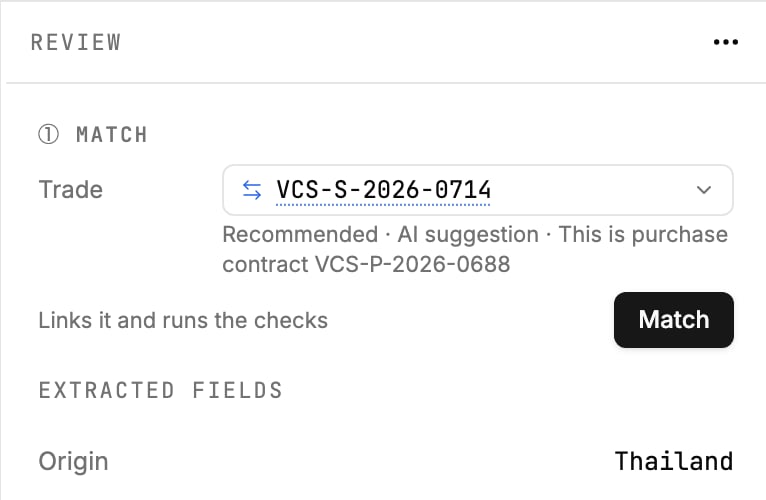
Otherwise Mercora doesn’t link the document. It recommends: the most likely trade is pre-selected in the trade picker with a Recommended label and the reason, and you click Match to confirm it or choose another trade. When a reference is shared by more than one trade, Mercora never picks the first one; it asks you. When nothing fits, the document stays Unmatched.You can always change the trade a document is matched to, or mark it as belonging to no trade. See Matching documents to trades.
Purchase contract VCS-P-2026-0688 doesn't carry the trade's reference, so Mercora recommends VCS-S-2026-0714, says why, and waits for you to click Match.
4
Mercora checks it for discrepancies
Once a document is matched, Mercora compares it with the trade and with the trade’s other documents and flags anything that doesn’t line up, like a quantity outside the contract tolerance, a weight that differs between the B/L and the invoice, or a container seal number that differs between the weight certificate and the trade. See Discrepancies.
5
You review and approve
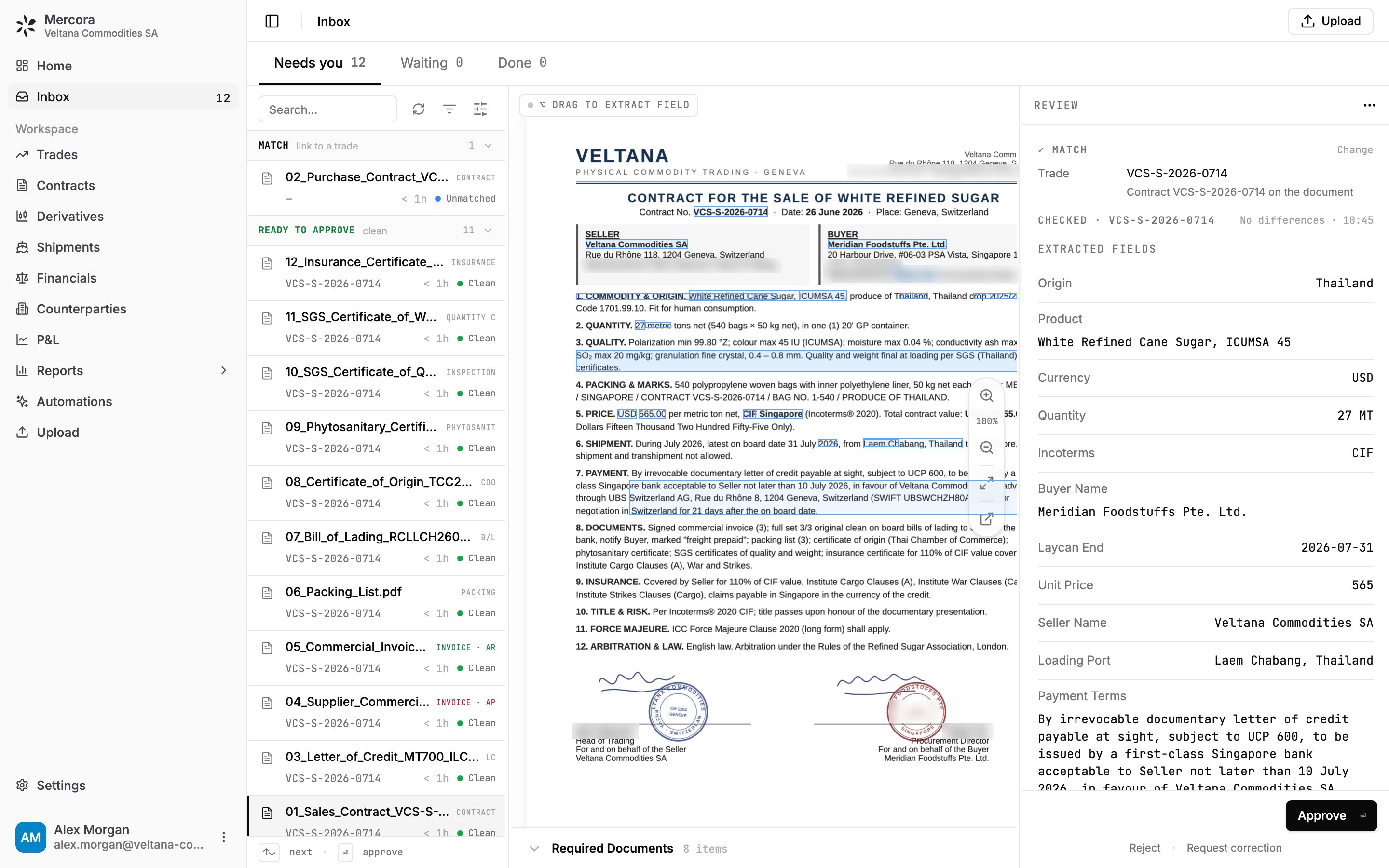
In the Inbox, you see what Mercora read next to the original document. You correct any field that’s wrong, settle the trade it belongs to, review the flagged discrepancies, and click Approve. Approve stays unavailable until the document is matched and its checks have run.Only when a person approves does the document’s information count: until then, it isn’t part of your trade records, even if Mercora linked it to a trade on its own.
Sales contract VCS-S-2026-0714 beside its extracted fields: matched to its trade, checked with no differences, and waiting for Approve.
From there, the approved data feeds the rest of Mercora: the trade’s documents and discrepancies, its financials and invoices, shipments, and the P&L, depending on which modules your workspace uses. The walkthrough follows VCS-S-2026-0714 through every one of these steps.
Mercora is built on one rule: AI recommends, a person approves.
Nothing counts until approved
Mercora links a document to a trade on its own only when a reference matches exactly one trade or the match is highly confident. It never approves a document or changes your trade records by itself. Workflows such as deal capture, hedging and automations start switched off, and your admin turns each one on deliberately.
You make the call
When Mercora isn’t sure, it recommends and ranks the likely answer first. Matching and approving are your clicks, and Mercora records who approved each document and who matched it by hand.
Everything is visible
Mercora shows what it read, where it read it, and why it matched or recommended a trade. When something is uncertain, it says so instead of guessing.
Decisions can be changed
You can correct an extracted field, move a document to a different trade, or reclassify it. Your corrections and decisions are kept when a document is processed again.
The same rule applies beyond documents:
Copilot answers questions using only the data your role can see. Anything it would do outside Mercora on your behalf, such as sending an email or changing a shared spreadsheet, waits for you to click Approve.
Automations report what they find, and anything they would change waits for a person.
The API lets your own systems send requests to Mercora, but what they create lands in the Inbox for an operator. For example, a hedge request sent through the API is not sent to your broker until someone in your team sends it.
Physical trade finance depends on accountability. A missed discrepancy can cost far more than the time it takes to check one, so Mercora is careful about what it claims to know. As each workflow proves itself on real books, more of the routine work can be handled for you, and that is always something your workspace opts into. Whatever Mercora does stays visible and explained.
See the whole flow on the sugar trade VCS-S-2026-0714.
Matching documents to trades
How matches and recommendations work, and how to change them.
Modules
Which parts of Mercora your workspace uses.
⌘I
{"docsConfig":{"theme":"maple","$schema":"https://mintlify.com/docs.json","name":"Mercora","description":"Trade operations for physical commodity traders: documents, matching, reconciliation, financials and the P\u0026L.","colors":{"primary":"#232323","light":"#FFF9EE","dark":"#232323"},"logo":{"light":"https://mintcdn.com/placeholder-f4ffdeec/22McaegbdDRSI41b/logo/mark-dark.svg?fit=max\u0026auto=format\u0026n=22McaegbdDRSI41b\u0026q=85\u0026s=72ad184e9bf63cc57e531ed33f5c631b","dark":"https://mintcdn.com/placeholder-f4ffdeec/22McaegbdDRSI41b/logo/mark-light.svg?fit=max\u0026auto=format\u0026n=22McaegbdDRSI41b\u0026q=85\u0026s=743a6c820e7423e0df7a6e0ae10efc86","href":"/"},"favicon":"https://mintcdn.com/placeholder-f4ffdeec/22McaegbdDRSI41b/favicon.svg?fit=max\u0026auto=format\u0026n=22McaegbdDRSI41b\u0026q=85\u0026s=60a082af42cdf29819901c284f9e7359","appearance":{"default":"system","strict":false},"background":{"color":{"light":"#FFFFFF","dark":"#171717"}},"navbar":{"links":[{"href":"https://mercora.io","label":"mercora.io"}]},"footer":{"socials":{"website":"https://mercora.io","linkedin":"https://www.linkedin.com/company/mercoraai"}},"search":{"prompt":"Search the docs…"},"fonts":{"family":"Inter"},"icons":{"library":"fontawesome"},"styling":{"eyebrows":"section","codeblocks":"system","latex":true},"contextual":{"options":["copy","view","chatgpt","claude"],"display":"header"},"navigation":{"pages":[]}},"deployment":{"deploymentMetadataValue":{"subdomain":"placeholder-f4ffdeec","hasAudioNarration":false,"actualSubdomain":"placeholder-f4ffdeec","customDomains":["docs.mercora.io"],"gitSource":{"type":"github","owner":"sebastianbugal","repo":"mercora","deployBranch":"main","contentDirectory":"client_docs","isPrivate":true,"mountPath":"","label":"","_id":"6adf3dbbabb6f86a455ef035"},"chroma":{"latestBuiltDeploymentHistoryId":"6ae0668a02cd8de5ec2643dc","collectionId":"13289552-774c-43a0-b354-db31f2d90208","liveDeploymentHistoryId":"6ae0668a02cd8de5ec2643dc","schemaVersion":"v3"},"entitlements":{"AI_CHAT":{"status":"ENABLED"},"WEB_MCP":{"status":"ENABLED"},"NARRATION":{"status":"ENABLED"}},"buildId":"6ae09da407896b4595e1d2f2","clientVersion":"0.0.3971","searchFilterCounts":[{"language":"default","tag":"Guides","count":37},{"language":"default","tag":"API reference","count":6},{"language":"default","tag":"Documents","count":6},{"language":"default","tag":"Integrations","count":6},{"language":"default","tag":"Copilot and workflows","count":5},{"language":"default","tag":"Get started","count":5},{"language":"default","tag":"Administration","count":3},{"language":"default","tag":"Core concepts","count":3},{"language":"default","tag":"Finance","count":3},{"language":"default","tag":"Records","count":3}]},"assistantConfig":{"enableAskAiButton":false,"enableStarterQuestions":false,"enableContextualStarterQuestions":false,"enableAskAiSearchBar":true},"basePath":"","hasChatPermissions":true,"hasWebMcpPermissions":true,"toggles":[{"name":"kill-isr","enabled":true,"variant":{"name":"disabled","enabled":false,"feature_enabled":true},"impressionData":false},{"name":"agent-mintlify-slack","enabled":true,"variant":{"name":"disabled","enabled":false,"feature_enabled":true},"impressionData":false},{"name":"editor-v7-file-tree","enabled":true,"variant":{"name":"disabled","enabled":false,"feature_enabled":true},"impressionData":false},{"name":"agent-integrations-settings","enabled":true,"variant":{"name":"disabled","enabled":false,"feature_enabled":true},"impressionData":false},{"name":"automations-pr-grouping","enabled":true,"variant":{"name":"disabled","enabled":false,"feature_enabled":true},"impressionData":false},{"name":"custom-prefix","enabled":true,"variant":{"name":"disabled","enabled":false,"feature_enabled":true},"impressionData":false},{"name":"analytics-v7","enabled":true,"variant":{"name":"disabled","enabled":false,"feature_enabled":true},"impressionData":false},{"name":"user-flows-analytics","enabled":true,"variant":{"name":"disabled","enabled":false,"feature_enabled":true},"impressionData":false},{"name":"no-publish-flow","enabled":true,"variant":{"name":"disabled","enabled":false,"feature_enabled":true},"impressionData":false},{"name":"workos-onboarding","enabled":true,"variant":{"name":"disabled","enabled":false,"feature_enabled":true},"impressionData":false},{"name":"llms-txt-v2","enabled":true,"variant":{"name":"disabled","enabled":false,"feature_enabled":true},"impressionData":false},{"name":"pause-universal-search-reconcile","enabled":true,"variant":{"name":"disabled","enabled":false,"feature_enabled":true},"impressionData":false},{"name":"snapshot-serving-live","enabled":true,"variant":{"name":"disabled","enabled":false,"feature_enabled":true},"impressionData":false},{"name":"stripTemperatureMiddleware","enabled":true,"variant":{"name":"disabled","enabled":false,"feature_enabled":true},"impressionData":false},{"name":"per-site-search-delta","enabled":true,"variant":{"name":"disabled","enabled":false,"feature_enabled":true},"impressionData":false},{"name":"support-platform-pylon-zendesk","enabled":true,"variant":{"name":"disabled","enabled":false,"feature_enabled":true},"impressionData":false},{"name":"snapshot-serving","enabled":true,"variant":{"name":"disabled","enabled":false,"feature_enabled":true},"impressionData":false},{"name":"instant-rollback","enabled":true,"variant":{"name":"disabled","enabled":false,"feature_enabled":true},"impressionData":false},{"name":"granular-notifications-server","enabled":true,"variant":{"name":"disabled","enabled":false,"feature_enabled":true},"impressionData":false},{"name":"granular-notifications","enabled":true,"variant":{"name":"disabled","enabled":false,"feature_enabled":true},"impressionData":false},{"name":"editor-private-page-search","enabled":true,"variant":{"name":"disabled","enabled":false,"feature_enabled":true},"impressionData":false},{"name":"automations-fable","enabled":true,"variant":{"name":"disabled","enabled":false,"feature_enabled":true},"impressionData":false},{"name":"fixed-ai-action-pricing","enabled":true,"variant":{"name":"disabled","enabled":false,"feature_enabled":true},"impressionData":false},{"name":"automation-resolve-merge-conflict","enabled":true,"variant":{"name":"disabled","enabled":false,"feature_enabled":true},"impressionData":false},{"name":"scoped-publishing","enabled":true,"variant":{"name":"disabled","enabled":false,"feature_enabled":true},"impressionData":false},{"name":"mintql","enabled":true,"variant":{"name":"disabled","enabled":false,"feature_enabled":true},"impressionData":false},{"name":"page-level-analytics","enabled":true,"variant":{"name":"disabled","enabled":false,"feature_enabled":true},"impressionData":false},{"name":"editor-version-history-v2","enabled":true,"variant":{"name":"disabled","enabled":false,"feature_enabled":true},"impressionData":false},{"name":"editor-nav-generations","enabled":true,"variant":{"name":"disabled","enabled":false,"feature_enabled":true},"impressionData":false},{"name":"billing-page-v2","enabled":true,"variant":{"name":"disabled","enabled":false,"feature_enabled":true},"impressionData":false},{"name":"workspace-projects","enabled":true,"variant":{"name":"disabled","enabled":false,"feature_enabled":true},"impressionData":false},{"name":"assistant-v5","enabled":true,"variant":{"name":"disabled","enabled":false,"feature_enabled":true},"impressionData":false},{"name":"byok-sep-25","enabled":true,"variant":{"name":"disabled","enabled":false,"feature_enabled":true},"impressionData":false},{"name":"fork-pr-previews","enabled":true,"variant":{"name":"disabled","enabled":false,"feature_enabled":true},"impressionData":false},{"name":"revalidation-jwt","enabled":true,"variant":{"name":"disabled","enabled":false,"feature_enabled":true},"impressionData":false},{"name":"vite-origin","enabled":true,"variant":{"name":"disabled","enabled":false,"feature_enabled":true},"impressionData":false},{"name":"editor-agent-model-picker","enabled":true,"variant":{"name":"disabled","enabled":false,"feature_enabled":true},"impressionData":false},{"name":"billing-updated-9-15","enabled":true,"variant":{"name":"disabled","enabled":false,"feature_enabled":true},"impressionData":false},{"name":"workos-sso-scim","enabled":true,"variant":{"name":"disabled","enabled":false,"feature_enabled":true},"impressionData":false},{"name":"hobby-abuse-scan","enabled":true,"variant":{"name":"disabled","enabled":false,"feature_enabled":true},"impressionData":false},{"name":"dashboard-inbox","enabled":true,"variant":{"name":"disabled","enabled":false,"feature_enabled":true},"impressionData":false},{"name":"workos-signup","enabled":true,"variant":{"name":"disabled","enabled":false,"feature_enabled":true},"impressionData":false},{"name":"workos-enabled","enabled":true,"variant":{"name":"disabled","enabled":false,"feature_enabled":true},"impressionData":false}],"isAtlas":false,"googleFontsInlined":false},"customCss":[{"filePath":"style.css","content":"/* vietnamese */\n@font-face {\n font-family: 'Newsreader';\n font-style: normal;\n font-weight: 400;\n font-display: swap;\n src: url(/_mintlify/assets/fonts/google/s/newsreader/v26/cY9AfjOCX1hbuyalUrK439HyjJBG.woff2) format('woff2');\n unicode-range: U+0102-0103, U+0110-0111, U+0128-0129, U+0168-0169, U+01A0-01A1, U+01AF-01B0, U+0300-0301, U+0303-0304, U+0308-0309, U+0323, U+0329, U+1EA0-1EF9, U+20AB;\n}\n/* latin-ext */\n@font-face {\n font-family: 'Newsreader';\n font-style: normal;\n font-weight: 400;\n font-display: swap;\n src: url(/_mintlify/assets/fonts/google/s/newsreader/v26/cY9AfjOCX1hbuyalUrK439DyjJBG.woff2) format('woff2');\n unicode-range: U+0100-02BA, U+02BD-02C5, U+02C7-02CC, U+02CE-02D7, U+02DD-02FF, U+0304, U+0308, U+0329, U+1D00-1DBF, U+1E00-1E9F, U+1EF2-1EFF, U+2020, U+20A0-20AB, U+20AD-20C4, U+2113, U+2C60-2C7F, U+A720-A7FF;\n}\n/* latin */\n@font-face {\n font-family: 'Newsreader';\n font-style: normal;\n font-weight: 400;\n font-display: swap;\n src: url(/_mintlify/assets/fonts/google/s/newsreader/v26/cY9AfjOCX1hbuyalUrK4397yjA.woff2) format('woff2');\n unicode-range: U+0000-00FF, U+0131, U+0152-0153, U+02BB-02BC, U+02C6, U+02DA, U+02DC, U+0304, U+0308, U+0329, U+2000-206F, U+20AC, U+2122, U+2191, U+2193, U+2212, U+2215, U+FEFF, U+FFFD;\n}\n/* vietnamese */\n@font-face {\n font-family: 'Newsreader';\n font-style: normal;\n font-weight: 500;\n font-display: swap;\n src: url(/_mintlify/assets/fonts/google/s/newsreader/v26/cY9AfjOCX1hbuyalUrK439HyjJBG.woff2) format('woff2');\n unicode-range: U+0102-0103, U+0110-0111, U+0128-0129, U+0168-0169, U+01A0-01A1, U+01AF-01B0, U+0300-0301, U+0303-0304, U+0308-0309, U+0323, U+0329, U+1EA0-1EF9, U+20AB;\n}\n/* latin-ext */\n@font-face {\n font-family: 'Newsreader';\n font-style: normal;\n font-weight: 500;\n font-display: swap;\n src: url(/_mintlify/assets/fonts/google/s/newsreader/v26/cY9AfjOCX1hbuyalUrK439DyjJBG.woff2) format('woff2');\n unicode-range: U+0100-02BA, U+02BD-02C5, U+02C7-02CC, U+02CE-02D7, U+02DD-02FF, U+0304, U+0308, U+0329, U+1D00-1DBF, U+1E00-1E9F, U+1EF2-1EFF, U+2020, U+20A0-20AB, U+20AD-20C4, U+2113, U+2C60-2C7F, U+A720-A7FF;\n}\n/* latin */\n@font-face {\n font-family: 'Newsreader';\n font-style: normal;\n font-weight: 500;\n font-display: swap;\n src: url(/_mintlify/assets/fonts/google/s/newsreader/v26/cY9AfjOCX1hbuyalUrK4397yjA.woff2) format('woff2');\n unicode-range: U+0000-00FF, U+0131, U+0152-0153, U+02BB-02BC, U+02C6, U+02DA, U+02DC, U+0304, U+0308, U+0329, U+2000-206F, U+20AC, U+2122, U+2191, U+2193, U+2212, U+2215, U+FEFF, U+FFFD;\n}\n:root{--mc-border:rgb(35 35 35 / 0.1);--mc-border-strong:rgb(35 35 35 / 0.28);--mc-shadow:0 1px 2px rgb(0 0 0 / 0.04), 0 6px 16px -6px rgb(0 0 0 / 0.08);--mc-frame-bg:#fafafa}html.dark{--mc-border:rgb(255 249 238 / 0.1);--mc-border-strong:rgb(255 249 238 / 0.3);--mc-shadow:0 1px 2px rgb(0 0 0 / 0.3), 0 6px 16px -6px rgb(0 0 0 / 0.5);--mc-frame-bg:#1d1d1d}#page-title{font-family:\"Newsreader\",ui-serif,Georgia,serif;font-weight:500;letter-spacing:-.015em}.mdx-content>blockquote,.mdx-content>ol,.mdx-content>p,.mdx-content>ul{max-width:72ch}.card{transition:border-color 150ms ease,box-shadow 150ms ease}.card:hover{border-color:var(--mc-border-strong)!important;box-shadow:var(--mc-shadow)}[data-name=frame]{background:var(--mc-frame-bg)}[data-name=frame] img{border:1px solid var(--mc-border);border-radius:.625rem}.mdx-content table{font-size:.875rem;font-variant-numeric:tabular-nums}.mdx-content td,.mdx-content th{padding-top:.5rem;padding-bottom:.5rem}@media (prefers-reduced-motion:reduce){.card{transition:none}}"}],"page":{"pagePath":"concepts/how-mercora-works","slug":"/concepts/how-mercora-works","pageMetadata":{"title":"How Mercora works","description":"Follow a document from arrival to approval, and learn the trust model: Mercora reads, checks and recommends, and a person approves.","icon":"diagram-project","href":"/concepts/how-mercora-works"},"description":{"compiledSource":"\"use strict\";\nconst {jsx: _jsx} = arguments[0];\nconst {useMDXComponents: _provideComponents} = arguments[0];\nfunction _createMdxContent(props) {\n const _components = {\n p: \"p\",\n ..._provideComponents(),\n ...props.components\n };\n return _jsx(_components.p, {\n children: \"Follow a document from arrival to approval, and learn the trust model: Mercora reads, checks and recommends, and a person approves.\"\n });\n}\nfunction MDXContent(props = {}) {\n const {wrapper: MDXLayout} = {\n ..._provideComponents(),\n ...props.components\n };\n return MDXLayout ? _jsx(MDXLayout, {\n ...props,\n children: _jsx(_createMdxContent, {\n ...props\n })\n }) : _createMdxContent(props);\n}\nreturn {\n default: MDXContent\n};\n","frontmatter":{},"scope":{}},"pageType":"default","mdx":{"mdxSource":{"compiledSource":"\"use strict\";const{Fragment:_Fragment,jsx:_jsx,jsxs:_jsxs}=arguments[0];const{useMDXComponents:_provideComponents}=arguments[0];function _createMdxContent(props){const _components={a:`a`,li:`li`,p:`p`,strong:`strong`,ul:`ul`,..._provideComponents(),...props.components},{Card,CardGroup,Frame,Heading,OptimizedImage,Step,Steps}=_components;if(!Card)_missingMdxReference(`Card`,true);if(!CardGroup)_missingMdxReference(`CardGroup`,true);if(!Frame)_missingMdxReference(`Frame`,true);if(!Heading)_missingMdxReference(`Heading`,true);if(!OptimizedImage)_missingMdxReference(`OptimizedImage`,true);if(!Step)_missingMdxReference(`Step`,true);if(!Steps)_missingMdxReference(`Steps`,true);return _jsxs(_Fragment,{children:[_jsx(_components.p,{children:`A single physical trade generates a stack of paper. Veltana Commodities SA’s sugar trade VCS-S-2026-0714 (27 MT of white refined sugar, bought FOB Laem Chabang from Kanchana Siam Sugar and sold CIF Singapore to Meridian Foodstuffs) comes with twelve documents: the purchase and sales contracts, the letter of credit ILC26SG04582, the supplier and customer invoices, the B/L (bill of lading, the carrier’s receipt for the cargo) RCLLCH2607841, a packing list, and certificates of origin, quality, weight, phytosanitary condition and insurance. Someone has to read all of it, file it against the right trade, catch what contradicts what, and keep the numbers honest.`}),`\n`,_jsx(_components.p,{children:`Mercora does the reading and the checking. You make the decisions. This page explains what happens to a document, and where a person stays in control.`}),`\n`,_jsx(Heading,{level:`2`,id:`from-document-to-trade`,children:`From document to trade`}),`\n`,_jsxs(Steps,{children:[_jsxs(Step,{title:`A document arrives`,children:[_jsxs(_components.p,{children:[`Documents reach Mercora when you `,_jsx(_components.a,{href:`/documents/uploading`,children:`upload them`}),` or when they come in by `,_jsx(_components.a,{href:`/documents/email-ingestion`,children:`email`}),`. A saved email you upload is opened up and each attachment is handled as its own document.`]}),_jsxs(_components.p,{children:[`If one file holds several documents, for example a scanned pack with an invoice, a B/L and three certificates, Mercora splits it into separate documents. If your admin has turned on `,_jsx(_components.strong,{children:`Bundle review`}),`, Mercora holds the pack in the Inbox until someone confirms the split.`]})]}),_jsx(Step,{title:`Mercora reads and classifies it`,children:_jsxs(_components.p,{children:[`Mercora works out what kind of document it is and reads the fields that matter for that type: parties, references, commodity, quantities, weights, prices, dates, vessel and so on. See `,_jsx(_components.a,{href:`/documents/processing`,children:`Document processing`}),`.`]})}),_jsxs(Step,{title:`Mercora matches it to a trade`,children:[_jsx(_components.p,{children:`Mercora looks for the trade the document belongs to, and only links it on its own when the evidence leaves no real doubt:`}),_jsxs(_components.ul,{children:[`\n`,_jsxs(_components.li,{children:[_jsx(_components.strong,{children:`A reference matches exactly one trade.`}),` The document carries a trade reference, contract number, deal reference or B/L number that belongs to one trade and no other. Mercora links it and shows the reason, for example “Contract VCS-S-2026-0714 on the document”.`]}),`\n`,_jsxs(_components.li,{children:[_jsx(_components.strong,{children:`The match is highly confident.`}),` Without a unique reference, Mercora links the document only when the evidence for one trade is strong, and again shows why.`]}),`\n`]}),_jsxs(_components.p,{children:[`Otherwise Mercora doesn’t link the document. It recommends: the most likely trade is pre-selected in the trade picker with a `,_jsx(_components.strong,{children:`Recommended`}),` label and the reason, and you click `,_jsx(_components.strong,{children:`Match`}),` to confirm it or choose another trade. When a reference is shared by more than one trade, Mercora never picks the first one; it asks you. When nothing fits, the document stays `,_jsx(_components.strong,{children:`Unmatched`}),`.`]}),_jsxs(_components.p,{children:[`You can always change the trade a document is matched to, or mark it as belonging to no trade. See `,_jsx(_components.a,{href:`/documents/matching`,children:`Matching documents to trades`}),`.`]}),_jsx(Frame,{caption:`Purchase contract VCS-P-2026-0688 doesn't carry the trade's reference, so Mercora recommends VCS-S-2026-0714, says why, and waits for you to click Match.`,children:_jsx(OptimizedImage,{src:`https://mintcdn.com/placeholder-f4ffdeec/22McaegbdDRSI41b/images/documents/match-step-recommended.png?fit=max\u0026auto=format\u0026n=22McaegbdDRSI41b\u0026q=85\u0026s=02a8088829f6d0daa68f1aa1f8624703`,alt:`The Match step with a recommended trade and the Match button`,\"data-og-width\":`766`,width:`766`,\"data-og-height\":`500`,height:`500`,\"data-path\":`images/documents/match-step-recommended.png`,\"data-optimize\":`true`,\"data-opv\":`3`,srcset:`https://mintcdn.com/placeholder-f4ffdeec/22McaegbdDRSI41b/images/documents/match-step-recommended.png?w=280\u0026fit=max\u0026auto=format\u0026n=22McaegbdDRSI41b\u0026q=85\u0026s=24fb1307cdad39d4df79213ffd401c72 280w, https://mintcdn.com/placeholder-f4ffdeec/22McaegbdDRSI41b/images/documents/match-step-recommended.png?w=560\u0026fit=max\u0026auto=format\u0026n=22McaegbdDRSI41b\u0026q=85\u0026s=a266a0d05ac18654d08f86070eecc44a 560w, https://mintcdn.com/placeholder-f4ffdeec/22McaegbdDRSI41b/images/documents/match-step-recommended.png?w=840\u0026fit=max\u0026auto=format\u0026n=22McaegbdDRSI41b\u0026q=85\u0026s=bad5bc6ec1acb0c462453af66b66347c 840w, https://mintcdn.com/placeholder-f4ffdeec/22McaegbdDRSI41b/images/documents/match-step-recommended.png?w=1100\u0026fit=max\u0026auto=format\u0026n=22McaegbdDRSI41b\u0026q=85\u0026s=eca267424b37bc335113cda40caae1a5 1100w, https://mintcdn.com/placeholder-f4ffdeec/22McaegbdDRSI41b/images/documents/match-step-recommended.png?w=1650\u0026fit=max\u0026auto=format\u0026n=22McaegbdDRSI41b\u0026q=85\u0026s=3268f2eecb1c8568bfeabe8caef88724 1650w, https://mintcdn.com/placeholder-f4ffdeec/22McaegbdDRSI41b/images/documents/match-step-recommended.png?w=2500\u0026fit=max\u0026auto=format\u0026n=22McaegbdDRSI41b\u0026q=85\u0026s=7aacc47c27bdaedd4ad85dd2f3fdbed6 2500w`})})]}),_jsx(Step,{title:`Mercora checks it for discrepancies`,children:_jsxs(_components.p,{children:[`Once a document is matched, Mercora compares it with the trade and with the trade’s other documents and flags anything that doesn’t line up, like a quantity outside the contract tolerance, a weight that differs between the B/L and the invoice, or a container seal number that differs between the weight certificate and the trade. See `,_jsx(_components.a,{href:`/documents/discrepancies`,children:`Discrepancies`}),`.`]})}),_jsxs(Step,{title:`You review and approve`,children:[_jsxs(_components.p,{children:[`In the `,_jsx(_components.a,{href:`/documents/inbox`,children:`Inbox`}),`, you see what Mercora read next to the original document. You correct any field that’s wrong, settle the trade it belongs to, review the flagged discrepancies, and click `,_jsx(_components.strong,{children:`Approve`}),`. `,_jsx(_components.strong,{children:`Approve`}),` stays unavailable until the document is matched and its checks have run.`]}),_jsx(_components.p,{children:`Only when a person approves does the document’s information count: until then, it isn’t part of your trade records, even if Mercora linked it to a trade on its own.`})]})]}),`\n`,_jsx(Frame,{caption:`Sales contract VCS-S-2026-0714 beside its extracted fields: matched to its trade, checked with no differences, and waiting for Approve.`,children:_jsx(OptimizedImage,{src:`https://mintcdn.com/placeholder-f4ffdeec/22McaegbdDRSI41b/images/getting-started/walkthrough-02-review-sales-contract.png?fit=max\u0026auto=format\u0026n=22McaegbdDRSI41b\u0026q=85\u0026s=a7bb863ab92fe4b36cfdba72eb644b67`,alt:`A document open in the Inbox with the original beside the extracted fields`,\"data-og-width\":`2880`,width:`2880`,\"data-og-height\":`1800`,height:`1800`,\"data-path\":`images/getting-started/walkthrough-02-review-sales-contract.png`,\"data-optimize\":`true`,\"data-opv\":`3`,srcset:`https://mintcdn.com/placeholder-f4ffdeec/22McaegbdDRSI41b/images/getting-started/walkthrough-02-review-sales-contract.png?w=280\u0026fit=max\u0026auto=format\u0026n=22McaegbdDRSI41b\u0026q=85\u0026s=cf6ab740e46c01ff5b999481820646db 280w, https://mintcdn.com/placeholder-f4ffdeec/22McaegbdDRSI41b/images/getting-started/walkthrough-02-review-sales-contract.png?w=560\u0026fit=max\u0026auto=format\u0026n=22McaegbdDRSI41b\u0026q=85\u0026s=deff02185f94c4374d3b55e412587f22 560w, https://mintcdn.com/placeholder-f4ffdeec/22McaegbdDRSI41b/images/getting-started/walkthrough-02-review-sales-contract.png?w=840\u0026fit=max\u0026auto=format\u0026n=22McaegbdDRSI41b\u0026q=85\u0026s=e98adea65e8e95c1eb601c9817538ede 840w, https://mintcdn.com/placeholder-f4ffdeec/22McaegbdDRSI41b/images/getting-started/walkthrough-02-review-sales-contract.png?w=1100\u0026fit=max\u0026auto=format\u0026n=22McaegbdDRSI41b\u0026q=85\u0026s=d17c47bfef6ae67aa832deb0f603fb01 1100w, https://mintcdn.com/placeholder-f4ffdeec/22McaegbdDRSI41b/images/getting-started/walkthrough-02-review-sales-contract.png?w=1650\u0026fit=max\u0026auto=format\u0026n=22McaegbdDRSI41b\u0026q=85\u0026s=e182866686029841d725fc04558907e3 1650w, https://mintcdn.com/placeholder-f4ffdeec/22McaegbdDRSI41b/images/getting-started/walkthrough-02-review-sales-contract.png?w=2500\u0026fit=max\u0026auto=format\u0026n=22McaegbdDRSI41b\u0026q=85\u0026s=c63d23f5b83a1baf340f8cb2b637971d 2500w`})}),`\n`,_jsxs(_components.p,{children:[`From there, the approved data feeds the rest of Mercora: the trade’s documents and discrepancies, its financials and invoices, shipments, and the P\u0026L, depending on which `,_jsx(_components.a,{href:`/concepts/modules`,children:`modules`}),` your workspace uses. The `,_jsx(_components.a,{href:`/getting-started/walkthrough`,children:`walkthrough`}),` follows VCS-S-2026-0714 through every one of these steps.`]}),`\n`,_jsx(Heading,{level:`2`,id:`the-trust-model`,children:`The trust model`}),`\n`,_jsxs(_components.p,{children:[`Mercora is built on one rule: `,_jsx(_components.strong,{children:`AI recommends, a person approves.`})]}),`\n`,_jsxs(CardGroup,{cols:2,children:[_jsx(Card,{title:`Nothing counts until approved`,icon:`hand`,children:_jsx(_components.p,{children:`Mercora links a document to a trade on its own only when a reference matches exactly one trade or the match is highly confident. It never approves a document or changes your trade records by itself. Workflows such as deal capture, hedging and automations start switched off, and your admin turns each one on deliberately.`})}),_jsx(Card,{title:`You make the call`,icon:`user-check`,children:_jsx(_components.p,{children:`When Mercora isn’t sure, it recommends and ranks the likely answer first. Matching and approving are your clicks, and Mercora records who approved each document and who matched it by hand.`})}),_jsx(Card,{title:`Everything is visible`,icon:`eye`,children:_jsx(_components.p,{children:`Mercora shows what it read, where it read it, and why it matched or recommended a trade. When something is uncertain, it says so instead of guessing.`})}),_jsx(Card,{title:`Decisions can be changed`,icon:`rotate-left`,children:_jsx(_components.p,{children:`You can correct an extracted field, move a document to a different trade, or reclassify it. Your corrections and decisions are kept when a document is processed again.`})})]}),`\n`,_jsx(_components.p,{children:`The same rule applies beyond documents:`}),`\n`,_jsxs(_components.ul,{children:[`\n`,_jsxs(_components.li,{children:[_jsx(_components.strong,{children:`Copilot`}),` answers questions using only the data your role can see. Anything it would do outside Mercora on your behalf, such as sending an email or changing a shared spreadsheet, waits for you to click `,_jsx(_components.strong,{children:`Approve`}),`.`]}),`\n`,_jsxs(_components.li,{children:[_jsx(_components.strong,{children:`Workflows`}),` such as `,_jsx(_components.a,{href:`/workflows/deal-capture`,children:`deal capture`}),`, `,_jsx(_components.a,{href:`/workflows/hedging`,children:`hedging`}),` and `,_jsx(_components.a,{href:`/workflows/freight-rates`,children:`freight rates`}),` put their proposals in the Inbox for a person to confirm.`]}),`\n`,_jsxs(_components.li,{children:[_jsx(_components.strong,{children:`Automations`}),` report what they find, and anything they would change waits for a person.`]}),`\n`,_jsxs(_components.li,{children:[_jsx(_components.strong,{children:`The API`}),` lets your own systems send requests to Mercora, but what they create lands in the Inbox for an operator. For example, a hedge request sent through the API is not sent to your broker until someone in your team sends it.`]}),`\n`]}),`\n`,_jsx(Heading,{level:`2`,id:`why-it-works-this-way`,children:`Why it works this way`}),`\n`,_jsx(_components.p,{children:`Physical trade finance depends on accountability. A missed discrepancy can cost far more than the time it takes to check one, so Mercora is careful about what it claims to know. As each workflow proves itself on real books, more of the routine work can be handled for you, and that is always something your workspace opts into. Whatever Mercora does stays visible and explained.`}),`\n`,_jsx(Heading,{level:`2`,id:`next-steps`,children:`Next steps`}),`\n`,_jsxs(CardGroup,{cols:3,children:[_jsx(Card,{title:`Walkthrough`,icon:`route`,href:`/getting-started/walkthrough`,children:_jsx(_components.p,{children:`See the whole flow on the sugar trade VCS-S-2026-0714.`})}),_jsx(Card,{title:`Matching documents to trades`,icon:`link`,href:`/documents/matching`,children:_jsx(_components.p,{children:`How matches and recommendations work, and how to change them.`})}),_jsx(Card,{title:`Modules`,icon:`puzzle-piece`,href:`/concepts/modules`,children:_jsx(_components.p,{children:`Which parts of Mercora your workspace uses.`})})]})]})}function MDXContent(props={}){const{wrapper:MDXLayout}={..._provideComponents(),...props.components};return MDXLayout?_jsx(MDXLayout,{...props,children:_jsx(_createMdxContent,{...props})}):_createMdxContent(props)}return{default:MDXContent};function _missingMdxReference(id,component){throw new Error(`Expected `+(component?`component`:`object`)+\" `\"+id+\"` to be defined: you likely forgot to import, pass, or provide it.\")}","frontmatter":{},"scope":{"codeStyling":"system","config":{},"pageMetadata":{"title":"How Mercora works","description":"Follow a document from arrival to approval, and learn the trust model: Mercora reads, checks and recommends, and a person approves.","icon":"diagram-project","href":"/concepts/how-mercora-works"}}},"mdxSourceWithNoJs":null},"mdxExtracts":{"tableOfContents":[{"title":"From document to trade","slug":"from-document-to-trade","depth":2,"children":[]},{"title":"The trust model","slug":"the-trust-model","depth":2,"children":[]},{"title":"Why it works this way","slug":"why-it-works-this-way","depth":2,"children":[]},{"title":"Next steps","slug":"next-steps","depth":2,"children":[]}],"codeExamples":{}},"jsLinks":[],"subdomain":"placeholder-f4ffdeec","siteName":"Mercora","title":"How Mercora works - Mercora","navMaps":{"firstHrefInVersion":{},"firstHrefInLanguage":{}},"lastModified":"2026-10-26T11:51:25.993Z","originalFileLocation":"concepts/how-mercora-works.mdx"},"headHtml":"\u003cscript data-mint-head>(function(){var d=document.documentElement,p=null;if(!p){try{p=localStorage.getItem(\"isDarkMode\")}catch(e){}if(p==='true')p='dark';else if(p==='false')p='light';if(p!=='light'\u0026\u0026p!=='dark'\u0026\u0026p!=='system')p=\"system\"}var r=p==='system'?(matchMedia(\"(prefers-color-scheme: dark)\").matches?'dark':'light'):p;d.classList.remove(r==='dark'?'light':'dark');d.classList.add(r);d.setAttribute(\"data-theme-preference\",p)})();\u003c/script>\u003cmeta data-mint-head name=\"description\" content=\"Follow a document from arrival to approval, and learn the trust model: Mercora reads, checks and recommends, and a person approves.\">\u003cmeta data-mint-head name=\"application-name\" content=\"Mercora\">\u003cmeta data-mint-head name=\"generator\" content=\"Mintlify\">\u003clink data-mint-head rel=\"icon\" type=\"image/png\" sizes=\"192x192\" href=\"/mintlify-assets/_mintlify/favicons/placeholder-f4ffdeec/XOETJcrPFhZvltr-/_generated/favicon/android-chrome-192x192.png\" media=\"(prefers-color-scheme: light)\">\u003clink data-mint-head rel=\"apple-touch-icon\" type=\"image/png\" sizes=\"180x180\" href=\"/mintlify-assets/_mintlify/favicons/placeholder-f4ffdeec/XOETJcrPFhZvltr-/_generated/favicon/apple-touch-icon.png\">\u003clink data-mint-head rel=\"icon\" type=\"image/png\" sizes=\"16x16\" href=\"/mintlify-assets/_mintlify/favicons/placeholder-f4ffdeec/XOETJcrPFhZvltr-/_generated/favicon/favicon-16x16.png\" media=\"(prefers-color-scheme: light)\">\u003clink data-mint-head rel=\"icon\" type=\"image/png\" sizes=\"32x32\" href=\"/mintlify-assets/_mintlify/favicons/placeholder-f4ffdeec/XOETJcrPFhZvltr-/_generated/favicon/favicon-32x32.png\" media=\"(prefers-color-scheme: light)\">\u003clink data-mint-head rel=\"shortcut icon\" type=\"image/x-icon\" href=\"/mintlify-assets/_mintlify/favicons/placeholder-f4ffdeec/XOETJcrPFhZvltr-/_generated/favicon/favicon.ico\" media=\"(prefers-color-scheme: light)\">\u003clink data-mint-head rel=\"icon\" type=\"image/png\" sizes=\"192x192\" href=\"/mintlify-assets/_mintlify/favicons/placeholder-f4ffdeec/XOETJcrPFhZvltr-/_generated/favicon-dark/android-chrome-192x192.png\" media=\"(prefers-color-scheme: dark)\">\u003clink data-mint-head rel=\"icon\" type=\"image/png\" sizes=\"16x16\" href=\"/mintlify-assets/_mintlify/favicons/placeholder-f4ffdeec/XOETJcrPFhZvltr-/_generated/favicon-dark/favicon-16x16.png\" media=\"(prefers-color-scheme: dark)\">\u003clink data-mint-head rel=\"icon\" type=\"image/png\" sizes=\"32x32\" href=\"/mintlify-assets/_mintlify/favicons/placeholder-f4ffdeec/XOETJcrPFhZvltr-/_generated/favicon-dark/favicon-32x32.png\" media=\"(prefers-color-scheme: dark)\">\u003clink data-mint-head rel=\"shortcut icon\" type=\"image/x-icon\" href=\"/mintlify-assets/_mintlify/favicons/placeholder-f4ffdeec/XOETJcrPFhZvltr-/_generated/favicon-dark/favicon.ico\" media=\"(prefers-color-scheme: dark)\">\u003cmeta data-mint-head property=\"og:title\" content=\"How Mercora works - Mercora\">\u003cmeta data-mint-head property=\"og:description\" content=\"Follow a document from arrival to approval, and learn the trust model: Mercora reads, checks and recommends, and a person approves.\">\u003cmeta data-mint-head property=\"og:site_name\" content=\"Mercora\">\u003cmeta data-mint-head property=\"og:url\" content=\"https://docs.mercora.io/concepts/how-mercora-works\">\u003cmeta data-mint-head property=\"og:type\" content=\"website\">\u003cmeta data-mint-head property=\"og:image\" content=\"https://placeholder-f4ffdeec.mintlify.app/_mintlify/api/og/v2?division=Core+concepts\u0026amp;title=How+Mercora+works\u0026amp;description=Follow+a+document+from+arrival+to+approval%2C+and+learn+the+trust+model%3A+Mercora+reads%2C+checks+and+recommends%2C+and+a+person+approves.\u0026amp;theme=b55c1587f6fc9c9340bca578\u0026amp;signature=2db771618eeb473756c2ccb56c9a1b1d4841d0c3b87350361916cfef1483ca4c\">\u003cmeta data-mint-head property=\"og:image:width\" content=\"1200\">\u003cmeta data-mint-head property=\"og:image:height\" content=\"630\">\u003cmeta data-mint-head name=\"twitter:card\" content=\"summary_large_image\">\u003cmeta data-mint-head name=\"twitter:title\" content=\"How Mercora works - Mercora\">\u003cmeta data-mint-head name=\"twitter:description\" content=\"Follow a document from arrival to approval, and learn the trust model: Mercora reads, checks and recommends, and a person approves.\">\u003cmeta data-mint-head name=\"twitter:image\" content=\"https://placeholder-f4ffdeec.mintlify.app/_mintlify/api/og/v2?division=Core+concepts\u0026amp;title=How+Mercora+works\u0026amp;description=Follow+a+document+from+arrival+to+approval%2C+and+learn+the+trust+model%3A+Mercora+reads%2C+checks+and+recommends%2C+and+a+person+approves.\u0026amp;theme=b55c1587f6fc9c9340bca578\u0026amp;signature=2db771618eeb473756c2ccb56c9a1b1d4841d0c3b87350361916cfef1483ca4c\">\u003cmeta data-mint-head name=\"twitter:image:width\" content=\"1200\">\u003cmeta data-mint-head name=\"twitter:image:height\" content=\"630\">\u003cmeta data-mint-head name=\"msapplication-config\" content=\"/mintlify-assets/_mintlify/favicons/placeholder-f4ffdeec/XOETJcrPFhZvltr-/_generated/favicon/browserconfig.xml\">\u003cmeta data-mint-head name=\"apple-mobile-web-app-title\" content=\"Mercora\">\u003cmeta data-mint-head name=\"msapplication-TileColor\" content=\"#232323\">\u003clink data-mint-head rel=\"canonical\" href=\"https://docs.mercora.io/concepts/how-mercora-works\">\u003clink data-mint-head rel=\"alternate\" type=\"application/xml\" href=\"/sitemap.xml\">\u003clink data-mint-head rel=\"alternate\" type=\"text/markdown\" href=\"/concepts/how-mercora-works.md\">\u003cscript data-mint-head type=\"application/ld+json\">{\"@context\":\"https://schema.org\",\"@graph\":[{\"@type\":\"Organization\",\"@id\":\"https://docs.mercora.io/#organization\",\"name\":\"Mercora\",\"url\":\"https://docs.mercora.io\",\"logo\":{\"@type\":\"ImageObject\",\"url\":\"https://mintcdn.com/placeholder-f4ffdeec/22McaegbdDRSI41b/logo/mark-dark.svg?fit=max\u0026auto=format\u0026n=22McaegbdDRSI41b\u0026q=85\u0026s=72ad184e9bf63cc57e531ed33f5c631b\"}},{\"@type\":\"WebSite\",\"@id\":\"https://docs.mercora.io#website\",\"name\":\"Mercora\",\"url\":\"https://docs.mercora.io\",\"publisher\":{\"@id\":\"https://docs.mercora.io/#organization\"}},{\"@type\":\"WebPage\",\"@id\":\"https://docs.mercora.io/concepts/how-mercora-works#webpage\",\"url\":\"https://docs.mercora.io/concepts/how-mercora-works\",\"name\":\"How Mercora works\",\"description\":\"Follow a document from arrival to approval, and learn the trust model: Mercora reads, checks and recommends, and a person approves.\",\"dateModified\":\"2026-10-26T11:51:25.993Z\",\"isPartOf\":{\"@id\":\"https://docs.mercora.io#website\"},\"breadcrumb\":{\"@id\":\"https://docs.mercora.io/concepts/how-mercora-works#breadcrumb\"}},{\"@type\":\"BreadcrumbList\",\"@id\":\"https://docs.mercora.io/concepts/how-mercora-works#breadcrumb\",\"itemListElement\":[{\"@type\":\"ListItem\",\"position\":1,\"name\":\"Mercora\",\"item\":\"https://docs.mercora.io\"},{\"@type\":\"ListItem\",\"position\":2,\"name\":\"How Mercora works\",\"item\":\"https://docs.mercora.io/concepts/how-mercora-works\"}]},{\"@type\":[\"Article\",\"TechArticle\"],\"@id\":\"https://docs.mercora.io/concepts/how-mercora-works#article\",\"headline\":\"How Mercora works\",\"name\":\"How Mercora works\",\"description\":\"Follow a document from arrival to approval, and learn the trust model: Mercora reads, checks and recommends, and a person approves.\",\"url\":\"https://docs.mercora.io/concepts/how-mercora-works\",\"mainEntityOfPage\":{\"@id\":\"https://docs.mercora.io/concepts/how-mercora-works#webpage\"},\"dateModified\":\"2026-10-26T11:51:25.993Z\",\"publisher\":{\"@id\":\"https://docs.mercora.io/#organization\"},\"isPartOf\":{\"@id\":\"https://docs.mercora.io#website\"}}]}\u003c/script>\u003cscript data-mint-head type=\"application/ld+json\">{\"@context\":\"https://schema.org\",\"@type\":\"WebSite\",\"name\":\"Mercora\",\"creator\":{\"@type\":\"Organization\",\"name\":\"Mintlify\",\"url\":\"https://mintlify.com\"}}\u003c/script>","siteName":"Mercora","nav":{"global":null,"tabs":[{"tab":"Guides","icon":"book-open","groups":[{"group":"Get started","icon":"rocket","pages":[{"title":"Welcome to Mercora","sidebarTitle":"Welcome","icon":"house","mode":"wide","href":""},{"title":"Quickstart","icon":"rocket","href":"/getting-started/quickstart"},{"title":"Walk through a trade","sidebarTitle":"Walkthrough","icon":"route","href":"/getting-started/walkthrough"},{"title":"Mercora by role","sidebarTitle":"By role","icon":"users","href":"/getting-started/by-role"},{"title":"Navigating Mercora","description":"A tour of the sidebar and the main areas of Mercora, and which ones depend on a workspace module.","icon":"compass","href":"/getting-started/navigating-mercora"}]},{"group":"Core concepts","icon":"lightbulb","pages":[{"title":"How Mercora works","icon":"diagram-project","href":"/concepts/how-mercora-works"},{"title":"Modules","description":"Modules are the parts of Mercora your workspace uses. Admins turn them on and off for the whole workspace.","icon":"puzzle-piece","href":"/concepts/modules"},{"title":"Roles and permissions","icon":"user-shield","href":"/concepts/roles-and-permissions"}]},{"group":"Documents","icon":"file-lines","pages":[{"title":"Uploading documents","icon":"upload","href":"/documents/uploading"},{"title":"Email ingestion","icon":"envelope-open-text","href":"/documents/email-ingestion"},{"title":"Document processing","icon":"gears","href":"/documents/processing"},{"title":"The Inbox","icon":"inbox","href":"/documents/inbox"},{"title":"Matching documents to trades","icon":"link","href":"/documents/matching"},{"title":"Discrepancies","icon":"triangle-exclamation","href":"/documents/discrepancies"}]},{"group":"Trades","icon":"arrow-right-arrow-left","pages":[{"title":"Trades","icon":"arrow-right-arrow-left","href":"/trades/overview"},{"title":"Shipments","icon":"ship","href":"/trades/shipments"},{"title":"Trade financials","icon":"file-invoice-dollar","href":"/trades/financials"}]},{"group":"Finance","icon":"scale-balanced","pages":[{"title":"Financials","icon":"scale-balanced","href":"/finance/financials"},{"title":"P\u0026L","icon":"chart-line","href":"/finance/pnl"},{"title":"Reports","icon":"chart-column","href":"/finance/reports"}]},{"group":"Records","icon":"folder-open","pages":[{"title":"Counterparties","icon":"building","href":"/records/counterparties"},{"title":"Contracts","icon":"file-contract","href":"/records/contracts"},{"title":"Derivatives","icon":"arrow-trend-up","href":"/records/derivatives"}]},{"group":"Copilot and workflows","icon":"wand-magic-sparkles","pages":[{"title":"Copilot","icon":"sparkles","href":"/copilot/overview"},{"title":"Automations","icon":"robot","href":"/workflows/automations"},{"title":"Deal capture","icon":"handshake","href":"/workflows/deal-capture"},{"title":"Hedging","icon":"scale-balanced","href":"/workflows/hedging"},{"title":"Freight rates","icon":"ship","href":"/workflows/freight-rates"}]},{"group":"Integrations","icon":"plug","pages":[{"title":"Integrations","icon":"plug","href":"/integrations/overview"},{"title":"Microsoft 365","icon":"microsoft","href":"/integrations/microsoft-365"},{"title":"WhatsApp","icon":"whatsapp","href":"/integrations/whatsapp"},{"title":"Google Sheets","icon":"table","href":"/integrations/google-sheets"},{"title":"QuickBooks Online","icon":"calculator","href":"/integrations/quickbooks"},{"title":"External systems","icon":"arrows-rotate","href":"/integrations/external-systems"}]},{"group":"Administration","icon":"users-gear","pages":[{"title":"Members","icon":"users","href":"/admin/members"},{"title":"Workspace settings","icon":"gear","href":"/admin/workspace-settings"},{"title":"API keys","icon":"key","href":"/admin/api-keys"}]}]},{"tab":"API reference","icon":"code","pages":[{"title":"API reference","href":"/api-reference/introduction"}]}]},"title":"How Mercora works - Mercora","buildId":"dpl_DFJrtvUi8HS5F9nkooKuDJsuD5BM","deploymentId":"dpl_DFJrtvUi8HS5F9nkooKuDJsuD5BM","dynamics":["07c022d89b","a74be98ba7"],"chunks":["Frame-COGkNuA6.js","DynamicMarkdown-85clUA0i.js","zoom-image-lightbox-BZxD9MAj.js","lightbox-handle-r17bVUz3.js"]}