

Available when the Reports module is turned on for your workspace. Each report also has its own switch (Operations report, Commercial cashflow and Overdue report), on by default once Reports is on. You also need Reports access in your role. Ask your workspace admin.
Operations
The Operations report is the state of your back office at a glance: what’s waiting on you, what Mercora processed, and what happened.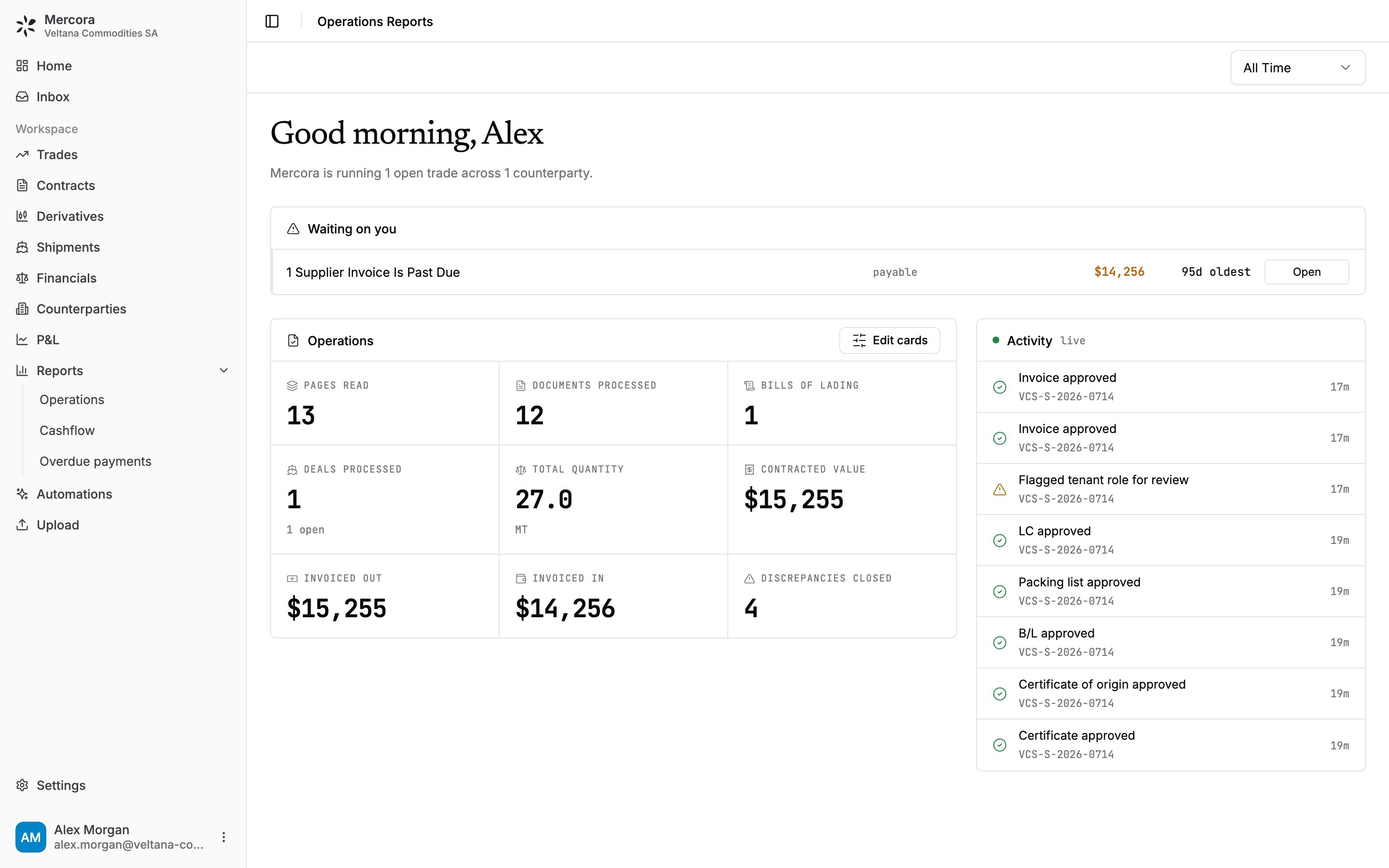
The Operations report for Veltana Commodities SA: one past-due supplier invoice waiting, 12 documents processed and 4 discrepancies closed on the sugar trade VCS-S-2026-0714.
Waiting on you
The most pressing exceptions, most serious first, each with a link straight to where you fix it:- discrepancies still open, with how many days each has been open;
- trades whose laycan closed with still no B/L, with how many days overdue;
- supplier invoices past due, with the oldest;
- cargoes that have shipped with no sales invoice raised;
- documents Mercora couldn’t match to any trade, which open in the Inbox;
- pushes to a connected external system that failed and haven’t been retried or marked handled.
Operations cards
The cards count the work in the period. Which cards appear depends on your modules. The standard set:
For the sugar trade alone, the cards read 13 pages read, 12 documents processed, 1 bill of lading, 1 deal (open), 27.0 MT, contracted value $15,255, invoiced out $15,255, invoiced in $14,256, and 4 discrepancies closed.
Workspaces running other workflows can also show Freight rows imported, Hedge plans read, Hedges filled, Lots filled, and the actions taken in, or failed to sync to, a connected external system.
Admins choose which cards everyone sees: click Edit cards to open the Report cards panel.
Activity
A feed of what happened in the period: documents filed to trades, approvals, fields flagged for review, and workflow events. It’s rebuilt from what Mercora recorded on each document and discrepancy, so it shows what happened, not why.Cashflow
Cashflow is realized, cash-basis margin: only money that has actually moved. It’s built from payments, not from invoices or contracts. The time range works on payment dates, so Last 30 Days shows cash received and paid in the last 30 days, even on trades created long before.
Cumulative · realized charts revenue and costs building up over the period, by day, week or month. Ancillary costs · realized breaks down cash paid on cost invoices by category, such as freight, insurance and inspection. Cargo, tax and adjustment categories are left out, and so are categories that net to zero or less in the period.
Everything is in your workspace’s reporting currency. Each payment converts at the rate captured on it when it was recorded, otherwise the trade’s FX override, otherwise today’s ECB (European Central Bank) rate. These are the same rates the trade pages use, so the same payment is worth the same here. If a payment can’t be converted because no rate is available, it’s left out and the Revenue tile says how many were skipped.
A refund on a credit note nets against the side it reverses, rather than reading as new revenue or cost.
Each invoice has one category. An invoice that mixes charges, such as freight and demurrage on one settlement, is filed under its main charge, so the whole amount shows in that slice.
Overdue payments
Overdue payments lists every unpaid invoice past its due date, so you know who to chase and who you owe.
For example, on 26 October 2026 with neither sugar invoice paid, Overdue receivable reads $15,255.00 (the sale invoice to Meridian Foodstuffs, due 13 August 2026, 74 days overdue) and **Overdue payable** reads $14,256.00 (Kanchana Siam Sugar’s invoice KSS-INV-26-0288, due 23 July 2026, 95 days overdue). The payable is listed first because it’s the more overdue.
The list shows Counterparty, Invoice #, AR / AP, Invoiced, Outstanding, Overdue, Next due, Next due amount and Days overdue, most overdue first. Filter by Type (Overdue or No due date) or AR / AP, search by counterparty, invoice or deal, and download the list as CSV. Preview an invoice’s document without leaving the report, or click a row to open it on its trade’s Financials tab.
What counts as overdue
“Overdue” isn’t just “the due date has passed”:- Payments, non-cash adjustments (bank charges, deductions, write-offs) and linked earlier invoices are all taken off before anything counts as late.
- Closed and superseded invoices are never overdue.
- With a payment schedule, only the unpaid part of installments already past due is overdue. A later installment that isn’t due yet doesn’t count.
- Rejected invoices and invoices on cancelled trades are left out.
Next steps
Trade financials
Record the payment that clears an overdue invoice.
P&L
Realized and open margin by commodity, book and delivery month.
Discrepancies
Clear the open discrepancies waiting on you.