What operators, finance, workspace admins and developers do in Mercora day to day, which areas and permissions they use, and what to read first.
Everyone in your workspace works on the same trades, documents and numbers. What differs is where each person spends the day and what their role lets them change. Find your job below for the areas you’ll use, the permissions they need and a short reading list. To see the whole flow first, walk through a trade.
You get each trade’s documents filed against the right trade, checked and approved.Day to day
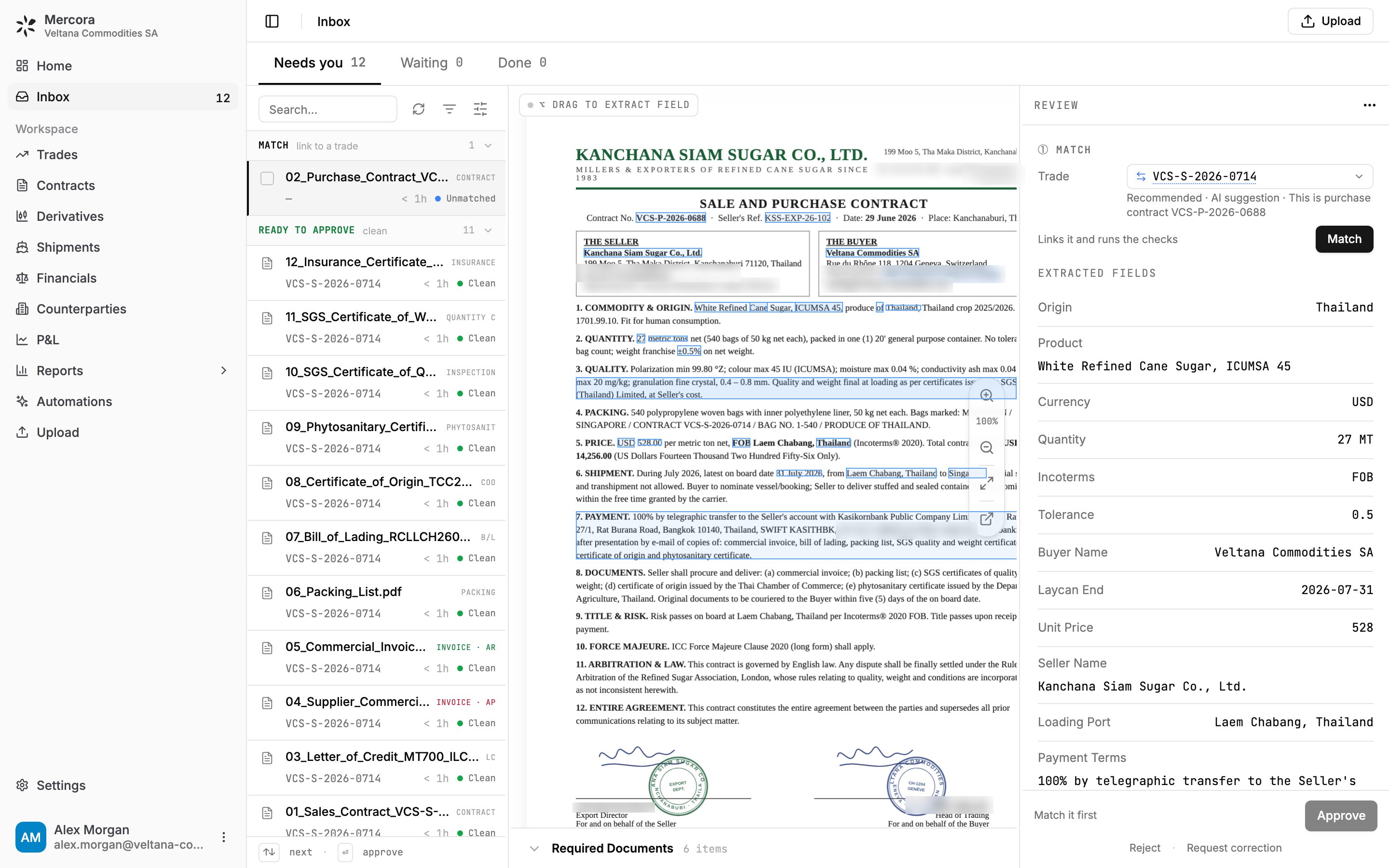
Upload documents, or let them come in by email, and work the Inbox’s Needs you tab from top to bottom.
Confirm the trade for documents Mercora couldn’t match, and check the fields it read against the original.
Decide on each discrepancy: approve the difference, decline it and request a correction, or add a note.
Approve contracts to create trades and their legs, and keep shipments and the expected-documents checklist current.
Areas: Inbox, Upload, Trades, Contracts, Shipments, Counterparties.Permissions: the Operator role covers it. Reviewing and approving documents, including the contracts that create trades and legs, needs Documents at Edit. Changing a trade or its expected-documents checklist needs Trades at Edit, and changing a shipment needs Shipments & logistics at Edit.
The Inbox, where operators spend most of the day: the documents waiting on you, the original and the fields Mercora read.
You keep invoices, payments and margins in line with what was actually billed and paid.Day to day
Follow receivables and payables across the book on Financials, and spot overdue invoices.
Record payments and adjustments on a trade’s Financials tab, and net AR against AP.
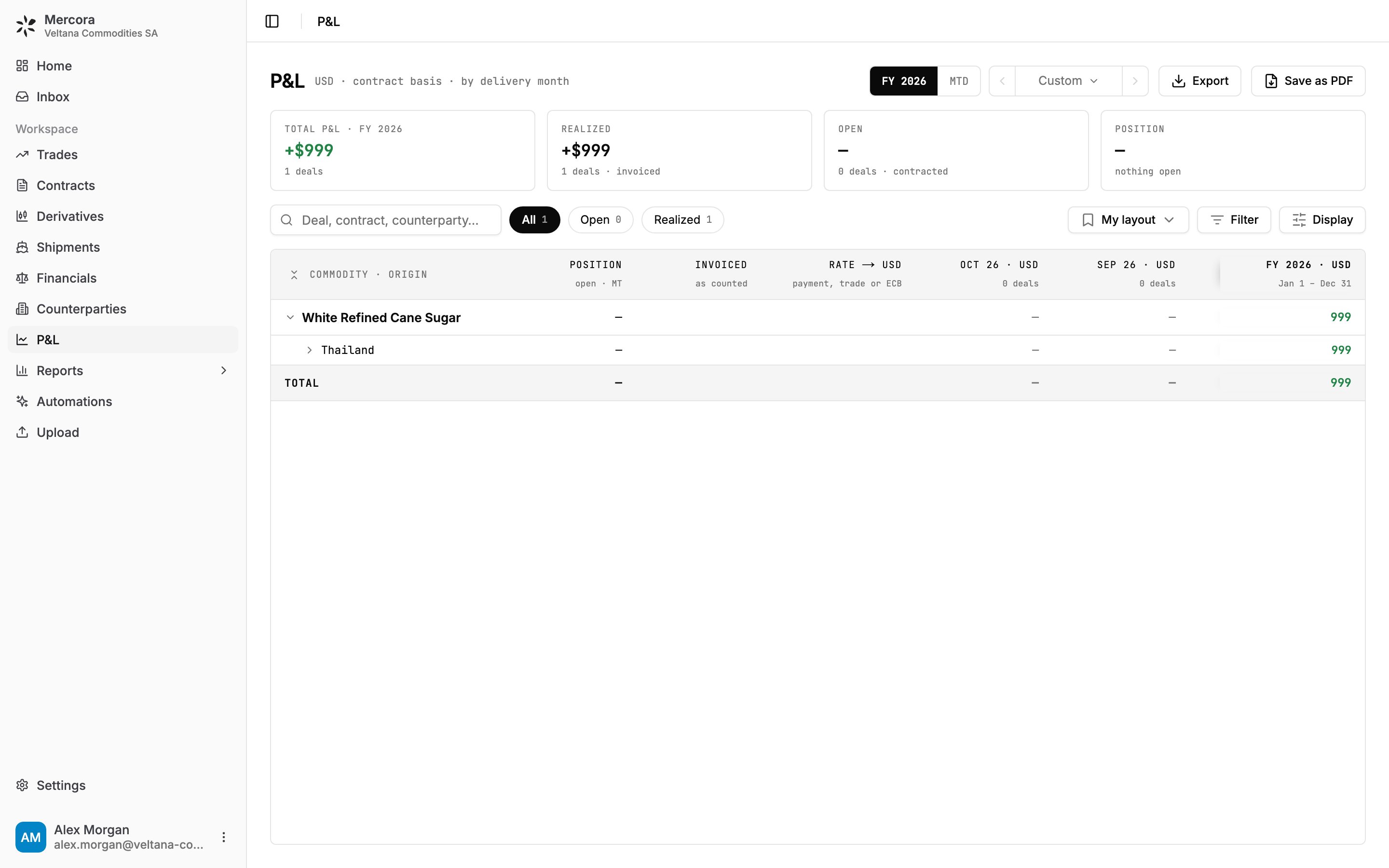
Read realized and open margin on the P&L by commodity, book and delivery month, and export it.
Check counterparty balances, and run the overdue-payments and cashflow reports.
Areas: Financials, P&L, Reports, Counterparties, and the Financials tab on each trade.Permissions:Financials at Edit to record payments and adjustments, Reports at View for the P&L and reports, and Counterparties for balances. Approving invoices in the Inbox also needs Documents at Edit. There’s no built-in finance role: use Operator, or ask your admin for a custom role such as “Trade finance”.
The P&L for FY 2026: +$999 on the sugar trade VCS-S-2026-0714, realized on its invoices.
You decide which parts of Mercora the team uses, and who can see and change what.Day to day
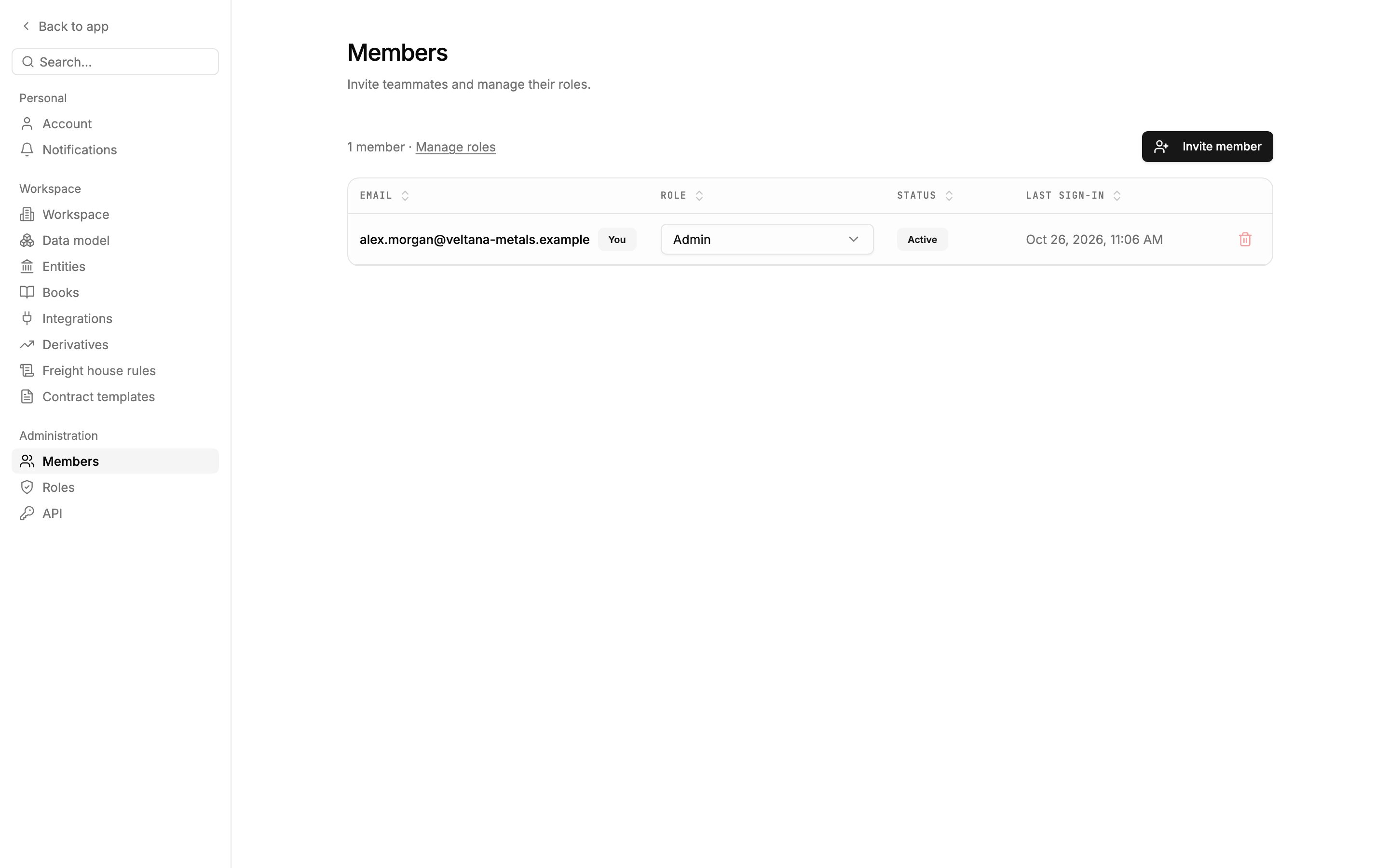
Invite teammates, give each one a role, and remove people who leave.
Turn modules on or off, and set the company profile, reporting currency and reporting year.
Create roles that fit your team, and decide deliberately who gets User access, Email and Files.
Connect integrations such as an email inbox, Microsoft 365, WhatsApp or Google Sheets, and create API keys for your developers.
Areas: Settings: Members, Roles, Workspace, Integrations and API.Permissions: the Admin role, or any role with Workspace admin on. To let someone change members’ roles without making them an admin, give their role User access.
Settings → Members: invite teammates and set each one's role.
You connect your firm’s own systems, such as an ERP or an internal script, to Mercora.Day to day
Read hedge books and positions, send hedge requests and check where they stand, through the API.
Start runs of automations that are set to run from the API, and hand a waiting run what it’s waiting for.
Follow what reaches your CTRM when your workspace pushes reviewed work to it.
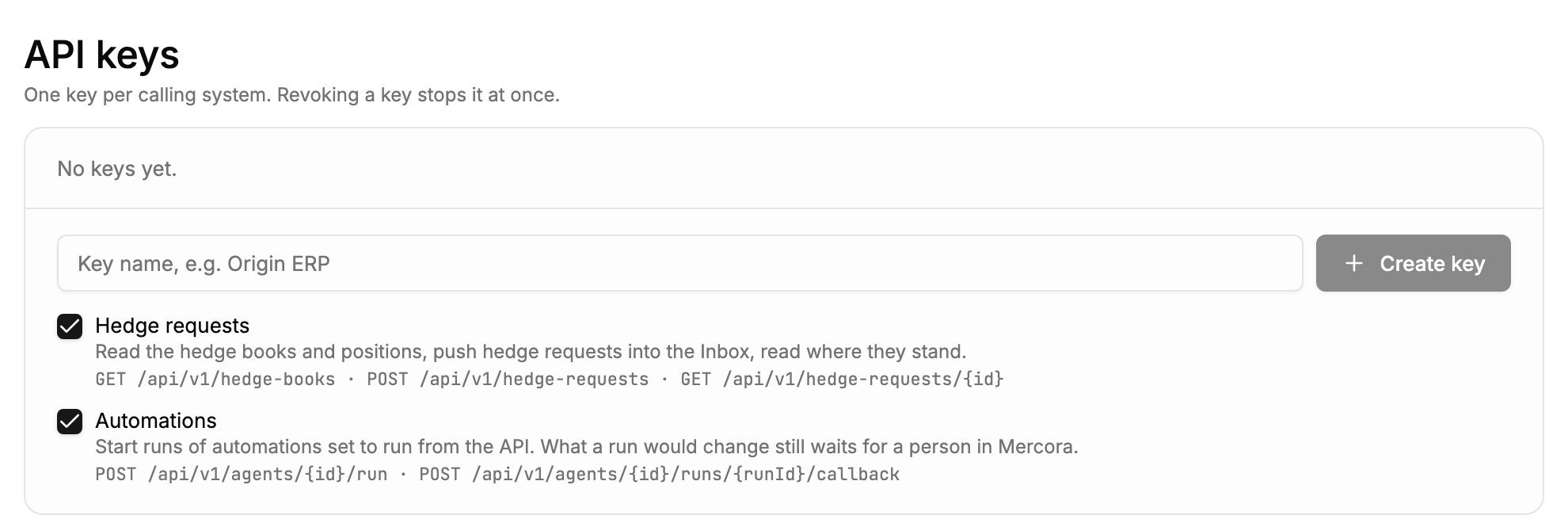
Whatever a call creates lands in the Inbox for a person to decide on: the API never bypasses review.Areas: the Mercora API, Automations, and Settings → API for the connection details.Permissions: API calls use a workspace API key, not a member’s role. Only admins create keys, one per calling system, each scoped to Hedge requests, Automations or both. Building automations in the app needs Automations — management.
Settings → API: one key per calling system, scoped to Hedge requests and Automations.
Follow one trade from its first documents to its P&L.
Roles and permissions
What each permission covers, and how to build a custom role.
Quickstart
Accept your invite, sign in and upload your first document.
⌘I
{"docsConfig":{"theme":"maple","$schema":"https://mintlify.com/docs.json","name":"Mercora","description":"Trade operations for physical commodity traders: documents, matching, reconciliation, financials and the P\u0026L.","colors":{"primary":"#232323","light":"#FFF9EE","dark":"#232323"},"logo":{"light":"https://mintcdn.com/placeholder-f4ffdeec/22McaegbdDRSI41b/logo/mark-dark.svg?fit=max\u0026auto=format\u0026n=22McaegbdDRSI41b\u0026q=85\u0026s=72ad184e9bf63cc57e531ed33f5c631b","dark":"https://mintcdn.com/placeholder-f4ffdeec/22McaegbdDRSI41b/logo/mark-light.svg?fit=max\u0026auto=format\u0026n=22McaegbdDRSI41b\u0026q=85\u0026s=743a6c820e7423e0df7a6e0ae10efc86","href":"/"},"favicon":"https://mintcdn.com/placeholder-f4ffdeec/22McaegbdDRSI41b/favicon.svg?fit=max\u0026auto=format\u0026n=22McaegbdDRSI41b\u0026q=85\u0026s=60a082af42cdf29819901c284f9e7359","appearance":{"default":"system","strict":false},"background":{"color":{"light":"#FFFFFF","dark":"#171717"}},"navbar":{"links":[{"href":"https://mercora.io","label":"mercora.io"}]},"footer":{"socials":{"website":"https://mercora.io","linkedin":"https://www.linkedin.com/company/mercoraai"}},"search":{"prompt":"Search the docs…"},"fonts":{"family":"Inter"},"icons":{"library":"fontawesome"},"styling":{"eyebrows":"section","codeblocks":"system","latex":true},"contextual":{"options":["copy","view","chatgpt","claude"],"display":"header"},"navigation":{"pages":[]}},"deployment":{"deploymentMetadataValue":{"subdomain":"placeholder-f4ffdeec","hasAudioNarration":false,"actualSubdomain":"placeholder-f4ffdeec","customDomains":["docs.mercora.io"],"gitSource":{"type":"github","owner":"sebastianbugal","repo":"mercora","deployBranch":"main","contentDirectory":"client_docs","isPrivate":true,"mountPath":"","label":"","_id":"6adf3dbbabb6f86a455ef035"},"chroma":{"latestBuiltDeploymentHistoryId":"6ae0668a02cd8de5ec2643dc","collectionId":"13289552-774c-43a0-b354-db31f2d90208","liveDeploymentHistoryId":"6ae0668a02cd8de5ec2643dc","schemaVersion":"v3"},"entitlements":{"AI_CHAT":{"status":"ENABLED"},"WEB_MCP":{"status":"ENABLED"},"NARRATION":{"status":"ENABLED"}},"buildId":"6ae09da407896b4595e1d2f2","clientVersion":"0.0.3971","searchFilterCounts":[{"language":"default","tag":"Guides","count":37},{"language":"default","tag":"API reference","count":6},{"language":"default","tag":"Documents","count":6},{"language":"default","tag":"Integrations","count":6},{"language":"default","tag":"Copilot and workflows","count":5},{"language":"default","tag":"Get started","count":5},{"language":"default","tag":"Administration","count":3},{"language":"default","tag":"Core concepts","count":3},{"language":"default","tag":"Finance","count":3},{"language":"default","tag":"Records","count":3}]},"assistantConfig":{"enableAskAiButton":false,"enableStarterQuestions":false,"enableContextualStarterQuestions":false,"enableAskAiSearchBar":true},"basePath":"","hasChatPermissions":true,"hasWebMcpPermissions":true,"toggles":[{"name":"kill-isr","enabled":true,"variant":{"name":"disabled","enabled":false,"feature_enabled":true},"impressionData":false},{"name":"agent-mintlify-slack","enabled":true,"variant":{"name":"disabled","enabled":false,"feature_enabled":true},"impressionData":false},{"name":"editor-v7-file-tree","enabled":true,"variant":{"name":"disabled","enabled":false,"feature_enabled":true},"impressionData":false},{"name":"agent-integrations-settings","enabled":true,"variant":{"name":"disabled","enabled":false,"feature_enabled":true},"impressionData":false},{"name":"automations-pr-grouping","enabled":true,"variant":{"name":"disabled","enabled":false,"feature_enabled":true},"impressionData":false},{"name":"custom-prefix","enabled":true,"variant":{"name":"disabled","enabled":false,"feature_enabled":true},"impressionData":false},{"name":"analytics-v7","enabled":true,"variant":{"name":"disabled","enabled":false,"feature_enabled":true},"impressionData":false},{"name":"user-flows-analytics","enabled":true,"variant":{"name":"disabled","enabled":false,"feature_enabled":true},"impressionData":false},{"name":"no-publish-flow","enabled":true,"variant":{"name":"disabled","enabled":false,"feature_enabled":true},"impressionData":false},{"name":"workos-onboarding","enabled":true,"variant":{"name":"disabled","enabled":false,"feature_enabled":true},"impressionData":false},{"name":"llms-txt-v2","enabled":true,"variant":{"name":"disabled","enabled":false,"feature_enabled":true},"impressionData":false},{"name":"pause-universal-search-reconcile","enabled":true,"variant":{"name":"disabled","enabled":false,"feature_enabled":true},"impressionData":false},{"name":"snapshot-serving-live","enabled":true,"variant":{"name":"disabled","enabled":false,"feature_enabled":true},"impressionData":false},{"name":"stripTemperatureMiddleware","enabled":true,"variant":{"name":"disabled","enabled":false,"feature_enabled":true},"impressionData":false},{"name":"per-site-search-delta","enabled":true,"variant":{"name":"disabled","enabled":false,"feature_enabled":true},"impressionData":false},{"name":"support-platform-pylon-zendesk","enabled":true,"variant":{"name":"disabled","enabled":false,"feature_enabled":true},"impressionData":false},{"name":"snapshot-serving","enabled":true,"variant":{"name":"disabled","enabled":false,"feature_enabled":true},"impressionData":false},{"name":"instant-rollback","enabled":true,"variant":{"name":"disabled","enabled":false,"feature_enabled":true},"impressionData":false},{"name":"granular-notifications-server","enabled":true,"variant":{"name":"disabled","enabled":false,"feature_enabled":true},"impressionData":false},{"name":"granular-notifications","enabled":true,"variant":{"name":"disabled","enabled":false,"feature_enabled":true},"impressionData":false},{"name":"editor-private-page-search","enabled":true,"variant":{"name":"disabled","enabled":false,"feature_enabled":true},"impressionData":false},{"name":"automations-fable","enabled":true,"variant":{"name":"disabled","enabled":false,"feature_enabled":true},"impressionData":false},{"name":"fixed-ai-action-pricing","enabled":true,"variant":{"name":"disabled","enabled":false,"feature_enabled":true},"impressionData":false},{"name":"automation-resolve-merge-conflict","enabled":true,"variant":{"name":"disabled","enabled":false,"feature_enabled":true},"impressionData":false},{"name":"scoped-publishing","enabled":true,"variant":{"name":"disabled","enabled":false,"feature_enabled":true},"impressionData":false},{"name":"mintql","enabled":true,"variant":{"name":"disabled","enabled":false,"feature_enabled":true},"impressionData":false},{"name":"page-level-analytics","enabled":true,"variant":{"name":"disabled","enabled":false,"feature_enabled":true},"impressionData":false},{"name":"editor-version-history-v2","enabled":true,"variant":{"name":"disabled","enabled":false,"feature_enabled":true},"impressionData":false},{"name":"editor-nav-generations","enabled":true,"variant":{"name":"disabled","enabled":false,"feature_enabled":true},"impressionData":false},{"name":"billing-page-v2","enabled":true,"variant":{"name":"disabled","enabled":false,"feature_enabled":true},"impressionData":false},{"name":"workspace-projects","enabled":true,"variant":{"name":"disabled","enabled":false,"feature_enabled":true},"impressionData":false},{"name":"assistant-v5","enabled":true,"variant":{"name":"disabled","enabled":false,"feature_enabled":true},"impressionData":false},{"name":"byok-sep-25","enabled":true,"variant":{"name":"disabled","enabled":false,"feature_enabled":true},"impressionData":false},{"name":"fork-pr-previews","enabled":true,"variant":{"name":"disabled","enabled":false,"feature_enabled":true},"impressionData":false},{"name":"revalidation-jwt","enabled":true,"variant":{"name":"disabled","enabled":false,"feature_enabled":true},"impressionData":false},{"name":"vite-origin","enabled":true,"variant":{"name":"disabled","enabled":false,"feature_enabled":true},"impressionData":false},{"name":"editor-agent-model-picker","enabled":true,"variant":{"name":"disabled","enabled":false,"feature_enabled":true},"impressionData":false},{"name":"billing-updated-9-15","enabled":true,"variant":{"name":"disabled","enabled":false,"feature_enabled":true},"impressionData":false},{"name":"workos-sso-scim","enabled":true,"variant":{"name":"disabled","enabled":false,"feature_enabled":true},"impressionData":false},{"name":"hobby-abuse-scan","enabled":true,"variant":{"name":"disabled","enabled":false,"feature_enabled":true},"impressionData":false},{"name":"dashboard-inbox","enabled":true,"variant":{"name":"disabled","enabled":false,"feature_enabled":true},"impressionData":false},{"name":"workos-signup","enabled":true,"variant":{"name":"disabled","enabled":false,"feature_enabled":true},"impressionData":false},{"name":"workos-enabled","enabled":true,"variant":{"name":"disabled","enabled":false,"feature_enabled":true},"impressionData":false}],"isAtlas":false,"googleFontsInlined":false},"customCss":[{"filePath":"style.css","content":"/* vietnamese */\n@font-face {\n font-family: 'Newsreader';\n font-style: normal;\n font-weight: 400;\n font-display: swap;\n src: url(/_mintlify/assets/fonts/google/s/newsreader/v26/cY9AfjOCX1hbuyalUrK439HyjJBG.woff2) format('woff2');\n unicode-range: U+0102-0103, U+0110-0111, U+0128-0129, U+0168-0169, U+01A0-01A1, U+01AF-01B0, U+0300-0301, U+0303-0304, U+0308-0309, U+0323, U+0329, U+1EA0-1EF9, U+20AB;\n}\n/* latin-ext */\n@font-face {\n font-family: 'Newsreader';\n font-style: normal;\n font-weight: 400;\n font-display: swap;\n src: url(/_mintlify/assets/fonts/google/s/newsreader/v26/cY9AfjOCX1hbuyalUrK439DyjJBG.woff2) format('woff2');\n unicode-range: U+0100-02BA, U+02BD-02C5, U+02C7-02CC, U+02CE-02D7, U+02DD-02FF, U+0304, U+0308, U+0329, U+1D00-1DBF, U+1E00-1E9F, U+1EF2-1EFF, U+2020, U+20A0-20AB, U+20AD-20C4, U+2113, U+2C60-2C7F, U+A720-A7FF;\n}\n/* latin */\n@font-face {\n font-family: 'Newsreader';\n font-style: normal;\n font-weight: 400;\n font-display: swap;\n src: url(/_mintlify/assets/fonts/google/s/newsreader/v26/cY9AfjOCX1hbuyalUrK4397yjA.woff2) format('woff2');\n unicode-range: U+0000-00FF, U+0131, U+0152-0153, U+02BB-02BC, U+02C6, U+02DA, U+02DC, U+0304, U+0308, U+0329, U+2000-206F, U+20AC, U+2122, U+2191, U+2193, U+2212, U+2215, U+FEFF, U+FFFD;\n}\n/* vietnamese */\n@font-face {\n font-family: 'Newsreader';\n font-style: normal;\n font-weight: 500;\n font-display: swap;\n src: url(/_mintlify/assets/fonts/google/s/newsreader/v26/cY9AfjOCX1hbuyalUrK439HyjJBG.woff2) format('woff2');\n unicode-range: U+0102-0103, U+0110-0111, U+0128-0129, U+0168-0169, U+01A0-01A1, U+01AF-01B0, U+0300-0301, U+0303-0304, U+0308-0309, U+0323, U+0329, U+1EA0-1EF9, U+20AB;\n}\n/* latin-ext */\n@font-face {\n font-family: 'Newsreader';\n font-style: normal;\n font-weight: 500;\n font-display: swap;\n src: url(/_mintlify/assets/fonts/google/s/newsreader/v26/cY9AfjOCX1hbuyalUrK439DyjJBG.woff2) format('woff2');\n unicode-range: U+0100-02BA, U+02BD-02C5, U+02C7-02CC, U+02CE-02D7, U+02DD-02FF, U+0304, U+0308, U+0329, U+1D00-1DBF, U+1E00-1E9F, U+1EF2-1EFF, U+2020, U+20A0-20AB, U+20AD-20C4, U+2113, U+2C60-2C7F, U+A720-A7FF;\n}\n/* latin */\n@font-face {\n font-family: 'Newsreader';\n font-style: normal;\n font-weight: 500;\n font-display: swap;\n src: url(/_mintlify/assets/fonts/google/s/newsreader/v26/cY9AfjOCX1hbuyalUrK4397yjA.woff2) format('woff2');\n unicode-range: U+0000-00FF, U+0131, U+0152-0153, U+02BB-02BC, U+02C6, U+02DA, U+02DC, U+0304, U+0308, U+0329, U+2000-206F, U+20AC, U+2122, U+2191, U+2193, U+2212, U+2215, U+FEFF, U+FFFD;\n}\n:root{--mc-border:rgb(35 35 35 / 0.1);--mc-border-strong:rgb(35 35 35 / 0.28);--mc-shadow:0 1px 2px rgb(0 0 0 / 0.04), 0 6px 16px -6px rgb(0 0 0 / 0.08);--mc-frame-bg:#fafafa}html.dark{--mc-border:rgb(255 249 238 / 0.1);--mc-border-strong:rgb(255 249 238 / 0.3);--mc-shadow:0 1px 2px rgb(0 0 0 / 0.3), 0 6px 16px -6px rgb(0 0 0 / 0.5);--mc-frame-bg:#1d1d1d}#page-title{font-family:\"Newsreader\",ui-serif,Georgia,serif;font-weight:500;letter-spacing:-.015em}.mdx-content>blockquote,.mdx-content>ol,.mdx-content>p,.mdx-content>ul{max-width:72ch}.card{transition:border-color 150ms ease,box-shadow 150ms ease}.card:hover{border-color:var(--mc-border-strong)!important;box-shadow:var(--mc-shadow)}[data-name=frame]{background:var(--mc-frame-bg)}[data-name=frame] img{border:1px solid var(--mc-border);border-radius:.625rem}.mdx-content table{font-size:.875rem;font-variant-numeric:tabular-nums}.mdx-content td,.mdx-content th{padding-top:.5rem;padding-bottom:.5rem}@media (prefers-reduced-motion:reduce){.card{transition:none}}"}],"page":{"pagePath":"getting-started/by-role","slug":"/getting-started/by-role","pageMetadata":{"title":"Mercora by role","sidebarTitle":"By role","description":"What operators, finance, workspace admins and developers do in Mercora day to day, which areas and permissions they use, and what to read first.","icon":"users","href":"/getting-started/by-role"},"description":{"compiledSource":"\"use strict\";\nconst {jsx: _jsx} = arguments[0];\nconst {useMDXComponents: _provideComponents} = arguments[0];\nfunction _createMdxContent(props) {\n const _components = {\n p: \"p\",\n ..._provideComponents(),\n ...props.components\n };\n return _jsx(_components.p, {\n children: \"What operators, finance, workspace admins and developers do in Mercora day to day, which areas and permissions they use, and what to read first.\"\n });\n}\nfunction MDXContent(props = {}) {\n const {wrapper: MDXLayout} = {\n ..._provideComponents(),\n ...props.components\n };\n return MDXLayout ? _jsx(MDXLayout, {\n ...props,\n children: _jsx(_createMdxContent, {\n ...props\n })\n }) : _createMdxContent(props);\n}\nreturn {\n default: MDXContent\n};\n","frontmatter":{},"scope":{}},"pageType":"default","mdx":{"mdxSource":{"compiledSource":"\"use strict\";const{Fragment:_Fragment,jsx:_jsx,jsxs:_jsxs}=arguments[0];const{useMDXComponents:_provideComponents}=arguments[0];function _createMdxContent(props){const _components={a:`a`,li:`li`,ol:`ol`,p:`p`,strong:`strong`,tbody:`tbody`,td:`td`,th:`th`,thead:`thead`,tr:`tr`,ul:`ul`,..._provideComponents(),...props.components},{Card,CardGroup,Frame,Heading,OptimizedImage,Tab,Table,Tabs}=_components;if(!Card)_missingMdxReference(`Card`,true);if(!CardGroup)_missingMdxReference(`CardGroup`,true);if(!Frame)_missingMdxReference(`Frame`,true);if(!Heading)_missingMdxReference(`Heading`,true);if(!OptimizedImage)_missingMdxReference(`OptimizedImage`,true);if(!Tab)_missingMdxReference(`Tab`,true);if(!Table)_missingMdxReference(`Table`,true);if(!Tabs)_missingMdxReference(`Tabs`,true);return _jsxs(_Fragment,{children:[_jsxs(_components.p,{children:[`Everyone in your workspace works on the same trades, documents and numbers. What differs is where each person spends the day and what their role lets them change. Find your job below for the areas you’ll use, the permissions they need and a short reading list. To see the whole flow first, `,_jsx(_components.a,{href:`/getting-started/walkthrough`,children:`walk through a trade`}),`.`]}),`\n`,_jsx(Heading,{level:`2`,id:`built-in-roles`,children:`Built-in roles`}),`\n`,_jsxs(_components.p,{children:[`Every member has one role. Each workspace starts with three, and admins can adjust them or create their own. See `,_jsx(_components.a,{href:`/concepts/roles-and-permissions`,children:`Roles and permissions`}),`.`]}),`\n`,_jsxs(Table,{children:[_jsx(_components.thead,{children:_jsxs(_components.tr,{children:[_jsx(_components.th,{children:`Role`}),_jsx(_components.th,{children:`What it can do`}),_jsx(_components.th,{children:`Usually for`})]})}),_jsxs(_components.tbody,{children:[_jsxs(_components.tr,{children:[_jsx(_components.td,{children:_jsx(_components.strong,{children:`Admin`})}),_jsx(_components.td,{children:`Everything, plus members, roles, settings, modules, integrations and API keys.`}),_jsx(_components.td,{children:`Workspace admins`})]}),_jsxs(_components.tr,{children:[_jsx(_components.td,{children:_jsx(_components.strong,{children:`Operator`})}),_jsxs(_components.td,{children:[_jsx(_components.strong,{children:`Edit`}),` on every area, except `,_jsx(_components.strong,{children:`User access`}),`, `,_jsx(_components.strong,{children:`Email`}),` and `,_jsx(_components.strong,{children:`Files`}),`.`]}),_jsx(_components.td,{children:`Operators, finance`})]}),_jsxs(_components.tr,{children:[_jsx(_components.td,{children:_jsx(_components.strong,{children:`Viewer`})}),_jsxs(_components.td,{children:[_jsx(_components.strong,{children:`View`}),` on every area, and `,_jsx(_components.strong,{children:`Use`}),` for the Copilot, except `,_jsx(_components.strong,{children:`User access`}),`, `,_jsx(_components.strong,{children:`Email`}),` and `,_jsx(_components.strong,{children:`Files`}),`.`]}),_jsx(_components.td,{children:`Anyone who follows the book without changing it`})]})]})]}),`\n`,_jsxs(_components.p,{children:[`A role only opens areas whose `,_jsx(_components.a,{href:`/concepts/modules`,children:`module`}),` is turned on for the workspace.`]}),`\n`,_jsx(Heading,{level:`2`,id:`your-role`,children:`Your role`}),`\n`,_jsxs(Tabs,{children:[_jsxs(Tab,{title:`Operators`,icon:`inbox`,id:`operators`,children:[_jsx(_components.p,{children:`You get each trade’s documents filed against the right trade, checked and approved.`}),_jsx(_components.p,{children:_jsx(_components.strong,{children:`Day to day`})}),_jsxs(_components.ul,{children:[`\n`,_jsxs(_components.li,{children:[`Upload documents, or let them come in by email, and work the Inbox’s `,_jsx(_components.strong,{children:`Needs you`}),` tab from top to bottom.`]}),`\n`,_jsx(_components.li,{children:`Confirm the trade for documents Mercora couldn’t match, and check the fields it read against the original.`}),`\n`,_jsx(_components.li,{children:`Decide on each discrepancy: approve the difference, decline it and request a correction, or add a note.`}),`\n`,_jsx(_components.li,{children:`Approve contracts to create trades and their legs, and keep shipments and the expected-documents checklist current.`}),`\n`]}),_jsxs(_components.p,{children:[_jsx(_components.strong,{children:`Areas:`}),` Inbox, Upload, Trades, Contracts, Shipments, Counterparties.`]}),_jsxs(_components.p,{children:[_jsx(_components.strong,{children:`Permissions:`}),` the `,_jsx(_components.strong,{children:`Operator`}),` role covers it. Reviewing and approving documents, including the contracts that create trades and legs, needs `,_jsx(_components.strong,{children:`Documents`}),` at `,_jsx(_components.strong,{children:`Edit`}),`. Changing a trade or its expected-documents checklist needs `,_jsx(_components.strong,{children:`Trades`}),` at `,_jsx(_components.strong,{children:`Edit`}),`, and changing a shipment needs `,_jsx(_components.strong,{children:`Shipments \u0026 logistics`}),` at `,_jsx(_components.strong,{children:`Edit`}),`.`]}),_jsx(Frame,{caption:`The Inbox, where operators spend most of the day: the documents waiting on you, the original and the fields Mercora read.`,children:_jsx(OptimizedImage,{src:`https://mintcdn.com/placeholder-f4ffdeec/22McaegbdDRSI41b/images/documents/inbox-overview.png?fit=max\u0026auto=format\u0026n=22McaegbdDRSI41b\u0026q=85\u0026s=08a78a63d07bbb6434a97deae54c8349`,alt:`The Inbox: tab strip, document rail, PDF and review panel`,\"data-og-width\":`2880`,width:`2880`,\"data-og-height\":`1800`,height:`1800`,\"data-path\":`images/documents/inbox-overview.png`,\"data-optimize\":`true`,\"data-opv\":`3`,srcset:`https://mintcdn.com/placeholder-f4ffdeec/22McaegbdDRSI41b/images/documents/inbox-overview.png?w=280\u0026fit=max\u0026auto=format\u0026n=22McaegbdDRSI41b\u0026q=85\u0026s=fdf4d8b1ad958791024f4b7126cc5f5f 280w, https://mintcdn.com/placeholder-f4ffdeec/22McaegbdDRSI41b/images/documents/inbox-overview.png?w=560\u0026fit=max\u0026auto=format\u0026n=22McaegbdDRSI41b\u0026q=85\u0026s=e7b3a763fccdc5dfef3871fc70e35139 560w, https://mintcdn.com/placeholder-f4ffdeec/22McaegbdDRSI41b/images/documents/inbox-overview.png?w=840\u0026fit=max\u0026auto=format\u0026n=22McaegbdDRSI41b\u0026q=85\u0026s=bc89d166ad9c4d01c1d86c5d195c118c 840w, https://mintcdn.com/placeholder-f4ffdeec/22McaegbdDRSI41b/images/documents/inbox-overview.png?w=1100\u0026fit=max\u0026auto=format\u0026n=22McaegbdDRSI41b\u0026q=85\u0026s=5dbbab6826e25d7c8a136b106c1625a9 1100w, https://mintcdn.com/placeholder-f4ffdeec/22McaegbdDRSI41b/images/documents/inbox-overview.png?w=1650\u0026fit=max\u0026auto=format\u0026n=22McaegbdDRSI41b\u0026q=85\u0026s=95a1f4fea043899b39926abcb8f627ff 1650w, https://mintcdn.com/placeholder-f4ffdeec/22McaegbdDRSI41b/images/documents/inbox-overview.png?w=2500\u0026fit=max\u0026auto=format\u0026n=22McaegbdDRSI41b\u0026q=85\u0026s=fb93dad636941383eadb8cdf9752ae44 2500w`})}),_jsx(_components.p,{children:_jsx(_components.strong,{children:`Read in this order`})}),_jsxs(_components.ol,{children:[`\n`,_jsx(_components.li,{children:_jsx(_components.a,{href:`/getting-started/quickstart`,children:`Quickstart`})}),`\n`,_jsx(_components.li,{children:_jsx(_components.a,{href:`/getting-started/walkthrough`,children:`Walk through a trade`})}),`\n`,_jsx(_components.li,{children:_jsx(_components.a,{href:`/documents/inbox`,children:`The Inbox`})}),`\n`,_jsx(_components.li,{children:_jsx(_components.a,{href:`/documents/matching`,children:`Matching documents to trades`})}),`\n`,_jsx(_components.li,{children:_jsx(_components.a,{href:`/documents/discrepancies`,children:`Discrepancies`})}),`\n`,_jsx(_components.li,{children:_jsx(_components.a,{href:`/trades/overview`,children:`Trades overview`})}),`\n`,_jsx(_components.li,{children:_jsx(_components.a,{href:`/trades/shipments`,children:`Shipments`})}),`\n`]})]}),_jsxs(Tab,{title:`Finance`,icon:`scale-balanced`,id:`finance`,children:[_jsx(_components.p,{children:`You keep invoices, payments and margins in line with what was actually billed and paid.`}),_jsx(_components.p,{children:_jsx(_components.strong,{children:`Day to day`})}),_jsxs(_components.ul,{children:[`\n`,_jsxs(_components.li,{children:[`Follow receivables and payables across the book on `,_jsx(_components.strong,{children:`Financials`}),`, and spot overdue invoices.`]}),`\n`,_jsxs(_components.li,{children:[`Record payments and adjustments on a trade’s `,_jsx(_components.strong,{children:`Financials`}),` tab, and net AR against AP.`]}),`\n`,_jsxs(_components.li,{children:[`Read realized and open margin on the `,_jsx(_components.strong,{children:`P\u0026L`}),` by commodity, book and delivery month, and export it.`]}),`\n`,_jsx(_components.li,{children:`Check counterparty balances, and run the overdue-payments and cashflow reports.`}),`\n`]}),_jsxs(_components.p,{children:[_jsx(_components.strong,{children:`Areas:`}),` Financials, P\u0026L, Reports, Counterparties, and the Financials tab on each trade.`]}),_jsxs(_components.p,{children:[_jsx(_components.strong,{children:`Permissions:`}),` `,_jsx(_components.strong,{children:`Financials`}),` at `,_jsx(_components.strong,{children:`Edit`}),` to record payments and adjustments, `,_jsx(_components.strong,{children:`Reports`}),` at `,_jsx(_components.strong,{children:`View`}),` for the P\u0026L and reports, and `,_jsx(_components.strong,{children:`Counterparties`}),` for balances. Approving invoices in the Inbox also needs `,_jsx(_components.strong,{children:`Documents`}),` at `,_jsx(_components.strong,{children:`Edit`}),`. There’s no built-in finance role: use `,_jsx(_components.strong,{children:`Operator`}),`, or ask your admin for a custom role such as “Trade finance”.`]}),_jsx(Frame,{caption:`The P\u0026L for FY 2026: +$999 on the sugar trade VCS-S-2026-0714, realized on its invoices.`,children:_jsx(OptimizedImage,{src:`https://mintcdn.com/placeholder-f4ffdeec/22McaegbdDRSI41b/images/finance/pnl.png?fit=max\u0026auto=format\u0026n=22McaegbdDRSI41b\u0026q=85\u0026s=e788a4ba1146eaac28c5be844bd45782`,alt:`The P\u0026L page with the four tiles, toolbar and grid`,\"data-og-width\":`2880`,width:`2880`,\"data-og-height\":`1800`,height:`1800`,\"data-path\":`images/finance/pnl.png`,\"data-optimize\":`true`,\"data-opv\":`3`,srcset:`https://mintcdn.com/placeholder-f4ffdeec/22McaegbdDRSI41b/images/finance/pnl.png?w=280\u0026fit=max\u0026auto=format\u0026n=22McaegbdDRSI41b\u0026q=85\u0026s=fe0c4ee2f74c78d141ba482691077a24 280w, https://mintcdn.com/placeholder-f4ffdeec/22McaegbdDRSI41b/images/finance/pnl.png?w=560\u0026fit=max\u0026auto=format\u0026n=22McaegbdDRSI41b\u0026q=85\u0026s=475deefa647497c555ffacda9dda8ab0 560w, https://mintcdn.com/placeholder-f4ffdeec/22McaegbdDRSI41b/images/finance/pnl.png?w=840\u0026fit=max\u0026auto=format\u0026n=22McaegbdDRSI41b\u0026q=85\u0026s=9ccd85336f953015d8732c37a6d65f05 840w, https://mintcdn.com/placeholder-f4ffdeec/22McaegbdDRSI41b/images/finance/pnl.png?w=1100\u0026fit=max\u0026auto=format\u0026n=22McaegbdDRSI41b\u0026q=85\u0026s=9e857c53925032bb774a0ecdfa21987b 1100w, https://mintcdn.com/placeholder-f4ffdeec/22McaegbdDRSI41b/images/finance/pnl.png?w=1650\u0026fit=max\u0026auto=format\u0026n=22McaegbdDRSI41b\u0026q=85\u0026s=bc0f8357baffba0b2be4840b812b611d 1650w, https://mintcdn.com/placeholder-f4ffdeec/22McaegbdDRSI41b/images/finance/pnl.png?w=2500\u0026fit=max\u0026auto=format\u0026n=22McaegbdDRSI41b\u0026q=85\u0026s=0e15e14cdeea2f5b5bbb19afbe236866 2500w`})}),_jsx(_components.p,{children:_jsx(_components.strong,{children:`Read in this order`})}),_jsxs(_components.ol,{children:[`\n`,_jsx(_components.li,{children:_jsx(_components.a,{href:`/getting-started/walkthrough`,children:`Walk through a trade`})}),`\n`,_jsx(_components.li,{children:_jsx(_components.a,{href:`/finance/financials`,children:`Financials`})}),`\n`,_jsx(_components.li,{children:_jsx(_components.a,{href:`/trades/financials`,children:`Trade financials`})}),`\n`,_jsx(_components.li,{children:_jsx(_components.a,{href:`/finance/pnl`,children:`P\u0026L`})}),`\n`,_jsx(_components.li,{children:_jsx(_components.a,{href:`/finance/reports`,children:`Reports`})}),`\n`,_jsx(_components.li,{children:_jsx(_components.a,{href:`/records/counterparties`,children:`Counterparties`})}),`\n`]})]}),_jsxs(Tab,{title:`Workspace admins`,icon:`users-gear`,id:`workspace-admins`,children:[_jsx(_components.p,{children:`You decide which parts of Mercora the team uses, and who can see and change what.`}),_jsx(_components.p,{children:_jsx(_components.strong,{children:`Day to day`})}),_jsxs(_components.ul,{children:[`\n`,_jsx(_components.li,{children:`Invite teammates, give each one a role, and remove people who leave.`}),`\n`,_jsx(_components.li,{children:`Turn modules on or off, and set the company profile, reporting currency and reporting year.`}),`\n`,_jsxs(_components.li,{children:[`Create roles that fit your team, and decide deliberately who gets `,_jsx(_components.strong,{children:`User access`}),`, `,_jsx(_components.strong,{children:`Email`}),` and `,_jsx(_components.strong,{children:`Files`}),`.`]}),`\n`,_jsx(_components.li,{children:`Connect integrations such as an email inbox, Microsoft 365, WhatsApp or Google Sheets, and create API keys for your developers.`}),`\n`]}),_jsxs(_components.p,{children:[_jsx(_components.strong,{children:`Areas:`}),` Settings: `,_jsx(_components.strong,{children:`Members`}),`, `,_jsx(_components.strong,{children:`Roles`}),`, `,_jsx(_components.strong,{children:`Workspace`}),`, `,_jsx(_components.strong,{children:`Integrations`}),` and `,_jsx(_components.strong,{children:`API`}),`.`]}),_jsxs(_components.p,{children:[_jsx(_components.strong,{children:`Permissions:`}),` the `,_jsx(_components.strong,{children:`Admin`}),` role, or any role with `,_jsx(_components.strong,{children:`Workspace admin`}),` on. To let someone change members’ roles without making them an admin, give their role `,_jsx(_components.strong,{children:`User access`}),`.`]}),_jsx(Frame,{caption:`Settings → Members: invite teammates and set each one's role.`,children:_jsx(OptimizedImage,{src:`https://mintcdn.com/placeholder-f4ffdeec/22McaegbdDRSI41b/images/admin/members.png?fit=max\u0026auto=format\u0026n=22McaegbdDRSI41b\u0026q=85\u0026s=a57f09ebffac49a613602cae8864cc9e`,alt:`Settings → Members with the members table and Invite member`,\"data-og-width\":`2880`,width:`2880`,\"data-og-height\":`1800`,height:`1800`,\"data-path\":`images/admin/members.png`,\"data-optimize\":`true`,\"data-opv\":`3`,srcset:`https://mintcdn.com/placeholder-f4ffdeec/22McaegbdDRSI41b/images/admin/members.png?w=280\u0026fit=max\u0026auto=format\u0026n=22McaegbdDRSI41b\u0026q=85\u0026s=eb4993722a699550a0866724ad71ee7c 280w, https://mintcdn.com/placeholder-f4ffdeec/22McaegbdDRSI41b/images/admin/members.png?w=560\u0026fit=max\u0026auto=format\u0026n=22McaegbdDRSI41b\u0026q=85\u0026s=5ac3d590e1a97f3521f721ebc6ca5d71 560w, https://mintcdn.com/placeholder-f4ffdeec/22McaegbdDRSI41b/images/admin/members.png?w=840\u0026fit=max\u0026auto=format\u0026n=22McaegbdDRSI41b\u0026q=85\u0026s=7e1a98bb15882adbf72420307e88dadf 840w, https://mintcdn.com/placeholder-f4ffdeec/22McaegbdDRSI41b/images/admin/members.png?w=1100\u0026fit=max\u0026auto=format\u0026n=22McaegbdDRSI41b\u0026q=85\u0026s=f1a57600539168873f712761dae82d57 1100w, https://mintcdn.com/placeholder-f4ffdeec/22McaegbdDRSI41b/images/admin/members.png?w=1650\u0026fit=max\u0026auto=format\u0026n=22McaegbdDRSI41b\u0026q=85\u0026s=f9218697610dd7f3d1f3604cfc08243a 1650w, https://mintcdn.com/placeholder-f4ffdeec/22McaegbdDRSI41b/images/admin/members.png?w=2500\u0026fit=max\u0026auto=format\u0026n=22McaegbdDRSI41b\u0026q=85\u0026s=42e577d59f164d71e8172c5dac54abf0 2500w`})}),_jsx(_components.p,{children:_jsx(_components.strong,{children:`Read in this order`})}),_jsxs(_components.ol,{children:[`\n`,_jsx(_components.li,{children:_jsx(_components.a,{href:`/admin/members`,children:`Members`})}),`\n`,_jsx(_components.li,{children:_jsx(_components.a,{href:`/concepts/roles-and-permissions`,children:`Roles and permissions`})}),`\n`,_jsx(_components.li,{children:_jsx(_components.a,{href:`/concepts/modules`,children:`Modules`})}),`\n`,_jsx(_components.li,{children:_jsx(_components.a,{href:`/admin/workspace-settings`,children:`Workspace settings`})}),`\n`,_jsx(_components.li,{children:_jsx(_components.a,{href:`/integrations/overview`,children:`Integrations`})}),`\n`,_jsx(_components.li,{children:_jsx(_components.a,{href:`/admin/api-keys`,children:`API keys`})}),`\n`]})]}),_jsxs(Tab,{title:`Developers`,icon:`code`,id:`developers`,children:[_jsx(_components.p,{children:`You connect your firm’s own systems, such as an ERP or an internal script, to Mercora.`}),_jsx(_components.p,{children:_jsx(_components.strong,{children:`Day to day`})}),_jsxs(_components.ul,{children:[`\n`,_jsx(_components.li,{children:`Read hedge books and positions, send hedge requests and check where they stand, through the API.`}),`\n`,_jsx(_components.li,{children:`Start runs of automations that are set to run from the API, and hand a waiting run what it’s waiting for.`}),`\n`,_jsx(_components.li,{children:`Follow what reaches your CTRM when your workspace pushes reviewed work to it.`}),`\n`]}),_jsx(_components.p,{children:`Whatever a call creates lands in the Inbox for a person to decide on: the API never bypasses review.`}),_jsxs(_components.p,{children:[_jsx(_components.strong,{children:`Areas:`}),` the `,_jsx(_components.a,{href:`/api-reference/introduction`,children:`Mercora API`}),`, Automations, and Settings → `,_jsx(_components.strong,{children:`API`}),` for the connection details.`]}),_jsxs(_components.p,{children:[_jsx(_components.strong,{children:`Permissions:`}),` API calls use a workspace API key, not a member’s role. Only admins create keys, one per calling system, each scoped to `,_jsx(_components.strong,{children:`Hedge requests`}),`, `,_jsx(_components.strong,{children:`Automations`}),` or both. Building automations in the app needs `,_jsx(_components.strong,{children:`Automations — management`}),`.`]}),_jsx(Frame,{caption:`Settings → API: one key per calling system, scoped to Hedge requests and Automations.`,children:_jsx(OptimizedImage,{src:`https://mintcdn.com/placeholder-f4ffdeec/22McaegbdDRSI41b/images/admin/api-keys.png?fit=max\u0026auto=format\u0026n=22McaegbdDRSI41b\u0026q=85\u0026s=45bc12a2e8e1b3d38f57b53dff4d6182`,alt:`The API keys section of Settings → API`,\"data-og-width\":`1980`,width:`1980`,\"data-og-height\":`660`,height:`660`,\"data-path\":`images/admin/api-keys.png`,\"data-optimize\":`true`,\"data-opv\":`3`,srcset:`https://mintcdn.com/placeholder-f4ffdeec/22McaegbdDRSI41b/images/admin/api-keys.png?w=280\u0026fit=max\u0026auto=format\u0026n=22McaegbdDRSI41b\u0026q=85\u0026s=fa5dd28c67eb0eec9704bf4660edd30e 280w, https://mintcdn.com/placeholder-f4ffdeec/22McaegbdDRSI41b/images/admin/api-keys.png?w=560\u0026fit=max\u0026auto=format\u0026n=22McaegbdDRSI41b\u0026q=85\u0026s=25640729ccde945d8fd542851abda792 560w, https://mintcdn.com/placeholder-f4ffdeec/22McaegbdDRSI41b/images/admin/api-keys.png?w=840\u0026fit=max\u0026auto=format\u0026n=22McaegbdDRSI41b\u0026q=85\u0026s=e8a79b3ef0901aa290e2f67c6f7ee6c6 840w, https://mintcdn.com/placeholder-f4ffdeec/22McaegbdDRSI41b/images/admin/api-keys.png?w=1100\u0026fit=max\u0026auto=format\u0026n=22McaegbdDRSI41b\u0026q=85\u0026s=b26f4de3f272c4e11eb8411a17b340da 1100w, https://mintcdn.com/placeholder-f4ffdeec/22McaegbdDRSI41b/images/admin/api-keys.png?w=1650\u0026fit=max\u0026auto=format\u0026n=22McaegbdDRSI41b\u0026q=85\u0026s=8cdae7cfabcd4cd2a5cffde3bad9f1e0 1650w, https://mintcdn.com/placeholder-f4ffdeec/22McaegbdDRSI41b/images/admin/api-keys.png?w=2500\u0026fit=max\u0026auto=format\u0026n=22McaegbdDRSI41b\u0026q=85\u0026s=4dea47aba6304cbb4a169ea1ac892a4e 2500w`})}),_jsx(_components.p,{children:_jsx(_components.strong,{children:`Read in this order`})}),_jsxs(_components.ol,{children:[`\n`,_jsx(_components.li,{children:_jsx(_components.a,{href:`/api-reference/introduction`,children:`API introduction`})}),`\n`,_jsx(_components.li,{children:_jsx(_components.a,{href:`/admin/api-keys`,children:`API keys`})}),`\n`,_jsx(_components.li,{children:_jsx(_components.a,{href:`/workflows/automations`,children:`Automations`})}),`\n`,_jsx(_components.li,{children:_jsx(_components.a,{href:`/workflows/hedging`,children:`Hedging`})}),`\n`,_jsx(_components.li,{children:_jsx(_components.a,{href:`/integrations/external-systems`,children:`External systems`})}),`\n`]})]})]}),`\n`,_jsx(Heading,{level:`2`,id:`next-steps`,children:`Next steps`}),`\n`,_jsxs(CardGroup,{cols:3,children:[_jsx(Card,{title:`Walk through a trade`,icon:`route`,href:`/getting-started/walkthrough`,children:_jsx(_components.p,{children:`Follow one trade from its first documents to its P\u0026L.`})}),_jsx(Card,{title:`Roles and permissions`,icon:`user-shield`,href:`/concepts/roles-and-permissions`,children:_jsx(_components.p,{children:`What each permission covers, and how to build a custom role.`})}),_jsx(Card,{title:`Quickstart`,icon:`rocket`,href:`/getting-started/quickstart`,children:_jsx(_components.p,{children:`Accept your invite, sign in and upload your first document.`})})]})]})}function MDXContent(props={}){const{wrapper:MDXLayout}={..._provideComponents(),...props.components};return MDXLayout?_jsx(MDXLayout,{...props,children:_jsx(_createMdxContent,{...props})}):_createMdxContent(props)}return{default:MDXContent};function _missingMdxReference(id,component){throw new Error(`Expected `+(component?`component`:`object`)+\" `\"+id+\"` to be defined: you likely forgot to import, pass, or provide it.\")}","frontmatter":{},"scope":{"codeStyling":"system","config":{},"pageMetadata":{"title":"Mercora by role","sidebarTitle":"By role","description":"What operators, finance, workspace admins and developers do in Mercora day to day, which areas and permissions they use, and what to read first.","icon":"users","href":"/getting-started/by-role"}}},"mdxSourceWithNoJs":null},"mdxExtracts":{"tableOfContents":[{"title":"Built-in roles","slug":"built-in-roles","depth":2,"children":[]},{"title":"Your role","slug":"your-role","depth":2,"children":[]},{"title":"Next steps","slug":"next-steps","depth":2,"children":[]}],"codeExamples":{}},"jsLinks":[],"subdomain":"placeholder-f4ffdeec","siteName":"Mercora","title":"Mercora by role - Mercora","navMaps":{"firstHrefInVersion":{},"firstHrefInLanguage":{}},"lastModified":"2026-10-26T11:51:25.988Z","originalFileLocation":"getting-started/by-role.mdx"},"headHtml":"\u003cscript data-mint-head>(function(){var d=document.documentElement,p=null;if(!p){try{p=localStorage.getItem(\"isDarkMode\")}catch(e){}if(p==='true')p='dark';else if(p==='false')p='light';if(p!=='light'\u0026\u0026p!=='dark'\u0026\u0026p!=='system')p=\"system\"}var r=p==='system'?(matchMedia(\"(prefers-color-scheme: dark)\").matches?'dark':'light'):p;d.classList.remove(r==='dark'?'light':'dark');d.classList.add(r);d.setAttribute(\"data-theme-preference\",p)})();\u003c/script>\u003cmeta data-mint-head name=\"description\" content=\"What operators, finance, workspace admins and developers do in Mercora day to day, which areas and permissions they use, and what to read first.\">\u003cmeta data-mint-head name=\"application-name\" content=\"Mercora\">\u003cmeta data-mint-head name=\"generator\" content=\"Mintlify\">\u003clink data-mint-head rel=\"icon\" type=\"image/png\" sizes=\"192x192\" href=\"/mintlify-assets/_mintlify/favicons/placeholder-f4ffdeec/XOETJcrPFhZvltr-/_generated/favicon/android-chrome-192x192.png\" media=\"(prefers-color-scheme: light)\">\u003clink data-mint-head rel=\"apple-touch-icon\" type=\"image/png\" sizes=\"180x180\" href=\"/mintlify-assets/_mintlify/favicons/placeholder-f4ffdeec/XOETJcrPFhZvltr-/_generated/favicon/apple-touch-icon.png\">\u003clink data-mint-head rel=\"icon\" type=\"image/png\" sizes=\"16x16\" href=\"/mintlify-assets/_mintlify/favicons/placeholder-f4ffdeec/XOETJcrPFhZvltr-/_generated/favicon/favicon-16x16.png\" media=\"(prefers-color-scheme: light)\">\u003clink data-mint-head rel=\"icon\" type=\"image/png\" sizes=\"32x32\" href=\"/mintlify-assets/_mintlify/favicons/placeholder-f4ffdeec/XOETJcrPFhZvltr-/_generated/favicon/favicon-32x32.png\" media=\"(prefers-color-scheme: light)\">\u003clink data-mint-head rel=\"shortcut icon\" type=\"image/x-icon\" href=\"/mintlify-assets/_mintlify/favicons/placeholder-f4ffdeec/XOETJcrPFhZvltr-/_generated/favicon/favicon.ico\" media=\"(prefers-color-scheme: light)\">\u003clink data-mint-head rel=\"icon\" type=\"image/png\" sizes=\"192x192\" href=\"/mintlify-assets/_mintlify/favicons/placeholder-f4ffdeec/XOETJcrPFhZvltr-/_generated/favicon-dark/android-chrome-192x192.png\" media=\"(prefers-color-scheme: dark)\">\u003clink data-mint-head rel=\"icon\" type=\"image/png\" sizes=\"16x16\" href=\"/mintlify-assets/_mintlify/favicons/placeholder-f4ffdeec/XOETJcrPFhZvltr-/_generated/favicon-dark/favicon-16x16.png\" media=\"(prefers-color-scheme: dark)\">\u003clink data-mint-head rel=\"icon\" type=\"image/png\" sizes=\"32x32\" href=\"/mintlify-assets/_mintlify/favicons/placeholder-f4ffdeec/XOETJcrPFhZvltr-/_generated/favicon-dark/favicon-32x32.png\" media=\"(prefers-color-scheme: dark)\">\u003clink data-mint-head rel=\"shortcut icon\" type=\"image/x-icon\" href=\"/mintlify-assets/_mintlify/favicons/placeholder-f4ffdeec/XOETJcrPFhZvltr-/_generated/favicon-dark/favicon.ico\" media=\"(prefers-color-scheme: dark)\">\u003cmeta data-mint-head property=\"og:title\" content=\"Mercora by role - Mercora\">\u003cmeta data-mint-head property=\"og:description\" content=\"What operators, finance, workspace admins and developers do in Mercora day to day, which areas and permissions they use, and what to read first.\">\u003cmeta data-mint-head property=\"og:site_name\" content=\"Mercora\">\u003cmeta data-mint-head property=\"og:url\" content=\"https://docs.mercora.io/getting-started/by-role\">\u003cmeta data-mint-head property=\"og:type\" content=\"website\">\u003cmeta data-mint-head property=\"og:image\" content=\"https://placeholder-f4ffdeec.mintlify.app/_mintlify/api/og/v2?division=Get+started\u0026amp;title=Mercora+by+role\u0026amp;description=What+operators%2C+finance%2C+workspace+admins+and+developers+do+in+Mercora+day+to+day%2C+which+areas+and+permissions+they+use%2C+and+what+to+read+first.\u0026amp;theme=b55c1587f6fc9c9340bca578\u0026amp;signature=b2c9f60612850959197a4e3828fffc78d7f7a4a6210d7589d1bd9b879ba25f17\">\u003cmeta data-mint-head property=\"og:image:width\" content=\"1200\">\u003cmeta data-mint-head property=\"og:image:height\" content=\"630\">\u003cmeta data-mint-head name=\"twitter:card\" content=\"summary_large_image\">\u003cmeta data-mint-head name=\"twitter:title\" content=\"Mercora by role - Mercora\">\u003cmeta data-mint-head name=\"twitter:description\" content=\"What operators, finance, workspace admins and developers do in Mercora day to day, which areas and permissions they use, and what to read first.\">\u003cmeta data-mint-head name=\"twitter:image\" content=\"https://placeholder-f4ffdeec.mintlify.app/_mintlify/api/og/v2?division=Get+started\u0026amp;title=Mercora+by+role\u0026amp;description=What+operators%2C+finance%2C+workspace+admins+and+developers+do+in+Mercora+day+to+day%2C+which+areas+and+permissions+they+use%2C+and+what+to+read+first.\u0026amp;theme=b55c1587f6fc9c9340bca578\u0026amp;signature=b2c9f60612850959197a4e3828fffc78d7f7a4a6210d7589d1bd9b879ba25f17\">\u003cmeta data-mint-head name=\"twitter:image:width\" content=\"1200\">\u003cmeta data-mint-head name=\"twitter:image:height\" content=\"630\">\u003cmeta data-mint-head name=\"msapplication-config\" content=\"/mintlify-assets/_mintlify/favicons/placeholder-f4ffdeec/XOETJcrPFhZvltr-/_generated/favicon/browserconfig.xml\">\u003cmeta data-mint-head name=\"apple-mobile-web-app-title\" content=\"Mercora\">\u003cmeta data-mint-head name=\"msapplication-TileColor\" content=\"#232323\">\u003clink data-mint-head rel=\"canonical\" href=\"https://docs.mercora.io/getting-started/by-role\">\u003clink data-mint-head rel=\"alternate\" type=\"application/xml\" href=\"/sitemap.xml\">\u003clink data-mint-head rel=\"alternate\" type=\"text/markdown\" href=\"/getting-started/by-role.md\">\u003cscript data-mint-head type=\"application/ld+json\">{\"@context\":\"https://schema.org\",\"@graph\":[{\"@type\":\"Organization\",\"@id\":\"https://docs.mercora.io/#organization\",\"name\":\"Mercora\",\"url\":\"https://docs.mercora.io\",\"logo\":{\"@type\":\"ImageObject\",\"url\":\"https://mintcdn.com/placeholder-f4ffdeec/22McaegbdDRSI41b/logo/mark-dark.svg?fit=max\u0026auto=format\u0026n=22McaegbdDRSI41b\u0026q=85\u0026s=72ad184e9bf63cc57e531ed33f5c631b\"}},{\"@type\":\"WebSite\",\"@id\":\"https://docs.mercora.io#website\",\"name\":\"Mercora\",\"url\":\"https://docs.mercora.io\",\"publisher\":{\"@id\":\"https://docs.mercora.io/#organization\"}},{\"@type\":\"WebPage\",\"@id\":\"https://docs.mercora.io/getting-started/by-role#webpage\",\"url\":\"https://docs.mercora.io/getting-started/by-role\",\"name\":\"Mercora by role\",\"description\":\"What operators, finance, workspace admins and developers do in Mercora day to day, which areas and permissions they use, and what to read first.\",\"dateModified\":\"2026-10-26T11:51:25.988Z\",\"isPartOf\":{\"@id\":\"https://docs.mercora.io#website\"},\"breadcrumb\":{\"@id\":\"https://docs.mercora.io/getting-started/by-role#breadcrumb\"}},{\"@type\":\"BreadcrumbList\",\"@id\":\"https://docs.mercora.io/getting-started/by-role#breadcrumb\",\"itemListElement\":[{\"@type\":\"ListItem\",\"position\":1,\"name\":\"Get started\",\"item\":\"https://docs.mercora.io/index\"},{\"@type\":\"ListItem\",\"position\":2,\"name\":\"Mercora by role\",\"item\":\"https://docs.mercora.io/getting-started/by-role\"}]},{\"@type\":[\"Article\",\"TechArticle\"],\"@id\":\"https://docs.mercora.io/getting-started/by-role#article\",\"headline\":\"Mercora by role\",\"name\":\"Mercora by role\",\"description\":\"What operators, finance, workspace admins and developers do in Mercora day to day, which areas and permissions they use, and what to read first.\",\"url\":\"https://docs.mercora.io/getting-started/by-role\",\"mainEntityOfPage\":{\"@id\":\"https://docs.mercora.io/getting-started/by-role#webpage\"},\"dateModified\":\"2026-10-26T11:51:25.988Z\",\"publisher\":{\"@id\":\"https://docs.mercora.io/#organization\"},\"isPartOf\":{\"@id\":\"https://docs.mercora.io#website\"}}]}\u003c/script>\u003cscript data-mint-head type=\"application/ld+json\">{\"@context\":\"https://schema.org\",\"@type\":\"WebSite\",\"name\":\"Mercora\",\"creator\":{\"@type\":\"Organization\",\"name\":\"Mintlify\",\"url\":\"https://mintlify.com\"}}\u003c/script>","siteName":"Mercora","nav":{"global":null,"tabs":[{"tab":"Guides","icon":"book-open","groups":[{"group":"Get started","icon":"rocket","pages":[{"title":"Welcome to Mercora","sidebarTitle":"Welcome","icon":"house","mode":"wide","href":""},{"title":"Quickstart","icon":"rocket","href":"/getting-started/quickstart"},{"title":"Walk through a trade","sidebarTitle":"Walkthrough","description":"Follow one sugar trade from its first documents to its P\u0026L, then see what happens when an aluminium trade's documents don't match.","icon":"route","href":"/getting-started/walkthrough"},{"title":"Mercora by role","sidebarTitle":"By role","icon":"users","href":"/getting-started/by-role"},{"title":"Navigating Mercora","description":"A tour of the sidebar and the main areas of Mercora, and which ones depend on a workspace module.","icon":"compass","href":"/getting-started/navigating-mercora"}]},{"group":"Core concepts","icon":"lightbulb","pages":[{"title":"How Mercora works","icon":"diagram-project","href":"/concepts/how-mercora-works"},{"title":"Modules","icon":"puzzle-piece","href":"/concepts/modules"},{"title":"Roles and permissions","icon":"user-shield","href":"/concepts/roles-and-permissions"}]},{"group":"Documents","icon":"file-lines","pages":[{"title":"Uploading documents","icon":"upload","href":"/documents/uploading"},{"title":"Email ingestion","icon":"envelope-open-text","href":"/documents/email-ingestion"},{"title":"Document processing","icon":"gears","href":"/documents/processing"},{"title":"The Inbox","icon":"inbox","href":"/documents/inbox"},{"title":"Matching documents to trades","icon":"link","href":"/documents/matching"},{"title":"Discrepancies","icon":"triangle-exclamation","href":"/documents/discrepancies"}]},{"group":"Trades","icon":"arrow-right-arrow-left","pages":[{"title":"Trades","icon":"arrow-right-arrow-left","href":"/trades/overview"},{"title":"Shipments","icon":"ship","href":"/trades/shipments"},{"title":"Trade financials","icon":"file-invoice-dollar","href":"/trades/financials"}]},{"group":"Finance","icon":"scale-balanced","pages":[{"title":"Financials","icon":"scale-balanced","href":"/finance/financials"},{"title":"P\u0026L","icon":"chart-line","href":"/finance/pnl"},{"title":"Reports","icon":"chart-column","href":"/finance/reports"}]},{"group":"Records","icon":"folder-open","pages":[{"title":"Counterparties","icon":"building","href":"/records/counterparties"},{"title":"Contracts","icon":"file-contract","href":"/records/contracts"},{"title":"Derivatives","icon":"arrow-trend-up","href":"/records/derivatives"}]},{"group":"Copilot and workflows","icon":"wand-magic-sparkles","pages":[{"title":"Copilot","icon":"sparkles","href":"/copilot/overview"},{"title":"Automations","icon":"robot","href":"/workflows/automations"},{"title":"Deal capture","icon":"handshake","href":"/workflows/deal-capture"},{"title":"Hedging","icon":"scale-balanced","href":"/workflows/hedging"},{"title":"Freight rates","icon":"ship","href":"/workflows/freight-rates"}]},{"group":"Integrations","icon":"plug","pages":[{"title":"Integrations","icon":"plug","href":"/integrations/overview"},{"title":"Microsoft 365","icon":"microsoft","href":"/integrations/microsoft-365"},{"title":"WhatsApp","icon":"whatsapp","href":"/integrations/whatsapp"},{"title":"Google Sheets","icon":"table","href":"/integrations/google-sheets"},{"title":"QuickBooks Online","icon":"calculator","href":"/integrations/quickbooks"},{"title":"External systems","icon":"arrows-rotate","href":"/integrations/external-systems"}]},{"group":"Administration","icon":"users-gear","pages":[{"title":"Members","icon":"users","href":"/admin/members"},{"title":"Workspace settings","icon":"gear","href":"/admin/workspace-settings"},{"title":"API keys","icon":"key","href":"/admin/api-keys"}]}]},{"tab":"API reference","icon":"code","pages":[{"title":"API reference","href":"/api-reference/introduction"}]}]},"title":"Mercora by role - Mercora","buildId":"dpl_DFJrtvUi8HS5F9nkooKuDJsuD5BM","deploymentId":"dpl_DFJrtvUi8HS5F9nkooKuDJsuD5BM","dynamics":["07c022d89b","a74be98ba7","a9bb46feb3"],"chunks":["Frame-COGkNuA6.js","DynamicMarkdown-85clUA0i.js","zoom-image-lightbox-BZxD9MAj.js","lightbox-handle-r17bVUz3.js","Markdown-Cfiy0xZO.js","clsx-rL8ZCCw4.js","lib--scc4DXi.js","lib-B8HbPgcC.js","html-void-elements-mCSPHezU.js","dist-aeztFa9U.js","katex-YMM-FMeD.js","marked.esm-CZWythHk.js","AssistantPageLink-BywkCr5C.js"]}